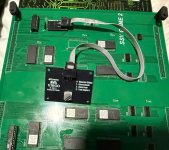
Sammy Seta Visco 4-in-1 Multi – Rotary Selector

HardAzRockz

Professional
Joined
Jul 25, 2020
Messages
368
Reaction score
343
Location
Tucson, az
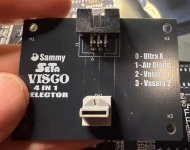
I put together a simple rotary selector for the Sammy Seta Visco 4-in-1 multi. Nothing fancy compared to some of the more polished solutions out there, but it gets the job done reliably.

The main reason I did this was because the DIP switches on the multi are located at the bottom of the board. Every time I wanted to change games, it felt like a chore—turning it over to access the dip switches, flipping switches. It got old pretty quick.

This setup replaces the DIP switching with a rotary selector, so now it’s just a quick turn to swap games. Much cleaner and way more convenient in practice.

Again, it’s not a high-end or feature-packed design—just a straightforward, functional solution that makes using the multi a lot less annoying. I will be designing a 3D printed mount

If anyone is interested, I can share the files.
IMG_4535.jpeg
IMG_4565.jpeg

View: https://youtu.be/bz7fgeK04wA
 
I’m all for these rotary selectors where possible over LCD. As long as they have the knob as pictured.

Not a fan of the ones where you can’t read the text and are a pain to turn.
 
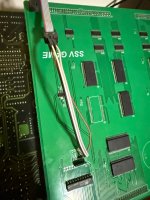
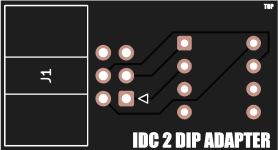
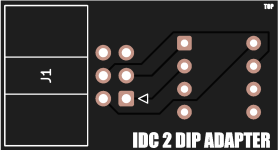
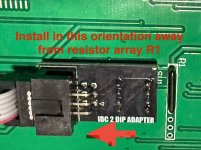
So I decided to make a few changes. I added an adapter PCB where the dip switches were. That’ll allow you to plug the 6pin IDC directly to the dip switch vias rather than use some janky solution.

cachedImage.png

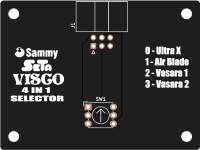
The PCBs will arrive in about a week. Once tested, I’ll release the files. I also added a rotary PCB with an updated silkscreen for those of you that have the new SSV 4 in 1 Vol2.cachedImage.png
 
Last edited:
Quick update on the Sammy Seta Visco rotary selector. The PCBs from JLCPCB finally arrived. Production and shipping were extremely slower than normal.

I already assembled two, but I haven’t tested it yet because I still need to install it into the multi and ran out of time tonight. I mainly just wanted to give an update to everyone who was interested.

I ordered enough extra parts to build another one. Once I fully test everything and confirm it’s working properly, I’d be willing to sell the extra assembled unit if anyone is interested.

I will post the gerbers once it’s confirmed working.

IMG_4768.jpeg
 
Would love the gerbers! I've got two different 4-in-1s, would love a second version to change the text for the games and have one of each. Can I edit a gerber or is it finalized?
 
Would love the gerbers! I've got two different 4-in-1s, would love a second version to change the text for the games and have one of each. Can I edit a gerber or is it finalized?
Take a closer look at the picture I’ve posted. I have both multis.
 
@kyletwentytwo Do you have the version with Survival Arts? I contacted the seller and told him the game was unplayable because you can’t use any of the kick buttons. The 4 in 1 doesn’t the connector. I own an original Survival Arts PCB. The seller sent me roms to swap SA for Storm Blade. Later he changed his eBay listing show a Storm Blade(much better game) instead of SA. Let me know I can the text for you if you have SA.
 
@kyletwentytwo Do you have the version with Survival Arts? I contacted the seller and told him the game was unplayable because you can’t use any of the kick buttons. The 4 in 1 doesn’t the connector. I own an original Survival Arts PCB. The seller sent me roms to swap SA for Storm Blade. Later he changed his eBay listing show a Storm Blade(much better game) instead of SA. Let me know I can the text for you if you have SA.

I don't know how I totally missed that the two in the pic were different, lol. I almost never hear anyone talk about the one with Storm Blade, but that's the one I've got (same as your first pic). These are awesome, thank you!
 
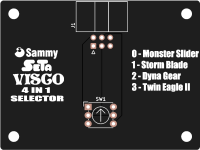
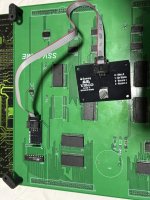
I finally got everything installed and tested successfully on both versions of the 4-in-1 multi. The rotary selector is working great and makes changing games way more convenient compared to reaching the DIP switches at the bottom of the multi.

I released the Gerbers(at the bottom) for anyone that wants to build their own. There are 2 PCBs required:

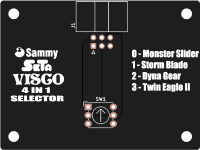
  • Rotary Switch PCB
  • IDC to DIP Adapter PCB
Bill of Materials:

  • 2x 6-pin right angle IDC connectors
  • 2x 6-pin IDC cables
  • 2x 4-pin 2.54mm headers
  • 1x PT65526 rotary switch
Mouser link for the rotary switch:
https://www.mouser.com/ProductDetail/642-PT65526

Please note there are two different rotary switch PCBs:

  • V1 is for the original 4-in-1 multi
  • V2 is for the recently released 4-in-1 multi
RotarySwitchV1.png
RotarySwitchV2.png
Both versions will function the same, but the silkscreen text was changed to correspond with the game numbering differences between the two multis.
The IDC2DIP adapter works with both.
IDC2DIP.png

IDC2DIPInstall.jpg
installed.jpg
installed2.jpg

Thanks to everyone that showed interest. If anyone lives in the US I have one left I can sell.

I will be releasing STL files soon for a 3D printable mount.
 

Attachments

Last edited:
Can't wait to get mine. That DIP switch is absolutely in a horrible location.
 
Back
Top