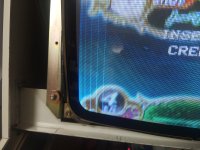
Aero city cabinet white line question.

LemonC

Student
Joined
Jan 18, 2022
Messages
30
Reaction score
2
Location
south korea
Hello. I own a Sega Aero City cabinet.

Originally, the monitor was installed horizontally, but I rotated it to use it in vertical orientation. After that, I tried running several CAVE PCBs on it.

However, no matter how much I adjust the H-HOLD, the white vertical line on the left side of the screen still remains.

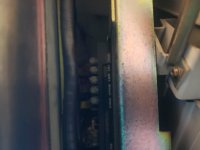
I was wondering if this could be caused by deteriorated capacitors on the monitor chassis and whether it needs repair.

If you are familiar with this symptom, I would really appreciate any advice or help.

Thank you very much.
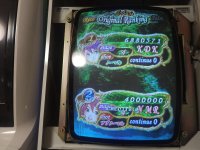
 

Attachments

  • KakaoTalk_20260612_184853587_06.jpg
    KakaoTalk_20260612_184853587_06.jpg
    212.5 KB · Views: 69
  • KakaoTalk_20260612_184853587_07.jpg
    KakaoTalk_20260612_184853587_07.jpg
    275.5 KB · Views: 70
  • KakaoTalk_20260612_184853587.jpg
    KakaoTalk_20260612_184853587.jpg
    104.8 KB · Views: 67
You have partial vertical collapse, if it started when you changed the monitor orientation than more likely it's a cold solder joint. Should reflow all the joints by the deflection transistors in the middle and replace the capacitors in that area.
 
Make sure the yoke is tightly adjusted, it should be a "hex" head screw there, see if the yoke have not been pushed back/away from the tube, towards the neckboard, see if it moves, if it does try to push it against the tube.
 
I have seen this on my Aero City's MS8-26, but ONLY with CV1000 PCBs strangely enough.
When using anything else, there are no lines, any CV1000 would show what looks like retrace line. Same symptom on several freshly recapped MS8-26.
So before any other conclusion, try some other game and report back.
 
You have partial vertical collapse, if it started when you changed the monitor orientation than more likely it's a cold solder joint. Should reflow all the joints by the deflection transistors in the middle and replace the capacitors in that area.
I see. For now, I’m planning to disassemble the cabinet and have the monitor board repaired first. Thank you for your comment.
 
I have seen this on my Aero City's MS8-26, but ONLY with CV1000 PCBs strangely enough.
When using anything else, there are no lines, any CV1000 would show what looks like retrace line. Same symptom on several freshly recapped MS8-26.
So before any other conclusion, try some other game and report back.
I see. After checking, it seems that the symptom does not appear with some PCBs, while it does appear with others.


For now, I will have the monitor board repaired first and then check the result again afterward. Thank you for comment.
 
Make sure the yoke is tightly adjusted, it should be a "hex" head screw there, see if the yoke have not been pushed back/away from the tube, towards the neckboard, see if it moves, if it does try to push it against the tube.
I think the yoke may be difficult for me to adjust, so I’ve decided to try having the monitor board repaired first.


Thank you for your comment.
 
I had the same exact problem on my Aero City with the lines. After I did a cap kit on it those lines went away for me. Maybe cap kit the chassis?
 
1791181857416.png


Do I have partial vertical collapse as well? Should I adjust H Hold or V hold? My image shifts up after about 10 mins then I get white lines. If I launch a game the picture will destabilize and move around. I also have an Aero City where I have weird short white lines horizontal lines that quickly flash on different parts of the screen as well noticable when that area is black.

I had my chassis serviced by Sharp image when I got the cab. The seller said there was no picture but he could feel the static electricity plus the arcade harness was all hacked to pieces so I just sent it for repair before doing any testing.

I turned down screen and tried to adjust the PSU voltage down so far.
 
Do I have partial vertical collapse as well? Should I adjust H Hold or V hold? My image shifts up after about 10 mins then I get white lines. If I launch a game the picture will destabilize and move around.
Raster lines on the whole screen is usually more a sign of the screen being turned up too high but could also just be a sync problem. Does it happen with any board you run on it?


I also have an Aero City where I have weird short white lines horizontal lines that quickly flash on different parts of the screen as well noticable when that area is black.
I think this is usually just a loose video ground.


I turned down screen and tried to adjust the PSU voltage down so far.
Are you talking about cabinet's PSU or something on the monitor?
 
Raster lines on the whole screen is usually more a sign of the screen being turned up too high but could also just be a sync problem. Does it happen with any board you run on it?


I think this is usually just a loose video ground.


Are you talking about cabinet's PSU or something on the monitor?
So sometimes the raster lines are just at the top and then other times it does take over the whole picture like you mentioned and in my picture

I will check for loose video ground (can you point me to where that is exactly?)

When I mentioned I turned down screen I meant the screen pot on the monitor flyback. Even with it turned all the way down I get the raster lines and a jumping picture eventually.

Thanks for your help, I am a little more confident working on Astro Cities and still have a lot to learn \ understand about Aero Cities. Go Braves.
 
I am using a mistercade I wonder if it is a video setting. I turned down vertical hold because the marked position seemed further to the left

I have had multiple times where I switch from Misterzine, return back to the main menu, or launch at game and the behavior starts right at that exact moment.

I wonder if it happens more when I am switching video modes a lot.

Edit: Turned down Vertical Hold and then my white lines seemed to go away, but I still had a rolling picture on Virtual Boy and Midway cores....so I lowered the vertical hold even further and now it appears those cores are working now too with a stable picture.

Glad i found this thread where LemonC mentioned adjusting his Horizontal Hold. I'll lyk if I run into any more issues.
 
Last edited:
Back
Top