Astro City MS9 screen adjustment help

alexvw

Student
Joined
Apr 10, 2019
Messages
45
Reaction score
17
Location
Illinois
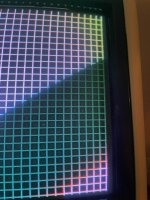
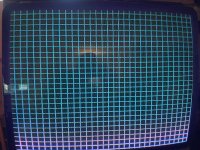
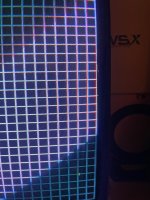
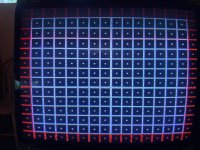
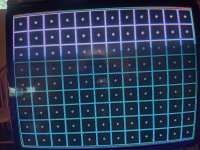
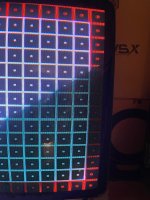
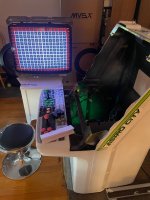
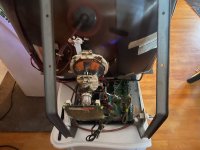
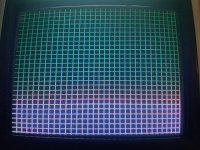
hello got a Astro city cabinet and trying to adjust screen at far right side image is shrink its been light this ever since a got it try to adjust geometry, convergence, add convergence trips, adjust ring a cant get the screen to get better i think to note i have not loosen the joke and move it around here screen shots of whats going on, if anybody has an idea please help will be very appreciated hope this picture shows whats going on thank you
 

Attachments
  • IMG_1902.jpeg
    IMG_1902.jpeg
    79.5 KB · Views: 38
  • IMG_1903.jpeg
    IMG_1903.jpeg
    67.3 KB · Views: 36
Last edited:
It's hard to read your post, but i'll do my best from the pictures.
It seems the horizontal screen size is a bit too large, cause the left and right parts of the screen to not match.
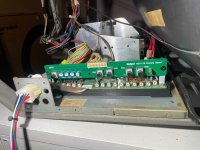
You can adjust the horizontal size with the 'hsize' adjustment pot. It's under the control panel usually.

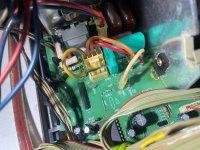
If you cannot go lower, and make the screen fit horizontally, there is a jumper wire that controls this a bit:
A jumper labeled "E" connects to either CN507 ("Normal") or CN505 ("Wide"). Check how it is set up now.

If this also doesn't help.. there is a HS.LIM adjustment on the main chassis, which is usually glued in place.
You can adjust this one if you clean it up, but be VERY gentle with it!!!
 
It's hard to read your post, but i'll do my best from the pictures.
It seems the horizontal screen size is a bit too large, cause the left and right parts of the screen to not match.
You can adjust the horizontal size with the 'hsize' adjustment pot. It's under the control panel usually.

If you cannot go lower, and make the screen fit horizontally, there is a jumper wire that controls this a bit:
A jumper labeled "E" connects to either CN507 ("Normal") or CN505 ("Wide"). Check how it is set up now.

If this also doesn't help.. there is a HS.LIM adjustment on the main chassis, which is usually glued in place.
You can adjust this one if you clean it up, but be VERY gentle with it!!!
thank you Asure soon i go back today after work give it a shot and will try to post more pictures with results and sorry for the grammar thanks
 
Last edited:
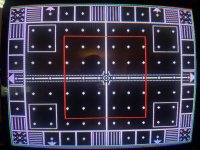
hello followed your suggestion and it worked here some pictures hope you can tell the differences
 

Attachments

  • IMG_3703.jpeg
    IMG_3703.jpeg
    608.3 KB · Views: 29
  • IMG_3704.jpeg
    IMG_3704.jpeg
    492 KB · Views: 25
  • IMG_3705.jpeg
    IMG_3705.jpeg
    459.8 KB · Views: 22
  • IMG_3707.jpeg
    IMG_3707.jpeg
    457.6 KB · Views: 25
  • IMG_3706.jpeg
    IMG_3706.jpeg
    520.2 KB · Views: 22
  • IMG_3708.jpeg
    IMG_3708.jpeg
    458.6 KB · Views: 25
  • IMG_3709.jpeg
    IMG_3709.jpeg
    382.7 KB · Views: 28
  • IMG_3710.jpeg
    IMG_3710.jpeg
    418 KB · Views: 29
  • IMG_3711.jpeg
    IMG_3711.jpeg
    360.8 KB · Views: 28
  • IMG_3712.jpeg
    IMG_3712.jpeg
    348.4 KB · Views: 32
Back
Top