Astro City PSU not fully outputting 5V AND 12V (400-5621)

bgwelistyl

Professional
Joined
Oct 16, 2022
Messages
267
Reaction score
162
Location
SoCal
Hi everyone, I'm having issues with my Astro City power supply, its not outputting the necessary 5V to run anything.

It seems to max out at 3V. and adjusting the 5v potentiometer doesnt really do anything.

I recapped and checked every solder joint and everything seems to be in order. No cold solder joints or any traces.

The weird part is that when I physically press down on the potentiometer area, the PSU/game seems to briefly light up and work to its necessary voltage, but once I let go it stops working.


I was wondering what area would you guys recommend I check out?
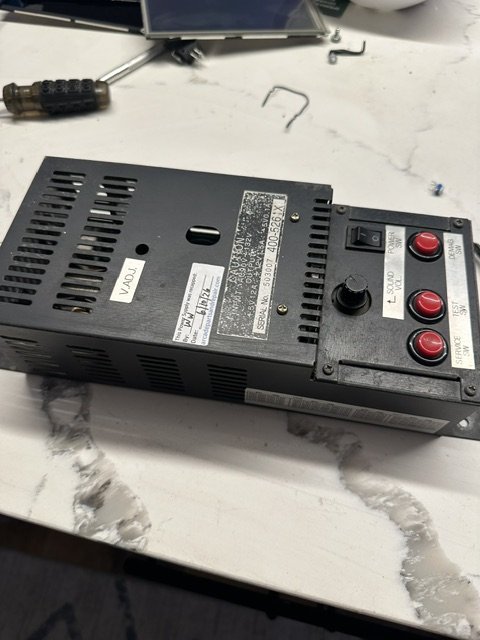


image0.jpeg
 
Could be the trim pot itself, could be a bad solder joint, coul be lots of stuff. Your probably going to have to narrow it down with a multimeter
 
  • Like
Reactions: nem
The weird part is that when I physically press down on the potentiometer area, the PSU/game seems to briefly light up and work to its necessary voltage, but once I let go it stops working.

Sounds to me like the solder joints need reflowing.
 
Whoops.. I completely didn't read that part.

Yeah I agree, it does sound like the pot either needs reflowing or replacing.
 
I did change the pot (1k) but that didnt change anything. I'm pretty careful in checking my traces, cant really see any cold joints, Im guessing it might be a regulator
 
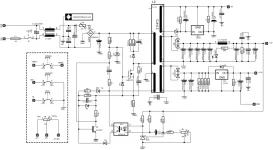
I've attached a schematic I've found on the web. Assuming it is correct.

If the 3v DC measured is on the 5v output, this would indicate that the power supply is oscillating and that the feedback circuit through the optocoupler IC1 is working to an extent.

With the power turned off I would start measuring the resistors R19 and R20. This form part of a voltage divider network for the 5v regulation.

I would also confirm that slowly turning the Variable Resistor VR1 is allows for a range of resistance between pins 1 and 3 of VR1. 0ohms to 1kOhms.

I would also check R21 (47ohms). I would assume that this resistor provides some minimum load to allow for voltage regulation.

Be careful as having the power supply turned on and probing around with a multi meter you can short out traces and make the supply unrepairable.
 

Attachments

  • sega-400-5261-psu-schematic (1).webp
    sega-400-5261-psu-schematic (1).webp
    48.9 KB · Views: 29
So I sent off my PSU to get it repaired via Sharp Image. They replaced one of the transistors mounted on the heat sink (as well as checking solder reflow and the usual), and apparently when they tested, it was outputting 5V and 12V

Unfortunately, when I got it back today and replugged it into my Astro, I'm still getting the same problem (still had to physically press down on the potentiometer to get a 5V AND 12V voltage).

Actually I just noticed when I was switching between readings on my jamma voltmeter that I wasn't getting a full 12V as well.

Would you guys suspect at this point the issue is still the power supply? I mean once the PSU gets to the 5V/12V range (physically pressed), everything boots up the way it should.
 
Last edited:
I am thinking if the PSU has been checked and you are still having the same issue check the wires going in to the PSU. They are AC but it may be a short or bad connection on the PSU input voltage. This is likely outside the actual PSU box (or maybe on the connector).
 
Not sure its of much help, but i had mine professionally repaired just this week by our local arcade repair specialist. Also a 5261z model.

Its had capacitors done about 10 years ago, but just recently had an issue where it would have problems under load only (when powering on with a game board/ no boot situations) and would work inconsistently. With a meter Voltage was showing 5v-5.2v if i adjust etc - not 3v like your situation. Didnt know how to load test though, only done a generic meter voltage check to adjust voltage.

Anyhow
I was told that it was found my Opto Isolator IC was showing problematic . Also couple components found with corroded legs, plus a couple of zener diodes , along with two questionable caps that handle voltage for tl494 voltage reference IC replaced in case. Also changed my adjusting pot. Dont quote me as i may not have interpreted it perfectly right. Anyhow something to consider if its helpful at all

Maybe i can take a photo when its back to see which exact components look new (ic1 or Pc1? Diodes? Any transistors etc). If you like? @bgwelistyl
 
Last edited:
So to confirm:

My issue was with booting game PCBs intermittently. Same PCBs work on other cabinets.
The power supply appeared to be giving the proper 5-5.1V at the edge connector, though i had no way to test 'load' or amp drops when powering on games.
With one particular pcb setup (raspberry pi with jamma adapter) - i used a direct power adapter to the raspberry pi as a test and sure enough, booted up perfectly on the cabinet.
Issue appears to be isolated to the power supply.

After sending the power supply away, the repairer indicated he was able to reproduce. He stated that after repair, he performed load tests up to 12amps with all testing good now.

I still have to reinstall and perform some tests, however I first wanted to have a look visually at the repair to maybe help your situation in case similar @bgwelistyl

After snooping around for fresh components and fresh solder underneath, I note the following

- Please bear in mind it has had capacitors replaced a few years back and has had little use since. It was hard to know if any have been 're done' again, as I didnt take a photo before sending.
In any case, if not done already by SHARP - I think a good recommendation is always to recap a 30 year old power supply regardless.

- What I did notice:

- Of the previously replaced caps, specifically two have been changed again - the two closest to IC3 on the board. The solder looked fresh on these two and they are a different brand to the others (and I was told two had to be changed)
- the VR1 pot was definitely replaced.
- Various diodes look to be replaced near that VR1 area of the pcb (pcb marks them as ZD or D on the printing). Looks like maybe 5 of them look fresh around that vicinity)
- Pretty sure PC1 looks to be replaced (521XGB) and is probably what was being referenced in my previous post
- I dont know for sure if IC1 (431L) was replaced, hard to tell if im being honest.

Hopefully thats of some help, but being you are pressing down on the pot and it corrects itself, id dare say maybe just your pots bad?!
 
Back
Top