
CPS2 overscan (or lack of it)

edd_jedi

Student
Joined
Jul 12, 2023
Messages
92
Reaction score
92
Location
England
Does anyone know why Capcom placed important information (credits, life bars, power bars, settings menu options etc) right on the very edges of the viewable area of the screen? The problem I've got is that I use the same CRT for consoles and my supergun, all the consoles have a reasonable amount of overscan, however the CPS2 has none at all. So my options are either fit the CPS2 display in view and have loads of blank space around the edges on all my consoles, or crop the consoles nicely but then not be able to see the edges of CPS2 games. I don't want to have to mess around with the TVs geometry every time I play the CPS2.
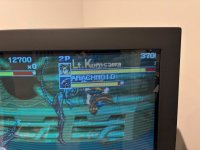
IMG_8160.jpeg
 
Yes something like that may work, but the RGB shifters I've seen only move the picture, they don't scale it, so I would have to choose whether to have the left or right cropped. I guess what I need is an inline scaler?
 
You'll either need to find a middle ground or a dedicated CRT.
I would buy a shifter instead and live with it.
 
Does anyone know why Capcom placed important information (credits, life bars, power bars, settings menu options etc) right on the very edges of the viewable area of the screen?


To maximize actual gameplay screen real estate. Capcom also made these games for arcade cabs that always, always had picture controls. It wasn't an issue then.
 
But every CRT has rounded edges, there is no such thing as a perfectly square picture tube, therefore every video input needs some overscan to avoid black edges or missing content?
 
Well yeah, but I frame it so I have black bars on all sides. The picture only touches the rounded corners. Looks good to me.
 
Back
Top