Garnet, a Taito G-Net multi-game loader with support for other PSX-based systems

kyletwentytwo

Grand Master
Joined
Oct 7, 2020
Messages
426
Reaction score
639
Location
UT
garnet_loading_screen.png
garnet_menu_screen.png


Get Garnet here (current version: 0.88b, released Nov 20, 2026): https://drive.google.com/drive/u/0/folders/1OpArkWyXfLB5U_uedGgF44xZoojKsqi_

I am excited to release Garnet, a multi-game loader for the Taito G-Net arcade system. It supports all Taito G-Net titles and a number of Sony ZN-1, Sony ZN-2, Namco System 10, and Namco System 12 games. More titles will be converted and released over time, and Namco System 11 and Sony PlayStation games are also on the table for conversion. @arcademodbios is already working on a number of PSX games.

Simply flash the .img file to your CompactFlash card (this first release requires a 4GB or 8GB card; future releases will likely require 8GB as more games are added). I use Win32DiskImager, personally. Garnet requires your Taito G-Net to have the G-Net Mod Bios installed, and the proper CF adapter. See here for details: https://ikotsu.blogspot.com/2015/01/taito-g-net-mod-bios.html

Garnet features:
-Hold start for ~5-7 seconds in any game to return to the Garnet main menu
-Service menu changes are saved to the CF card rather than the on-board flash; Service menu changes will be remembered even after swapping games
-After powering down and turning your G-Net back on, it will auto-resume the last game you played unless you press button 1 within 3 seconds (this is clearly stated in Garnet). This is especially helpful for games that have an upfront data load; subsequent boots will be much faster.
-Native G-Net games first load all of their sound data to the board's memory; Garnet handles this gracefully within the UI.

Currently included games (51 total):

1 on 1 Government*
Aqua Rush*
Battle Arena Toshinden 2*
Bloody Roar*
Bloody Roar 2*
Brave Blade*
Chaos Heat
Cool Boarders Arcade Jam*
Dead or Alive++*
Fighters Impact*
Flip Maze
G-Darius*
Gallop Racer*
Gallop Racer 2*
Gallop Racer 3*
Gamshara*
Go By RC
Heaven's Gate*
Kollon
Logic Pro Adventure*
Mahjong Oh
Monster Farm Jump*
Mr. Driller 2*
Mr. Driller G*
Night Raid
Otenami Haiken
Otenami Haiken Final
Otenki Kororin
Psyvariar -Medium Unit-
Psyvariar -Revision-
RayCrisis
RayStorm*
RC de Go
Shanghai Sangokuhai Tougi
Shanghai Shoryu Sairin
Shikigami no Shiro
Shiritsu Justice Gakuen (Rival Schools)*
Soutenryu
Space Invaders Anniversary
Strider 2*
Super Puzzle Bobble (EN)
Super Puzzle Bobble (JP)
Tecmo World Cup Millenium*
Tenkomori Shooting (EN)*
Tenkomori Shooting (JP)*
Tondemo Crisis*
Tondemo Crisis (EN, converted from PSX version language assets)*
Usagi
XII Stag
Zoku Otenamihaiken
Zooo

*Denotes a game that was not originally designed to run on the Taito G-Net. Consider these games experimental, although they work very well. All currently known issues are listed at the bottom of this post, please report any further findings. Due to music conversion being necessary in Yamaha, Q-Sound, and Namco titles, and the G-Net lacking a dedicated chip for music, the CPU has to work harder which leads to optimization being necessary in some cases. It is expected that music may be slightly differently timed compared to the original PCBs. G-Net CF read speed is also considerably slower than games with their data already in flash (all non-GNet games). This can lead to slightly slower loading times, which are also expected. Also, due to the way music is converted, differing base volume by game is expected.

For any game that uses buttons 5 or 6, 1P 5 and 6 can be connected via the 3P header's buttons 1 and 2 pins, and 2P 5 and 6 can be connected via the 4P header's buttons 1 and 2 pins. On the connector this is pins 8, 9, and ground on 15.

If you don't have a 4GB+ CF card or would just prefer one game per card, each individual title can be downloaded here: https://drive.google.com/drive/u/0/folders/1NLAoPO-s4LCNvB4XO5yoHFswxy-t1erN

A bad CF card can cause issues in games, and many will not work at all. The current best known working card is a Sandisk Extreme III, although mine is still in the mail so I haven't tested these myself. If you know of cards that work or do not work, please let me know and I can add them here.

Working:
16GB SanDisk Ultra 25MB/s
8GB Kingston 9904524-021.A01LF (Flower Picture)
8GB CompactFlash Digital Memory Card (2003 Memory Technology Company) (White and Blue)
8GB SanDisk Extreme III
4GB SanDisk Extreme III
64MB Sandisk CompactFlash (Red and Blue)

Did not work:
8GB SanDisk Ultra 25MB/s (may have just been a bad card)
8GB SanDisk Extreme 60MB/s UDMA
4GB SanDisk Ultra 25MB/s (Mirrored Label) - System error 00001
4GB SanDisk 4GB 30MB/s 200X (Plain White Label) - System error 00001
SanDisk Ultra Extreme IV
SD to CF adapter (with multiple SD cards)

I want to be transparent that development on Garnet and newly converted titles was AI-assisted. I am a software engineer by trade and put dozens of hours into planning, developing, and troubleshooting this release and the new game conversions; however, AI greatly simplifies repeatable tasks such as ripping all of the music from a game dump and sequencing it, and helping to put the UI together (not my area of expertise :D ).

Garnet and my newer conversions would not be possible without the previous work of numerous others, including the conversions of many of the games included in the build. I would be remiss if I didn't mention them here; sadly, I don't know everyone who was involved over the last 17 years, but I know @arcademodbios and @aje_fr were involved. If you know of any others, please let me know so I can properly credit them. Thank you very much to all of these individuals.

Known issues with the current build:
-All known issues with original release fixed in 0.88b
 
Last edited:
Thank You Shidoshi
garnet_loading_screen.png
garnet_menu_screen.png


Get Garnet here (current version: 0.87, released Nov 20, 2026): https://drive.google.com/drive/u/0/folders/1OpArkWyXfLB5U_uedGgF44xZoojKsqi_

I am excited to release Garnet, a multi-game loader for the Taito G-Net arcade system. It supports all Taito G-Net titles and a number of Sony ZN-1, Sony ZN-2, Namco System 10, and Namco System 12 games. More titles will be converted and released over time, and Namco System 11 and Sony PlayStation games are also on the table for conversion. @arcademodbios is already working on a number of PSX games.

Simply flash the .img file to your CompactFlash card (this first release requires a 4GB or 8GB card; future releases will likely require 8GB as more games are added). I use Win32DiskImager, personally. Garnet requires your Taito G-Net to have the G-Net Mod Bios installed, and the proper CF adapter. See here for details: https://ikotsu.blogspot.com/2015/01/taito-g-net-mod-bios.html

A bad CF card can cause issues in games, and many will not work at all. The currently best known working card is a Sandisk Ultra Extreme III, although mine is still in the mail so I haven't tested these myself. If you know of cards that work or do not work, please let me know and I can add them here.

Garnet features:
-Hold start for ~5-7 seconds in any game to return to the Garnet main menu
-Service menu changes are saved to the CF card rather than the on-board flash; Service menu changes will be remembered even after swapping games
-After powering down and turning your G-Net back on, it will auto-resume the last game you played unless you press button 1 within 3 seconds (this is clearly stated in Garnet). This is especially helpful for games that have an upfront data load; subsequent boots will be much faster.
-Native G-Net games first load all of their sound data to the board's memory; Garnet handles this gracefully within the UI.

Currently included games (51 total):

1 on 1 Government*
Aqua Rush*
Battle Arena Toshinden 2*
Bloody Roar*
Bloody Roar 2*
Brave Blade*
Chaos Heat
Cool Boarders Arcade Jam*
Dead or Alive++*
Fighters Impact*
Flip Maze
G-Darius*
Gallop Racer*
Gallop Racer 2*
Gallop Racer 3*
Gamshara*
Go By RC
Heaven's Gate*
Kollon
Logic Pro Adventure*
Mahjong Oh
Monster Farm Jump*
Mr. Driller 2*
Mr. Driller G*
Night Raid
Otenami Haiken
Otenami Haiken Final
Otenki Kororin
Psyvariar -Medium Unit-
Psyvariar -Revision-
RayCrisis
RayStorm*
RC de Go
Shanghai Sangokuhai Tougi
Shanghai Shoryu Sairin
Shikigami no Shiro
Shiritsu Justice Gakuen (Rival Schools)*
Soutenryu
Space Invaders Anniversary
Strider 2*
Super Puzzle Bobble (EN)
Super Puzzle Bobble (JP)
Tecmo World Cup Millenium*
Tenkomori Shooting (EN)*
Tenkomori Shooting (JP)*
Tondemo Crisis*
Tondemo Crisis (EN, converted from PSX version language assets)*
Usagi
XII Stag
Zoku Otenamihaiken
Zooo

*Denotes a game that was not originally designed to run on the Taito G-Net. Consider these games experimental, although they work very well. All currently known issues are listed at the bottom of this post, please report any further findings. Due to music conversion being necessary in Yamaha, Q-Sound, and Namco titles, and the G-Net lacking a dedicated chip for music, the CPU has to work harder which leads to optimization being necessary in some cases. Due to the way music is converted, differing base volume by game is expected.

For any game that uses buttons 5 or 6, 1P 5 and 6 can be connected via the 3P header's buttons 1 and 2 pins, and 2P 5 and 6 can be connected via the 4P header's buttons 1 and 2 pins.

If you don't have a 4GB+ CF card or would just prefer one game per card, each individual title can be downloaded here: https://drive.google.com/drive/u/0/folders/1NLAoPO-s4LCNvB4XO5yoHFswxy-t1erN

I want to be transparent that development on Garnet and newly converted titles was AI-assisted. I am a software engineer by trade and put dozens of hours into planning, developing, and troubleshooting this release and the new game conversions; however, AI greatly simplifies repeatable tasks such as ripping all of the music from a game dump and sequencing it, and helping to put the UI together (not my area of expertise :D ).

Garnet and my newer conversions would not be possible without the previous work of numerous others, including the conversions of many of the games included in the build. I would be remiss if I didn't mention them here; sadly, I don't know everyone who was involved over the last 17 years, but I know @arcademodbios and @aje_fr were involved. If you know of any others, please let me know so I can properly credit them. Thank you very much to all of these individuals.

Known issues with the current build:
-Japanese story text shown during the attract mode in Bloody Roar 2 shows as a red rectangle instead
Thank You Shidoshi 🙏

HEcbD6.gif
 
Collecting some of the CF Cards that have worked with this vs not worked with this from the thread:

Worked:
4GB SanDisk Extreme III 30MB/s [confirmed by neokoen]
8GB Kingston 9904524-021.A01LF (Flower Picture) [confirmed by twistedsymphony]
8GB SanDisk Extreme IV 45MB/S UDMA (Black label) [confirmed by Shin]
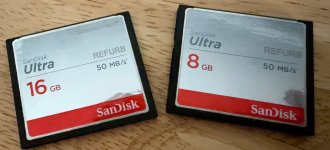
16GB SanDisk Ultra 50MB/s REFURB (Mirroed Label) [confirmed by ekorz]

Did not work
4GB SanDisk Ultra 25MB/s (Mirrored Label) - System error 00001 [confirmed by twistedsymphony]
4GB SanDisk 30MB/s 200X (Plain White Label) - System error 00001 [confirmed by twistedsymphony]
8GB SanDisk Ultra 50MB/s REFURB (Mirrored Label) - System error 00001 [confirmed by ekorz]
16GB SanDisk 60MB/s 400X (Plain White Label) - System error 00001 [confirmed by twistedsymphony]
 
Last edited:
Amazing work!

Just to report on CF media - the one on the left is working fine. The one on the right threw a system error (000001 I think). Anyway it is probably just a bad card, I do think Sandisk generally has worked for me and the gnet.
 

Attachments

  • IMG_9095.jpeg
    IMG_9095.jpeg
    184.9 KB · Views: 29
Amazing work!

Just to report on CF media - the one on the left is working fine. The one on the right threw a system error (000001 I think). Anyway it is probably just a bad card, I do think Sandisk generally has worked for me and the gnet.
Oh wow, didn't know any 16GB cards worked. This is good to know.
 
FYI Justice Gakuen (Rival Schools) appears to be crashing, I'm looking into this and will post a new build shortly.

Edit: New build posted, Justice Gakuen working again. Note that the start to exit doesn't work for this single game atm (this is how I broke it). It shouldn't be a long fix, but I hate having a completely broken game on the multi. I'll follow up with another build with the start button exit fix as I'm able to.

Edit2: New new build posted, 0.87b. Gakuen reset is back.
 
Last edited:
Hi! :)

One last report for the road regarding Battle Arena Toshinden 2, which is experiencing several stability issues:
  • Title Screen and Attract Mode: The title screen stays frozen and the Attract Mode (demo mode) does not start.
  • Sound & Voice Menu: Accessing it only works 1 out of 5 times. If it fails, the system reboots on its own.
  • Startup Latency: There is a noticeable delay when pressing the Start button.
  • Crash While Waiting for a Round: After selecting a character, while waiting for the first round, I instinctively tapped the Start button. This triggered a reboot followed by an error message on the blue Patch Loader screen mentioning an NVRAM error or wipe. Following this, Freeplay mode disappeared: the screen now displays Insert Coin with 0 credits.
  • Title Screen Test: I repeated the test on the title screen (with 0 credits) by pressing Start multiple times, which also causes the G-NET system to reboot.
 
Hi! :)

One last report for the road regarding Battle Arena Toshinden 2, which is experiencing several stability issues:
  • Title Screen and Attract Mode: The title screen stays frozen and the Attract Mode (demo mode) does not start.
  • Sound & Voice Menu: Accessing it only works 1 out of 5 times. If it fails, the system reboots on its own.
  • Startup Latency: There is a noticeable delay when pressing the Start button.
  • Crash While Waiting for a Round: After selecting a character, while waiting for the first round, I instinctively tapped the Start button. This triggered a reboot followed by an error message on the blue Patch Loader screen mentioning an NVRAM error or wipe. Following this, Freeplay mode disappeared: the screen now displays Insert Coin with 0 credits.
  • Title Screen Test: I repeated the test on the title screen (with 0 credits) by pressing Start multiple times, which also causes the G-NET system to reboot.
I think this must be a memory card issue. 👍 I just tested on the 0.87b (latest build)
-Attract mode starts just fine, loops over and over, rebooted the game multiple times and I still get the endless demonstration loops
-Entered sound and voice menu 10 times and played sound and music over and over, no issue
-Tapping start while waiting for a round, nothing happened, fight started
-Tapping start multiple times on the title screen with no credit in, nothing happens

https://photos.app.goo.gl/sqPcSvqXMizT1WX38

Pressing start after putting a coin in does take some time, I'll compare to PCB.
 
Last edited:
Version 0.88 released. This provides better music timing for a number of titles; the original report was that music in Heaven's Gate and Rival Schools ended earlier in the attract mode than it should. This is now much closer to accurate; not quite PCB perfect, but much closer.

On that note, I want to make sure I state this very clearly: There will be concessions that need to be made on some ports. The G-Net CF loader is considerably slower than the rom chips on other PCBs. We are also converting music from systems that have dedicated processing chips, to a system where we need to share the CPU.

In games where a decision must be made, I will always prioritize arcade-accurate gameplay over load times, music/sound quality and attract mode accuracy, etc.

Obviously I am going to do my absolute best, but the compact flash loading speed is a bottleneck that we have to work around. The reason the mentioned games' (and others I ended up fixing) music ended earlier than the PCB is not due to an actual music issue; it sounds great. It is because during attract mode some scenes take longer to load, while the music still plays. The reason that attract mode stands out more than anything is simply because it is a long, sustained music track that is easily comparable to the PCB.

Anyway, hope you are all enjoying the multi and the games!
 
Last edited:
I've been playing around with this and it's pretty damn impressive. and there are a lot of PS1 based arcade boards. Outside of the ZN platform and Namco System 10, 11, and 12, there's also Konami 573 as well as Konami GV and Konami GQ. Then of course the crazy size of the PS1 game library.

Despite all that what's been released so far is already surpassed my expectations!

I don't like making requests, but if anyone is looking for a game to port I would love to see Intelligent Qube running on this. :D
 
I've been playing around with this and it's pretty damn impressive. and there are a lot of PS1 based arcade boards. Outside of the ZN platform and Namco System 10, 11, and 12, there's also Konami 573 as well as Konami GV and Konami GQ. Then of course the crazy size of the PS1 game library.

Despite all that what's been released so far is already surpassed my expectations!

I don't like making requests, but if anyone is looking for a game to port I would love to see Intelligent Qube running on this. :D
I've definitely got a lot more games on the way, but there's a certain Konami GV game I would absolutely love to see on this thing. Gonna mess with that once I've released a few more of the games I'm currently in the middle of!

And I'm open to PSX stuff too (I really want Harmful Park on PCB), but I'm very interested in the work @arcademodbios is doing and can't wait to play his ports.
 
thanks for the pointers for the kick harness, anything else needs to be hooked up there like ground or something?

sadly amazon sent me the wrong card so I don't this I'll be able to test this right now🥲

I'm eager to try games like fighting layer and soul calibur😁

DDR and Taiko no tatsujin would be crazy awesome too

thanks a lot for your awesome work and deddication🤩
 
Great that this has its own thread now, and great to see further progress.

On that note, I want to make sure I state this very clearly: There will be concessions that need to be made on some ports. The G-Net CF loader is considerably slower than the ram chips on other PCBs.
I want to make sure I understand. Does that mean all games on Garnet will stream from CF rather than flashing chips on the motherboard? Or does it still flash some data to chips on the mobo, but CF transfers are generally much slower than the original non-G-Net hardware?
 
Thank you for sharing this!
I just downloaded v0.88 . File is around 3.3GB but when I burn it I only can see a 39MB fat16 partition. Disk tool is reporting the remaining space as free (non allocated). This is expected?
I used Linux' default image writer program so I don't discard a problem with that.
Thanks again!
 
Back
Top