El_isra
Professional
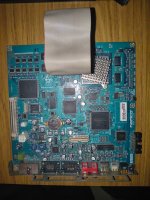
today I found out the EE UART TX pin on the system256 board
to use this UART to test for dead EE or IOP, you will need: cables (I used dupont cables female-male) and an RS232 to USB adapters (the ones that use DB9 connector)
the serial port pin is conveniently exposed on a test clamp pin near the dip switches connection, you can see it labeled as "TAB1" and "EERS"
that pin goes to your adapter RX pin. then take ground from wherever you want, there is a test clamp ping labeled as TAB2 left to the power plug for the cooler, that exposes GND cleanly
once you have it connected, plug the adapter to a PC and using an app like PuTTY or Simplyserial set it up with 38400 BAUD, 8 data bit, 1 stop bit and no parity
make sure the machine is set to 246+ mode
now poer it on...
you should see on your serial app text such as this comming in:
if you see a very similar log to this, then the EE and IOP are healthy and your issue is somewhere else
if you see the log hangs at one of the initialize.... line, it may be an issue on the EE
if nothing comes out, maybe the sephix rs242 transceiver that namco put on the way is fried, if that is healthy on the PCB, maybe the PS1 CPU is dead (EE Kernel waits for it to say its ready before proceeding)
certain issues at EE init may also clearly show up here. for example, for damaged RDRAM kernel may say:
Hope this helps someone at least. happy gaming
to use this UART to test for dead EE or IOP, you will need: cables (I used dupont cables female-male) and an RS232 to USB adapters (the ones that use DB9 connector)
the serial port pin is conveniently exposed on a test clamp pin near the dip switches connection, you can see it labeled as "TAB1" and "EERS"
that pin goes to your adapter RX pin. then take ground from wherever you want, there is a test clamp ping labeled as TAB2 left to the power plug for the cooler, that exposes GND cleanly
once you have it connected, plug the adapter to a PC and using an app like PuTTY or Simplyserial set it up with 38400 BAUD, 8 data bit, 1 stop bit and no parity
make sure the machine is set to 246+ mode
now poer it on...
you should see on your serial app text such as this comming in:
Code:
?# Initialize memory (rev:3.69, ctm:393Mhz, cpuclk:295Mhz detected)
frck=393233Khz, rdramType=4, speedBinType=1, maxSysDelay=0 sio clock = 921Khz, bus clock = 147462Khz
refresh disabled
wait done
min device tCAC = 8, min RMC tCAC = 8
rmc revision = 4, ee id reg = 4111
RAC_CONFA, RAC_CONFB set to 0000a500
RAC_TSEL set to 00882222
        RAC_TSEL.rdsel=2
test registers reset
setting tcycle to 00000027
AssignSDev: 2 RDRAMs were detected
ch=0, sdevid=d, devid=d, paddr=00000000
AssignSDev: 2 RDRAMs were detected
ch=1, sdevid=d, devid=d, paddr=00000000
SA_PDNXA set to 00000001
SA_PDNX set to 00000001
SA_NAPX set to 00000421
SA_TPARM set to 0000003a
SA_TCDLY1 set to 00000000
SA_TFRM set to 00000007
setr/clrr done
SA_PDNXA set to 00000001
SA_PDNX set to 00000001
SA_NAPX set to 00000421
setting skip register to 00000000
SA_CCA set to 00000040
SA_CCB set to 00000040
exiting power down mode
setting fast clock mode done
setting *DRAM_CONF to 0000000c
        DRAM_CONF.rdd=0
        DRAM_CONF.rams=0
setting *DRAM_TEST to 01800000
setting *DRAM_TP to 00001454
        DRAM_TP.tpp=1
        DRAM_TP.trp=1
        DRAM_TP.tss=1
        DRAM_TP.tras=4
        DRAM_TP.trcd=2
setting *DRAM_CBR to 00000000
setting *DRAM_ASWP to 00000007
performing RAC initial current control
setting *DRAM_REF to 0207f023
        DRAM_REF.refc=35
        DRAM_REF.cc=15
        DRAM_REF.refe=1
        DRAM_REF.refb=1
        DRAM_REF.srce=1
        DRAM_REF.cals=2
        DRAM_REF.cci=0
put all devices in ATTN mode
setting *DRAM_REF to 0207f090
        DRAM_REF.refc=144
        DRAM_REF.cc=15
        tCCTRL becomes 15(msec)
dump_reg: *DRAM_CONF=0000000c
dump_reg: *DRAM_REF =0207f090
dump_reg: *DRAM_TP  =00001454
dump_reg: *RAC_TSEL =01800000
dump_reg: *DRAM_CBR  =00000000
dump_reg: *DRAM_ASWP  =00000007
dump_reg: *DRAM_TP2  =835057a6
dump_reg: *RAC_CONF =0000a500
dump_reg: *RAC_TSEL =00882222
ch0:
AssignSDev: 2 RDRAMs were detected
dump_reg: sdevid=d: rdram_reg INIT   =0000
dump_reg: sdevid=d: rdram_reg CNFGA  =0000
dump_reg: sdevid=d: rdram_reg CNFGB  =0000
dump_reg: sdevid=d: rdram_reg DEVID  =0000
dump_reg: sdevid=d: rdram_reg REFB   =0000
dump_reg: sdevid=d: rdram_reg REFR   =0000
dump_reg: sdevid=d: rdram_reg CCA    =0000
dump_reg: sdevid=d: rdram_reg CCB    =0000
dump_reg: sdevid=d: rdram_reg NAPX   =0000
dump_reg: sdevid=d: rdram_reg PDNXA  =0000
dump_reg: sdevid=d: rdram_reg PDNX   =0000
dump_reg: sdevid=d: rdram_reg TPARM  =0000
dump_reg: sdevid=d: rdram_reg TFRM   =0000
dump_reg: sdevid=d: rdram_reg TCDLY1 =0000
dump_reg: sdevid=d: rdram_reg TCYCLE =0000
ch1:
AssignSDev: 2 RDRAMs were detected
dump_reg: sdevid=d: rdram_reg INIT   =0000
dump_reg: sdevid=d: rdram_reg CNFGA  =0000
dump_reg: sdevid=d: rdram_reg CNFGB  =0000
dump_reg: sdevid=d: rdram_reg DEVID  =0000
dump_reg: sdevid=d: rdram_reg REFB   =0000
dump_reg: sdevid=d: rdram_reg REFR   =0000
dump_reg: sdevid=d: rdram_reg CCA    =0000
dump_reg: sdevid=d: rdram_reg CCB    =0000
dump_reg: sdevid=d: rdram_reg NAPX   =0000
dump_reg: sdevid=d: rdram_reg PDNXA  =0000
dump_reg: sdevid=d: rdram_reg PDNX   =0000
dump_reg: sdevid=d: rdram_reg TPARM  =0000
dump_reg: sdevid=d: rdram_reg TFRM   =0000
dump_reg: sdevid=d: rdram_reg TCDLY1 =0000
dump_reg: sdevid=d: rdram_reg TCYCLE =0000
levelization: imode=0
AssignSDev: 2 RDRAMs were detected
ch=0 devid=d (vaddr=00000000): got 00000000ffffffff
AssignSDev: 2 RDRAMs were detected
ch=1 devid=d (vaddr=00000000): got 00000010ffffffff
sys_delay is 0
table look-up determined the new sys_delay that RMC supports while <=maxSysDelay is 0
levelization: imode=1
AssignSDev: 2 RDRAMs were detected
ch=0 devid=d (vaddr=00000000): got 00000000ffffffff
AssignSDev: 2 RDRAMs were detected
ch=1 devid=d (vaddr=00000000): got 00000010ffffffff
levelization: imode=2
AssignSDev: 2 RDRAMs were detected
ch=0 devid=d (vaddr=00000000): got 00000000ffffffff
AssignSDev: 2 RDRAMs were detected
ch=1 devid=d (vaddr=00000000): got 00000010ffffffff
successfully exiting InitRDRAM with:
totalSize=64Mb, #rdrams=2, system tCAC=8, added system delay (tTR-1) is 0
# Total accessable memory size: 64 MB (B:2:8:0) (369:4:a500)
# TLB spad=0 kernel=1:12 default=13:32 extended=33:41
# Initialize Start.
# Initialize GS ...
# Initialize INTC ...
# Initialize TIMER ...
# Initialize DMAC ...
# Initialize VU1 ...
# Initialize VIF1 ...
# Initialize GIF ...
# Initialize VU0 ...
# Initialize VIF0 ...
# Initialize IPU ...
# Initialize FPU ...
# Initialize User Memory ...
# Initialize Scratch Pad ...
# Initialize Done.

EE DECI2 Manager version 0.06 May 19 2004 14:54:08
  CPUID=2e42, BoardID=ffff, ROMGEN=2004-0519, 64M

# Restart Without Memory Clear.
# Initialize GS ...
# Initialize INTC ...
# Initialize TIMER ...
# Initialize DMAC ...
# Initialize VU1 ...
# Initialize VIF1 ...
# Initialize GIF ...
# Initialize VU0 ...
# Initialize VIF0 ...
# Initialize IPU ...
# Initialize FPU ...
# Initialize Scratch Pad ...
# Restart Without Memory Clear Done.
# Restart.
# Initialize GS ...
# Initialize INTC ...
# Initialize TIMER ...
# Initialize DMAC ...
# Initialize VU1 ...
# Initialize VIF1 ...
# Initialize GIF ...
# Initialize VU0 ...
# Initialize VIF0 ...
# Initialize IPU ...
# Initialize FPU ...
# Initialize User Memory ...
# Initialize Scratch Pad ...
# Restart Done.
# Restart Without Memory Clear.
# Initialize GS ...
# Initialize INTC ...
# Initialize TIMER ...
# Initialize DMAC ...
# Initialize VU1 ...
# Initialize VIF1 ...
# Initialize GIF ...
# Initialize VU0 ...
# Initialize VIF0 ...
# Initialize IPU ...
# Initialize FPU ...
# Initialize Scratch Pad ...
# Restart Without Memory Clear Done.
# Restart Without Memory Clear.
# Initialize GS ...
# Initialize INTC ...
# Initialize TIMER ...
# Initialize DMAC ...
# Initialize VU1 ...
# Initialize VIF1 ...
# Initialize GIF ...
# Initialize VU0 ...
# Initialize VIF0 ...
# Initialize IPU ...
# Initialize FPU ...
# Initialize Scratch Pad ...
# Restart Without Memory Clear Done.
if you see a very similar log to this, then the EE and IOP are healthy and your issue is somewhere else
if you see the log hangs at one of the initialize.... line, it may be an issue on the EE
if nothing comes out, maybe the sephix rs242 transceiver that namco put on the way is fried, if that is healthy on the PCB, maybe the PS1 CPU is dead (EE Kernel waits for it to say its ready before proceeding)
certain issues at EE init may also clearly show up here. for example, for damaged RDRAM kernel may say:
Failed to init RDRAM:-1Hope this helps someone at least. happy gaming