
Japanese Initial D Ver 3 project

AUSyTyIN

Beginner
Joined
Feb 26, 2025
Messages
5
Reaction score
5
Location
Denver, Colorado
First of all, I have to say a huge thank you to @gamefixer for getting me this far along. Without his amazing skills and advice, I'd still have two massive paperweights.

Bit of back story on these games; I've always wanted a pair of Initial D 1-3s, and had been on the look out for YEARS (seriously...15 years or so) for a set. It was always a case of "good price, too far away", "waaay too expensive", or just terrible timing financially. Well, several years ago the stars finally aligned when someone (I honestly can't remember who lol) sent me the contact info of a company who imported games from Japan and sold them at a reasonable price. I struggled to communicate with a salesman (?) due to language barrier as he only spoke broken English and with a very thick accent that I struggled to understand, and for whatever reason he had an aversion to email or text (probably so I had no proof of his promises). We reached an agreement to have him ship a pair of "fully functioning" ID3 cabinets complete with toppers.

Well, what showed up was not "fully functioning". I can't remember the actual details of what all wasn't working, but long-story-short I had zero working machines. After Mr Fixer swung by the first time, we were able to combine parts from both machines to get one machine working, but even that one wasn't perfect. In the end, I had a dead monitor, a dead GD-Rom, two dead card readers (a MAJOR reason I wanted these cabinets is because of the game progression and saving system), and I'm sure a bunch of other things that I'm forgetting. I reached out to the seller, and he said I should send out the broken components and he'd send working ones. I had zero faith in this claim that he'd ship out replacements, and was fearful of loosing the components I had, so I decided to pass on his offer.

Over the next few years, Mr Fixer got the 2nd monitor working via a cap kit on the Toshiba D29C051, which is apparently a bit of a rare monitor and different than what came in the US versions. We talked about the best way to proceed, and seeing how I needed a GD-Rom drive we decided the going netboot was the best path forward.


Fast forward to the current day. Mr Fixer did some voodoo and now they're both mostly working (see below for details) running netboot. I'm thrilled that I finally have a pair working, but I still have a few things that I want to do that I'm needing some help with, hence me posting here. This site has been a huge resource for the Fixer and I throughout this ordeal, but I'm struggling/failing at finding solutions for the following:


1. Saving game specific configurations. My pedals and steering need adjusting every time I boot up a new game, not to mention having settings set for free play, master vs slave, machine #, etc. Fixer said that in order to do this I'd have to change to .NV files on the Raspberry Pi but he gracefully bowed out of further tweaks on this.​
​
2. Adjusting color on the monitors. I'm trying to buy an "extended menu" board vs building one, but coming up short. I found them on Cosmo-logi but no way to buy them. I've reached out to them now though.​
​
3. Force Feedback. Works on one machine but not the other. Have voltage to the force feedback board and the fuse is good, but I haven't checked beyond that. Could swap parts from the working one to diagnose.​
​
4. Game selection. Fixer threw every(?) game possible on there, so I'm wanting to figure out what games actually work with it without having to drill holes to install switches/etc to fix wiring issues. So far I've got the following working.​
  • 18 Wheeler. Game starts fine through character selection, but crashes when the level is loading. Seems the same for Standard or Delux
  • Crazy Taxi. Seems to work fine, but if you shift into reverse (by pressing "view change") there is no way to get it back into drive.
  • Initial D 1-3. Anyone know the difference between the different Revisions? Not Import vs Export, but some where they're labeled as Rev A and Rev B. I looked around and couldn't see anything online about it
  • Club Kart European Session 2002. Seems to boot to reversed steering for some reason, but that's fixable in configurations
  • Maximum Speed
  • Jambo Safari. Really surprised this one works using the shifter for the lasso, but it does
  • Wave Runner. Roll, Pitch, Emergency Switch, or View buttons aren't mapped to ID's buttons. Shows error message of "No Drive Board"
  • Wild Riders. Unable to jump or duck, and the brake pedal seems to only operate the front brakes
  • Others? Can Ferrari 355 work? I've seen people saying they can. Any others?
​
5. Card reader. The main reason that Initial D was a grail game for me. I have blank cards, and had planned on getting the readers fixed, but apparently you can do virtual cards now? I tried looking into it, but I'm totally lost. I know I need a cable, but no clue if I need to buy something else on the other end of that cable too, then what I need to do to get the game to see the "card", how to switch cards, etc.​
​
Besides those things the only issues are a few cosmetic issues (missing horn button being the biggest, so not bad at all). Images attached for attention, also because I'm happy that for the first time all of my games are playable!
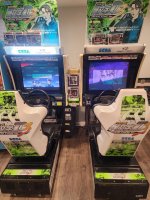
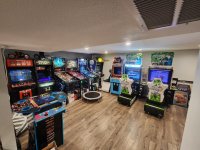
 

Attachments

  • ID3 1.jpg
    ID3 1.jpg
    186.4 KB · Views: 263
  • all on.jpg
    all on.jpg
    172.9 KB · Views: 163
5. Card reader. The main reason that Initial D was a grail game for me. I have blank cards, and had planned on getting the readers fixed, but apparently you can do virtual cards now? I tried looking into it, but I'm totally lost. I know I need a cable, but no clue if I need to buy something else on the other end of that cable too, then what I need to do to get the game to see the "card", how to switch cards, etc.

Read wipi manual

it will tell you to buy
1- a trendnet usb to serial cable
2- a female to female db9 cable
3- a 6 position jst connector and pins

once you get them, cut the DB9 cable in half. Wire one end to the jst end. The pinout is at page 13, or below:

JST DB9
1766933838586.png

Once you have this JST cable done, connect it to your naomi CN8 connector and connect the other end to the Trendnet male DB9.
Setup a rasberry pi with WIPI and plug the usb part of the trendnet in the pi.
Run the card emulator and enjoy ( for *1* car right now. The multiple seat version has issues right now.)
 
I started working on a pair of NA ID3's last year. Super fun to play but experienced similar issues to yours. IMO, the units arriving non-working is acceptable if the CRT's are intact & Naomi's will boot up without any issues (GD-rom aside) given you can netboot them.

#1 I think is the Netdimm battery -- they'll only last a few days at best & need to have the settings redone afterwards. There's a thread w/DC adapter but haven't done that yet.

#2 I got my NAC's through them -- they'll do well if they got the parts and can get them to you!

#3 The motors have some rubber stoppers & a belt system inside them. They're a bit like working on a car. If it has power and the belt is connected it's likely a motor issue and would probably just be an easy replacement. There's an Initial D & Initial D2 Field Service Bulletin from SEGA available that goes through a rebuild process that has most of the info/diagrams required to rebuild one. You can also source new rubber bushings (you'll have to cut to fit) from Ebay but if anyone know's the type/model of tubing it is, it's probably cheaper to buy at a hardware store if you can find it^^

#5 Mrhide's got the basics above, wire up a USB<->DB9 cable as he suggested & work on getting a card reader emu loaded. It's a bit finicky and while there are two card readers I got working, YACardEmu was the one I wound up using for the majority of the time. I reached out to Ken @ irepairsega for an RMA & intend to send him 2/3 of my non-working card readers. One originally worked but I either re-assembled it incorrectly or blew something on it when I took it apart.

The biggest issue w/an actual card reader, is the traditional Sega cards don't seem to be visibly eraseable. AFAIK, You can put [Invalid]'s in the card reader after they're rejected to get re-written upon but if you do that with multiple ID's, you'll wind up with multiple sets of writing on it & it'll eventually be too difficult to read. I've got a video of a JP ID3 owner able to heat-gun his NAMCO card at a high (400F+) temperature & erased the text but if you do this on the Sega ones, it'll wind up permaburnt. I'm not sure what type of cards he used in the video as I didn't have any luck w/this yet but only tried on a WMMT card. The ones in the video were for Mario Kart which I have, but haven't tried burning w/the heat gun.
 
Force feedback - can you describe what about it is not working? Is it the motor not activating? FWIW Ken said he doesn't service the ffb boards, but they're at least available from Yaton and other places

For steering, you have to open it up and look at the camshaft, timing belt, etc to see whats going on. I went through with the rebuild (new bearings, bushings, added loctite, etc)

For the card reader system - can you describe what is not working with them? I solved a nagging "looping" issue with the card reader. If you have the same issue, I'd be happy to walk you through steps I took to diagnose and solve.

Overall, we've been through your shoes. Owning a machine is tough because there aren't a long list of people who will come to your house and solve the issue immediately. But stick at it and you should be able to fix everything over time. Having a twin cab means you can swap parts and figure out which is broken and why. You can also call ken at irepairsega and he can help give pointers on where to look except for netbooting.
 
Thanks for the replies. Life pulled me away from this but I'm back at it now.

I just bought what Mrhide said to (thanks for that as well as the wipi manual!)

I started working on a pair of NA ID3's last year. Super fun to play but experienced similar issues to yours. IMO, the units arriving non-working is acceptable if the CRT's are intact & Naomi's will boot up without any issues (GD-rom aside) given you can netboot them.

#1 I think is the Netdimm battery -- they'll only last a few days at best & need to have the settings redone afterwards. There's a thread w/DC adapter but haven't done that yet.

#2 I got my NAC's through them -- they'll do well if they got the parts and can get them to you!

#3 The motors have some rubber stoppers & a belt system inside them. They're a bit like working on a car. If it has power and the belt is connected it's likely a motor issue and would probably just be an easy replacement. There's an Initial D & Initial D2 Field Service Bulletin from SEGA available that goes through a rebuild process that has most of the info/diagrams required to rebuild one. You can also source new rubber bushings (you'll have to cut to fit) from Ebay but if anyone know's the type/model of tubing it is, it's probably cheaper to buy at a hardware store if you can find it^^

#5 Mrhide's got the basics above, wire up a USB<->DB9 cable as he suggested & work on getting a card reader emu loaded. It's a bit finicky and while there are two card readers I got working, YACardEmu was the one I wound up using for the majority of the time. I reached out to Ken @ irepairsega for an RMA & intend to send him 2/3 of my non-working card readers. One originally worked but I either re-assembled it incorrectly or blew something on it when I took it apart.

The biggest issue w/an actual card reader, is the traditional Sega cards don't seem to be visibly eraseable. AFAIK, You can put [Invalid]'s in the card reader after they're rejected to get re-written upon but if you do that with multiple ID's, you'll wind up with multiple sets of writing on it & it'll eventually be too difficult to read. I've got a video of a JP ID3 owner able to heat-gun his NAMCO card at a high (400F+) temperature & erased the text but if you do this on the Sega ones, it'll wind up permaburnt. I'm not sure what type of cards he used in the video as I didn't have any luck w/this yet but only tried on a WMMT card. The ones in the video were for Mario Kart which I have, but haven't tried burning w/the heat gun.

#1, are you saying that this is the expected way for a netboot to behave? I'm wanting (borderline needing) the machines to save settings, especially because there are so many games to setup.

#2 I still haven't heard back. Need to reach out again.

#3 The board has power, but I haven't checked if it's getting to the motor

#5. is there a how-to on YACardEmu? I was thinking it'd just be through the same site that I connect to on the netboot to change games, is that not the case?

I'm not too worried about actual cards. It would be nice if they worked, but at this point I don't think it's worth it to try and get my readers working, even though I do have ~50 blank cards. Is there a repair guide that anyone knows of if I do try to dig into them myself? Thanks again.

Force feedback - can you describe what about it is not working? Is it the motor not activating? FWIW Ken said he doesn't service the ffb boards, but they're at least available from Yaton and other places

For steering, you have to open it up and look at the camshaft, timing belt, etc to see whats going on. I went through with the rebuild (new bearings, bushings, added loctite, etc)

For the card reader system - can you describe what is not working with them? I solved a nagging "looping" issue with the card reader. If you have the same issue, I'd be happy to walk you through steps I took to diagnose and solve.

Overall, we've been through your shoes. Owning a machine is tough because there aren't a long list of people who will come to your house and solve the issue immediately. But stick at it and you should be able to fix everything over time. Having a twin cab means you can swap parts and figure out which is broken and why. You can also call ken at irepairsega and he can help give pointers on where to look except for netbooting.

It doesn't even try to work. I know I have voltage to the board, but don't know what to check beyond that.

It's been a while since I've messed with the readers, but I seem to remember them being stuck in a loop while testing them out. They currently just throw an error during boot up so I have to go in the settings and turn them off. Thanks for the kind words. as well
 
I don't think it's worth it to try and get my readers working
It is just my opinion, but having working card readers adds a lot to the long term playability and resale value of the machine.

Looping issue with card reader

Here's a thread that discusses the looping issue and potential approaches to solving it https://www.arcade-projects.com/threads/sega-card-reader-looping-reset-mechanism.2526/

In the thread, some people would just unseat the power connector and then reseat it and it would eventually work. I did that for a while until it stopped working.

In my own case, it was most likely a wiring issue.

How I triaged it:
  • Swapped card readers and problem persisted on one side
  • Confirmed both card readers were working correctly on the good side
  • Checked voltages (5V and 12V)
  • Checked continuity
  • Traced wiring and found a spliced ground (Ken advised me to remove it)
  • Checked 2 of the 3 sections of wiring
  • Got a replacement japanese harness and re-pinned it to the molex connector they use in the US
In the end, it was a wiring issue on the power side that was causing my looping issue. Might be a bad crimp or connector and redoing it fixed my issue.

If the replacement harness + repinning didnt work, I'm almost certain that running a new wiring harness straight from the card reader to the card reader psu and the i/o board would also work.
 
Force feedback:

I would definitely swap the force feedback boards and see what happens. Theres only a few connnectors, so it should be a quick swap.

I had one go out and the light would just blink red only. AFAIK, Ken doesn't service these, so if your board is bad, you'll have to source elsewhere.
 
It is just my opinion, but having working card readers adds a lot to the long term playability and resale value of the machine.

Looping issue with card reader

Here's a thread that discusses the looping issue and potential approaches to solving it https://www.arcade-projects.com/threads/sega-card-reader-looping-reset-mechanism.2526/

In the thread, some people would just unseat the power connector and then reseat it and it would eventually work. I did that for a while until it stopped working.

In my own case, it was most likely a wiring issue.

How I triaged it:
  • Swapped card readers and problem persisted on one side
  • Confirmed both card readers were working correctly on the good side
  • Checked voltages (5V and 12V)
  • Checked continuity
  • Traced wiring and found a spliced ground (Ken advised me to remove it)
  • Checked 2 of the 3 sections of wiring
  • Got a replacement japanese harness and re-pinned it to the molex connector they use in the US
In the end, it was a wiring issue on the power side that was causing my looping issue. Might be a bad crimp or connector and redoing it fixed my issue.

If the replacement harness + repinning didnt work, I'm almost certain that running a new wiring harness straight from the card reader to the card reader psu and the i/o board would also work.
I completely agree. I have a dream of keeping a binder to store cards for visitors so they don't have to worry about bringing it everytime....just a few sheets of trading card holders in a 3 ring. That'd be so much better than having to get into an app every time. I just don't know if it's a solid long term solution. Not sure if they're unreliable only when used in an arcade setting or if it's just something that happens as time passes.

Thanks for the thread and the rundown! Definitely gives me a good place to start.
Force feedback:

I would definitely swap the force feedback boards and see what happens. Theres only a few connnectors, so it should be a quick swap.

I had one go out and the light would just blink red only. AFAIK, Ken doesn't service these, so if your board is bad, you'll have to source elsewhere.

Thanks for the heads up. Hopefully if it is the board, that it's a common component that I can get from an electrical parts supplier and solder it in myself...
 
Back
Top