Konami Vendetta bad c16?

r67055

Enthusiast
Joined
Apr 3, 2021
Messages
309
Reaction score
86
Location
Hungary
hello.
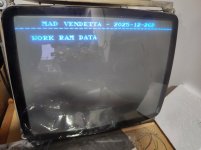
I would like to ask for some help. I have a Vendetta PCB that does not start, it resets from time to time and in the background it apparently says bad 16c. I replaced the Ram with a tmm2063ap-70 and there was no change. I started to check all the data lines are connected to the cpu. the 20th and 22nd pins are also connected to the pal ic and the cpu. do you have any ideas on how to continue? I definitely have a C16 error?

Thanks


View: https://youtu.be/5erzB9ea3FE?si=caqVgPBZ_LuofW7L
 
.I see that there is a c16 ram data error. I simply can't find my way around the schematic. The font is so small that I can't find the c16 ram in the schematic. Can I follow exactly which data line goes where?
 

Attachments

  • IMG_20251227_140747.jpg
    IMG_20251227_140747.jpg
    137.1 KB · Views: 36
Last edited:
.I see that there is a c16 ram data error. I simply can't find my way around the schematic. The font is so small that I can't find the c16 ram in the schematic. Can I follow exactly which data line goes where?
(16C) ram (D0-D7)11-12-13-15-16-17-18-19 pins reach 052109 cpu

I don't know what this means? Is there no communication between the ram and the cpu?
 
Last edited:
052109 isn't the CPU, its part of bg/fg tile subsystem. The CPU is 053248 (15E), which is the smaller QFP chip to the right of the work ram (16C). Work ram data lines don't connect directly to the CPU, instead they go through the 74LS245 at 17D.
 
052109 isn't the CPU, its part of bg/fg tile subsystem. The CPU is 053248 (15E), which is the smaller QFP chip to the right of the work ram (16C). Work ram data lines don't connect directly to the CPU, instead they go through the 74LS245 at 17D.
yes. quick I have measured all the lines between the 74ls245 and the 16c ram and they are all good. I will continue tomorrow. if everything is fine with the lines between the 74ls245 and the cpu then it follows that the 74ls245 is the fault?
 
If you re-grab the zip from my first reply it has an updated version of the diag, which should print some more info about why the error triggered.

I'm not 100% sure the 74LS245 itself is bad. In order for the diag to clear the screen and write text the CPU has to talk to the 052109. Talking the 052109 requires going through that 74LS245.

Perhaps there is something wrong with the DIR pin of the 74LS245 or your replacement ram chip is also bad?
 
If you re-grab the zip from my first reply it has an updated version of the diag, which should print some more info about why the error triggered.

I'm not 100% sure the 74LS245 itself is bad. In order for the diag to clear the screen and write text the CPU has to talk to the 052109. Talking the 052109 requires going through that 74LS245.

Perhaps there is something wrong with the DIR pin of the 74LS245 or your replacement ram chip is also bad?
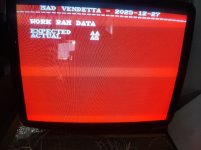
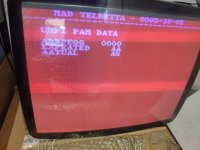
It seems there will be a problem with the colors. The picture was red yesterday. It only turned black after a while, when I took the picture it was already black. I replaced it with the new eprom content. I don't think it's a Ram problem because I replaced 3 pieces of Ram and they all reacted the same.
 

Attachments

  • IMG_20251228_110539.jpg
    IMG_20251228_110539.jpg
    249.9 KB · Views: 29
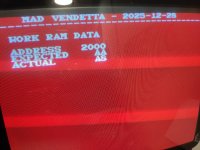
Code:
Data Line:      7654 3210
Expected:  AA = 1010 1010
Actual:    A8 = 1010 1000

The error is pointing to something wrong with D1. I would double check that pin is not lose on the cpu. If not I would try replacing the 74LS245 and see if that helps.
 
Mind re-grabbing the zip and testing with it. I was able to abuse a quark in the konami2 cpu that makes it possible to print the work ram address the error happened on. I wanna makes sure the address its prints looks sane on your board.
 
looks correct, thanks for testing
I thank you for helping me.
the D1 line is connected to pin 3 of 74ls245 and pin x of 052109. no floating fixed. ls 245 is the suspect?
 
Last edited:
I think so, but before you swap it I would double check you don't have any solder bridges from when you replaced 16C. There are a couple traces that go very close to the through holes of the ram chip. It wouldn't take much for a desolder gun to rub off the solder mask to one of those traces then accidentally bridging to it when you solder the ram pins.
 
I think so, but before you swap it I would double check you don't have any solder bridges from when you replaced 16C. There are a couple traces that go very close to the through holes of the ram chip. It wouldn't take much for a desolder gun to rub off the solder mask to one of those traces then accidentally bridging to it when you solder the ram pins.
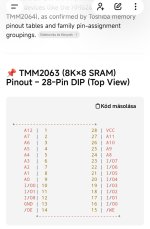
I started looking at the Ram Pins and noticed that pin 1 is at +5v level. I don't understand how it could be there...I'll try to check the soldering but there's very little space there.
 
I started looking at the Ram Pins and noticed that pin 1 is at +5v level. I don't understand how it could be there...I'll try to check the soldering but there's very little space there.
sorry, you can't trust the chat gpt either, I asked him for the pinout of the ram and he sent this. That's why I suspected the wrong 5v
 

Attachments

  • Screenshot_2025-12-29-12-05-30-313_com.openai.chatgpt-edit.jpg
    Screenshot_2025-12-29-12-05-30-313_com.openai.chatgpt-edit.jpg
    84.1 KB · Views: 17
I replaced the 74ls245. I can't find such an error message in the description.
 

Attachments

  • 17670087856251250146178278256646.jpg
    17670087856251250146178278256646.jpg
    206.1 KB · Views: 17
because now I see that it writes everything incorrectly. the ram's D0-D7 pins arrive at the 74ls245. I have a bad feeling that the 19th pin of the ls245 is in high. It should be in low. Its control comes from the pal ic.
 
I'm not approaching the problem from the Pal ic side. Because if I put the factory eprom back in, it behaves differently. I returned to the basic problem of examining the D1 data line. I examined the line with a logic pencil first from the CPU side. To my great joy, the logic pencil vibrated between the CPU and the LS245. The 3rd leg of the LS245 is already low. Surprisingly, I bent the 3rd leg of the 245 out of the socket and looked at what it showed. The 3rd leg started flashing. At that moment I knew that the LS245 was good. This indicated to me that there was something in the wire that was pulling the data line down to 0. Since it wasn't the RAM that was pulling it down, but something else. I measured between the 3rd leg and GND to see if this was the problem, but it wasn't. At that moment I started to despair, this wasn't a good sign. What else could be connected to the D1 line? Unfortunately, the line is not connected to another RAM, but to several custom ICs: 053247,053251,051962,052109. This sounds depressing. I don't know how to continue, because any of them could cause the error.
 
Back
Top