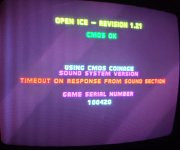
Midway wolf unit "bad U1" help needed

SubScorpion

Student
Joined
Jan 9, 2021
Messages
120
Reaction score
30
Location
USA
Anyone familiar with Midway wolf unit board audio section repairs? Haven't seen too many of these with bad audio sections. CPU test indicates a bad U1. No startup bong and no led activity during the game. My first thought is to reflow U1, which I did, but no luck. So far I've also done the following:
* Checked the coils near the edge connector for continuity - all good
* Swapped U57 with a known good one and replaced the socket for good measure - no change
* Swapped in 4 known good sound roms - no change.
* Swapped U58 with a known good one - no change.
I'm curious where I should look next. Quick visual inspection doesn't indicate any possible causes like corrosion, cut traces, touching pins etc.
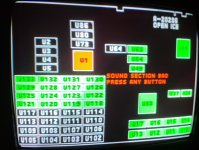
20251029_143525~2.jpg20251029_143545~2.jpg
 
The ADSP-2105 luckily doesn't have any internal factory programmed ROM, so if that's really what is bad, it can be easily replaced: https://www.analog.com/media/en/technical-documentation/data-sheets/adsp-2105.pdf
Here is a nice repair video that can give you some tips:
View: https://www.youtube.com/watch?v=Lemvn68-LvA

Also @philBennet made some partial schematics of MK3 that are attached. They can be opened with KiCad.
It looks like the proper schematics were found and sold: https://www.ebay.com/itm/154554912947
I wonder if someone has them.....
Unrelated, but Midway Seattle can also be found here:
http://arcarc.xmission.com/PDF_Arcade_Manuals_and_Schematics/Midway_Seattle_Hardware_Schematics.pdf

It's possible that the U1 is actually bad, so changing it would clarify that. Besides that, everything that sits between the CPU and this chip is where you should look at. Looking at the schematics, to me, you should check
 

Attachments

The ADSP-2105 luckily doesn't have any internal factory programmed ROM, so if that's really what is bad, it can be easily replaced: https://www.analog.com/media/en/technical-documentation/data-sheets/adsp-2105.pdf
Here is a nice repair video that can give you some tips:
View: https://www.youtube.com/watch?v=Lemvn68-LvA

Also @philBennet made some partial schematics of MK3 that are attached. They can be opened with KiCad.
It looks like the proper schematics were found and sold: https://www.ebay.com/itm/154554912947
I wonder if someone has them.....
Unrelated, but Midway Seattle can also be found here:
http://arcarc.xmission.com/PDF_Arcade_Manuals_and_Schematics/Midway_Seattle_Hardware_Schematics.pdf

It's possible that the U1 is actually bad, so changing it would clarify that. Besides that, everything that sits between the CPU and this chip is where you should look at. Looking at the schematics, to me, you should check
Appreciate the input DS. I think you didn't finish your final thought though. The last line in your message was "Looking at the schematics, to me, you should check...." Really curious where you think I should look. I can confirm U1 is NOT bad. Swapped one in from an MKII soundboard and the problem remains, also the chip I pulled from the OI board functions perfectly in the MKII soundboard.
 
It's possible that the U1 is actually bad, so changing it would clarify that. Besides that, everything that sits between the CPU and this chip is where you should look at. Looking at the schematics, to me, you should check
Clarification to the above, Darksoft?
 
You should check whatever chip sits between m1 and the processor. I would say some PAL or 74ls could be the culprit.
 
Did anyone solve their issues with a bad U1 check? I've seen several of these threads across the internet, but none of them have updates that they solved it. I only see articles of what to look at and phil solving his through probing, starting with U2. Since U1 itself is the Lease likely culprit, how do we determine the state of U2 after boot to see what could be causing U1 to look bad? Phil found A10 to be stuck on High. I've found the same, but over half the pins on U2 are High when I probed it, so I don't know what that means.
 
Back
Top