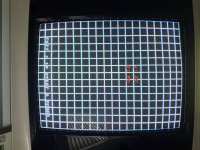
Nanao MS9-29 horizontal size issue.

scaryhours

Student
Joined
Sep 22, 2015
Messages
71
Reaction score
25
Location
Canfield, OH
Hello. Hoping someone can help me out.

I purchased a spare MS9 chassis from a reputable shop back in October - it had ghost lines, so I sent it back, they repaired it. This time the high voltage circuit had a broken trace which prevented the monitor from powering on. Sent it back, they fixed it. Now, I fine tuned it to Muchi Muchi Pork (original PCB) - had it looking decent. Popped my PGM with a fluffy Ketsui in - works, but there isn't enough vertical size to fill the screen. I've already had it at the shop and they said the issue is on my end.

What am I missing? Is there someone on here in the States who's willing to look at it? I should mention they had to replace the neck board with a spare - o don't know if that's relevant or not. But this is getting a little frustrating.
 
Last edited:
OK, so you have a horizontal width issue, not a vertical size issue. Very different problem and why we always refer to monitor problems as if they are in landscape orientation.

You said this is a spare--does your other chassis have the same issue? Is your width jumper set to Normal or Wide?
 
OK, so you have a horizontal width issue, not a vertical size issue. Very different problem and why we always refer to monitor problems as if they are in landscape orientation.

You said this is a spare--does your other chassis have the same issue? Is your width jumper set to Normal or Wide?
Thanks for the clarification. How would I know about the width jumper?
 
Just found the jumper - I set it to wide and will swap it tomorrow. Will report back, thank you very much!
 
Just went and looked, the jumper on the chassis currently in my cab is set to N507 - so is there any point in trying it? Is there someone I can send this to in the states?
 
Just went and looked, the jumper on the chassis currently in my cab is set to N507 - so is there any point in trying it? Is there someone I can send this to in the states?
This doesn't sound like something someone can repair for you, it sounds like an adjustment issue you will need to solve on your own.

CN507 is narrow.
CN506 is wide.
Try switching the white jumper to CN506 and adjust your Width control on the remote board.

If that doesn't give you the desired outcome, return the jumper back to CN507, then try adjusting the HH.15 and H.S.LIN on the chassis as well as the Width control on the remote board. I've gotten good width results adjusting all 3 of these in conjunction.
 
a reputable shop back in October - it had ghost lines, so I sent it back, they repaired it. This time the high voltage circuit had a broken trace which prevented the monitor from powering on. Sent it back, they fixed it

"This time" ? Did "the reputable shop" break the trace or did you?
 
So twice you had to sent it back to get it work?
I understand once but twice and where it wouldn't even power on is is a bit wild. I would personally mention their names but hey, glad they made it right I guess.
 
So twice you had to sent it back to get it work?
I understand once but twice and where it wouldn't even power on is is a bit wild. I would personally mention their names but hey, glad they made it right I guess.

they're good people - when I first inquired about getting the broken chassis on one of my cabs recapped, I asked if they had a spare MS9 on hand that I could purchase. When it arrived, the picture was great but it had ghost lines on the left side of the screen. They were extremely light, but I was just happy I had a working chassis - sent my broken one out for repair, received it back in perfect condition, fine tuned it without any issues.

I sent the chassis I purchased from them back for repair. After some back and forth, they figured it out. Sent it back to me. That's when I went to power it on and nothing. So I sent it back to them, after a week they found a small piece of solder had broken or cracked off a high voltage trace. Sent it back to me. I put it back in my cab, adjusted it to Muchi Muchi Pork - had a nice picture. Then when I put my PGM in, Ketsui ran out of vertical adjustment. Sent the chassis back, they found no problems. Tried swapping and adjusting yesterday - same issue.

I admit, I'm not super knowledgeable with electronics - but I've tried adjusting every pot on that chassis in conjunction with the remote board. I cannot, for the life of me, get Ketsui to fill the screen.
 
This doesn't sound like something someone can repair for you, it sounds like an adjustment issue you will need to solve on your own.

CN507 is narrow.
CN506 is wide.
Try switching the white jumper to CN506 and adjust your Width control on the remote board.

If that doesn't give you the desired outcome, return the jumper back to CN507, then try adjusting the HH.15 and H.S.LIN on the chassis as well as the Width control on the remote board. I've gotten good width results adjusting all 3 of these in conjunction.
I'll try again today. Are there any other tips you can provide? I'm going to adjust it with the PGM connected this time.

Does it matter that the jumper on the "working" chassis in my cab is set to normal? (CN507)
 
I'll try again today. Are there any other tips you can provide? I'm going to adjust it with the PGM connected this time.
Actually, try my second suggestion first.

1. Put the PGM in test mode so you can get the grid pattern screen.
2. Set the width control on the remote board to about halfway.
3. Then fiddle with the H.S.LIN pot on your chassis (Horizontal Linearity). That pot should expand and contract the sides for you.

The CN506 is another more extreme option, in case all other adjustments fail.
 
Actually, try my second suggestion first.

1. Put the PGM in test mode so you can get the grid pattern screen.
2. Set the width control on the remote board to about halfway.
3. Then fiddle with the H.S.LIN pot on your chassis (Horizontal Linearity). That pot should expand and contract the sides for you.

The CN506 is another more extreme option, in case all other adjustments fail.

I did it!

It did take moving the jumper to CN506 though. Picture is very nice but can use some convergence adjustments - the top has a VERY slight wave to it. But it was present on my other chassis. Thank you very much for the advice!
 
Not thrilled about the top. But I went from trap to pin to para and back. Tiny tiny increments. Any suggestions?
 

Attachments

  • IMG_1050.jpeg
    IMG_1050.jpeg
    197.8 KB · Views: 51
Not thrilled about the top. But I went from trap to pin to para and back. Tiny tiny increments. Any suggestions?
Play with the SPC 15 pot on the chassis (Side PinCushion 15 khz). that should minimize that bow.

Also, don't dwell too much on the grid screen. What you have looks really good, just adjust the bowing a bit with the pincushion control and call it a day. a lot of monitor issues seem to be unnoticeable when running an actual game.
 
Play with the SPC 15 pot on the chassis (Side PinCushion 15 khz). that should minimize that bow.

Also, don't dwell too much on the grid screen. What you have looks really good, just adjust the bowing a bit with the pincushion control and call it a day. a lot of monitor issues seem to be unnoticeable when running an actual game.

I messed around for 3 hours. It's as good as it's gonna get. I'm always chasing perfection or near it, so it's difficult leaving it the way it is. I really appreciate your and @trashedcabs help in getting me up and running.
 
"Perfection is not attainable, but if we chase perfection we can catch excellence."
-Vince Lombardi​

Yeah that's what I do, get it the point where it's as good as it's going to get, then just enjoy gaming. A person can go deep into the "hardware fixing rabbit hole" that sometimes we forget to enjoy the hardware. ;)
Like i said, what you've already shown looks pretty great as-is, I wouldn't worry about getting too OCD about having the monitor be "perfect".

Nanao MS9's are my favorite arcade monitors, I've repaired so many at this point that I've got a good grasp of all it's quirks.

I hope you enjoy it, and happy gaming!
 
Back
Top