Naomi on black screen when booting from CF

CamoYoshi

Professional
Joined
Mar 24, 2024
Messages
230
Reaction score
199
Location
Burien, WA
Before you post your suggestion to help:

- Yes I am using a "Sun" power supply.
- Yes I have reseated/replaced the RAM.
- Yes I have a known good zero key installed.
- Yes my power supply is at EXACTLY 5.05V.
- Yes my Naomi works with NetDIMMs.
- Yes my Naomi works with carts.
- My DIMM firmware has been upgraded to 4.02.
- I have followed the information provided by rtw for making your own CF cards.
- I have connected the CF card to an IDE port on a motherboard and gotten the sector ID.
- I have written the game image with the gcfi utility correctly as far as I am aware.
- Don't suggest these things I listed above and waste my time.

With that out of the way:

Attempting to boot up a DIMM with a 64MB CF card flashed with Ikaruga causes the Naomi to sit at a black screen. No JVS activity, no audio, no video. Disconnecting the CF card allows it to boot normally. I have tried multiple brands and sizes from 40MB up to 128MB without any luck. All sectors on every CF card I've tried are good with no errors, tested with h2testw.
 
CF cards can be finicky with Naomi. I have certain ones that boot every time and others I have to reboot by pulling the power to the reader once or twice to get going. There's a certain card reader made by a member on here that has a built in component that auto reboots for exactly this, think it was made by @Tailsnic Retroworks if I'm not mistaken.
 
CF cards can be finicky with Naomi. I have certain ones that boot every time and others I have to reboot by pulling the power to the reader once or twice to get going. There's a certain card reader made by a member on here that has a built in component that auto reboots for exactly this, think it was made by @Tailsnic Retroworks if I'm not mistaken.
Can you confirm if a failed load means a black screen? I would think it would give ERROR 26.
 
Can you confirm if a failed load means a black screen? I would think it would give ERROR 26.
This is prior to any error code. Its within seconds of booting. I've watched the lights on the reader and they stop reacting when it fails. I reboot the reader at that point, not the whole naomi.
 
I have power cycled the reader a few times manually and still haven't had any luck. Any other ideas?
 
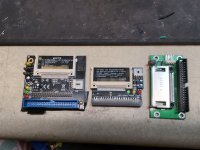
What does your CF adapter look like?


How do you know? Two different zero keys for Netbooting and Drive booting.
That's not all correct. The difference is there exist a Zero Key for Naomi dimm/netdimm and a Zero Key for Chihiro/Triforce Type 3 netdimm
 
I've always used two different keys for Netbooting and CF card loading:

 
What does your CF adapter look like?


How do you know? Two different zero keys for Netbooting and Drive booting.

I have tried three different adapters. See attached photo. Same behavior on all of them. They work on other systems including my Rush 2049 cabs which are also picky about CF cards.

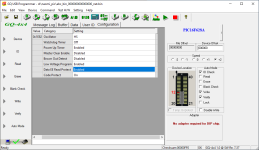
I have tried both zero key files in multiple dimms with no change in behavior.

I've always used two different keys for Netbooting and CF card loading:


This is the exact post I got my files from. I attached a copy of the configuration I push to both chips.
 

Attachments

  • 2025-09-08-00-24-38-450.jpg
    2025-09-08-00-24-38-450.jpg
    158.7 KB · Views: 31
  • programmer_config.png
    programmer_config.png
    41.4 KB · Views: 33
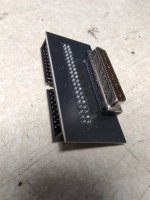
The middle one definitely works. How are you connecting the IDE connector to the SCSI connector?
I am using this adapter PCB that I bought. I traced out the pins to make sure it was manufactured correctly as well.
 

Attachments

  • 2025-09-11-15-17-56-070.jpg
    2025-09-11-15-17-56-070.jpg
    149.1 KB · Views: 17
What CF card did you use? I've had the same issue with the Aliexpress CF cards

1757630838888.png

I use the middle card reader in my setup but I migrated to using Original sandisk CF cards which I found to work 90% of the time. 100% after a few reboots.
 
Here are a list of the CF cards I have tried so far:

40MB SanDisk H923CU-F
48MB PNY VersaCard P-CF048-PA
64MB Cisco/Unigen UGB30SHF0064E4-CSB

Here is a list of the rest I will try:

64MB MemoryPartner.com (no obvious model name on it)
64MB Simple Technology 90000-00756-032 001005-FL1-002
64MB Lexar Media 4X P/N 2175 Rev A
64MB NEC EliteMail VMP 750533 FM64(4) V6.72 Q51531
64MB Cisco CCF064JCHS5MB00H
64MB Pretec P/N CFL064
64MB Memorex 1161TTDE
128MB Delkin eFilm Premium Series CFX128P1G1-DAAA000 1735364
2GB Transcend TS2GCF266 8190VH1024

My PC I am using for this is extremely slow to boot up so getting the sector takes upwards of 10 minutes each time.
 
Here are a list of the CF cards I have tried so far:

40MB SanDisk H923CU-F
48MB PNY VersaCard P-CF048-PA
64MB Cisco/Unigen UGB30SHF0064E4-CSB

Here is a list of the rest I will try:

64MB MemoryPartner.com (no obvious model name on it)
64MB Simple Technology 90000-00756-032 001005-FL1-002
64MB Lexar Media 4X P/N 2175 Rev A
64MB NEC EliteMail VMP 750533 FM64(4) V6.72 Q51531
64MB Cisco CCF064JCHS5MB00H
64MB Pretec P/N CFL064
64MB Memorex 1161TTDE
128MB Delkin eFilm Premium Series CFX128P1G1-DAAA000 1735364
2GB Transcend TS2GCF266 8190VH1024

My PC I am using for this is extremely slow to boot up so getting the sector takes upwards of 10 minutes each time.
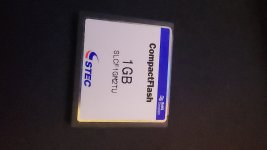
This brand has given me the best compatibility.
 

Attachments

  • 20250906_213541.jpg
    20250906_213541.jpg
    87 KB · Views: 22
Back
Top