NeoSD Pro MVS Question on SD card files

ner38073

Enthusiast
Joined
Aug 1, 2021
Messages
183
Reaction score
110
Location
United States
Hi community. I have a question for those who have a NeoSD Pro flash cart for both the MVS and AES.
I recently purchased the MVS flash cart from Terraonion. I already had the AES NeoSD Pro flash cart. My question is if the same SD card will be playable in the MVS flash cart. Has anyone tried this? So my AES NeoSD Pro flash cart works good but then I went ahead and used the same SD card in the MVS flash cart but I get no screen other than a lot of colored squares. Does the MVS sd card need a different set up or file/format? I tried the MVS flash cart through an snk MV1C. Or do you think the MV1C does not support the flash cart? Any insight will help on getting this to work. Thank you.
 
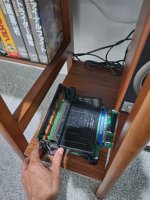
Which board of mvs you have ? On top loader the mvs cart goes in backward. Read the sticker on cart. I learned this after wasting an hour on it.
 
Oh, I had a feeling and this is my first time hooking an mv1c. Photo of the mv1c attached. So do you think to try it backwards? I don't want to try before someone confirming from my photo attached. Let me know please.
 

Attachments

  • 20260826_142753.jpg
    20260826_142753.jpg
    171.6 KB · Views: 19
The arrow on the cartridge is on the backside of the case so that should confirm you that it goes backward. Give it a try, you ll be ok, you have inserted it the wrong way many times already :)
 
The arrow on the cartridge is on the backside of the case so that should confirm you that it goes backward. Give it a try, you ll be ok, you have inserted it the wrong way many times already :)
Thanks a lot. It does go backwards. It worked. However, it does not read the SD card. This is for the NeoSD Pro MVS flash cart. I am using the SD card from the AES flash cart and that one works well on the Neo Geo AES. Do you know if the MVS flash cart has a different SD set up? The cartridge goes directly to play the preloaded game StoneAgeGamer put in the cart: Vengeance Hunters. But it does not read the SD card.
 
I had the same issue but I do not remember how I resolved it, may be the SD card was setup incorrectly, I do not remember. Are your games *.neo format and on root of SD card ?
 
I had the same issue but I do not remember how I resolved it, may be the SD card was setup incorrectly, I do not remember. Are your games *.neo format and on root of SD card ?
Yes, all are .neo files and in the root of SD card. What I did was just use the sd card from my AES flash cart, which is functional on the AES but when used on the MVS flash cart, it does not read it. I also prepared a new sd card, formatted it FAT32 and dropped all the files from the aes sd card but same thing, it won't read it. The MVS NeoSD Pro cart is new and just got it back in July. I emailed them today asking for help, if the MVS cart is the issue. But you said you had the same issue.
 
see if you have lastgame.pro in the SD card, if you have delete it and then try. Cart is probably ok, I had same issues setting this up. Also their customer service is absolutely garbage, I emailed them as well at that time and never got a response.
 
see if you have lastgame.pro in the SD card, if you have delete it and then try. Cart is probably ok, I had same issues setting this up. Also their customer service is absolutely garbage, I emailed them as well at that time and never got a response.
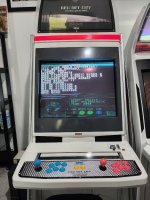
Found the issue. Game was loading directly. So when powering holding 1p start button loads to menu. Here it is. Thanks a lot for your help! Now just have to find a way to copy over the files to a new sd card to avoid swapping the aes with the mvs sd. I tried but did not work.
 

Attachments

  • 20260826_160659.jpg
    20260826_160659.jpg
    217.6 KB · Views: 19
They probably did that so the label doesnt get scratched on side loading MVS boards.
It's more so that it's for the front loading single slot boards (MV1FZ, 1A, etc). For those it's positioned so the label is facing up. But it still bugs me that it's not in a MVS style case...
 
Definitely open the cart up and turn it around inside. It's a little fussy to do, but it's designed to do that.

Just get another SD card, and copy all the game files over from the one to the other. That's what I did. Things like which games are currently loaded don't carry over properly from one cart to the other.
 
Back
Top