New astro city - MS9 horizontal line curved

vesta03

Beginner
Joined
Sep 26, 2024
Messages
34
Reaction score
4
Location
france
Hi team,

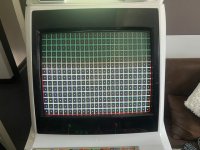
I’d like to ask for your help with something. Some might say I’m a little crazy, but honestly, that’s all I see in certain games. As you can see, the horizontal lines are slightly curved downward. Do you have any idea what might be causing this?
Is there a potentiometer to adjust or the yoke to move?

Thanks in advance for your help!
 

Attachments

  • IMG_8202.jpeg
    IMG_8202.jpeg
    65 KB · Views: 52
It likely needs new caps. Wavy lines are a clear sign the caps are going, and I'm going to assume the monitor chassis hasn't been serviced in a while?
 
Hi everyone,


Thanks for your help

@opt2not: Hi, the MS9 was completely recapped about a month ago, and the problem was already there before that.

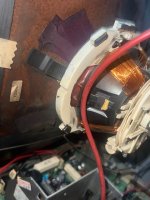
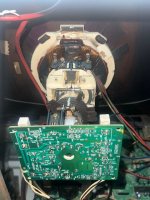
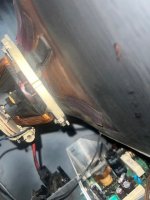
@nem: OK, apparently, when I push the below part of the yoke toward the screen, the curved horizontal lines are more pronounced in that area... I’ve also noticed an issue with image clarity; is that also due to the sagging?

does it looks well installed on the photos ?
 

Attachments

  • IMG_8214.jpeg
    IMG_8214.jpeg
    65.3 KB · Views: 21
  • IMG_8208.jpeg
    IMG_8208.jpeg
    71.7 KB · Views: 24
  • IMG_8209.jpeg
    IMG_8209.jpeg
    53.9 KB · Views: 22
For proper adjustment of the yoke you would have to undo the clamp at the base of the yoke and break off the glue between the yoke and the rubber wedges. Since the monitor is currently installed inside the cabinet, I would not attempt doing this.

For clarity, have you adjusted the focus pot on the flyback? It's the top one of the two pots.
 
Thanks! I'll ask a friend for help taking the screen out and fixing it outside. So, do I need to completely remove the rubber spacers (there are two in total) or just cut the glue to free the yoke? I noticed there are also some magnetic strips glued on; should I remove those too? (As you can see, the convergence isn't great...) Regarding the focus, yes, it's been adjusted, but it's a yellowish color issue, as if a degaussing is needed. The degaussing doesn't change anything, but when I pass a magnet over a small yellow area, the color returns to normal.
 
Once the clamp is freed, you can just rotate the yoke to break of the glue. I would not remove the magnetic strips. If you remove them, you will likely have to put in new ones.

For the record, I think your convergence isn't bad. You can certainly make it way worse, so tread carefully. Look up videos on Youtube on how to do monitor convergence and take a side picture of the yoke and the yoke rings so you can put them back in their original positions if needed.

As for the discolored spot, it could be that not enough current is passing through the degauss coil to completely demagnetize the screen. That's a chassis issue. You could try an external degaussing wand instead.
 
Back
Top