
[PROJECT REQUEST] Fighting Vipers Extended Character Select Fix

KikkerFrog

Student
Joined
Aug 18, 2026
Messages
44
Reaction score
17
Location
Uncle Warren's Pig Farm
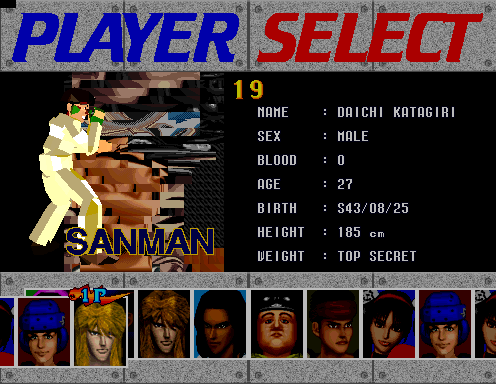
As some of you might know, there is a modified FV ROM out there that unlocks Mahler, Big Mahler, Sonic & Tails and the developers of the game as playable characters, but choosing the developer character will crash the game because it doesn't actually have any intro animations assigned to it. Would one of you be able to either:
1. Remove the developer character from the character select screen so only Mahler, Big Mahler and Sonic & Tails remain or 2. Assign the developer character a proper start up animation? I want to flash this ROM onto an actual Model 2B board, but I also don't want to have to unplug the arcade every single time someone decides to try and play as the developer character.
1791419330378.png


Thank you kindly in advance to anyone that's willing to take a crack at this for me. Feel free to message me for the modified files in question. :thumbup:
 
Last edited:
1791942300019.png


You need someone who knows intel 80960 risc, and the only person I can think of is @biggestsonicfan.

That said, if you want to send me the files I could take a look at what has changed. Even though I don't know risc I could boot it up in mame and use the changed values as a starting point and go from there. What you're asking for isn't that much work, at its simplest solution, so depending on how the data is structured I might be able to figure it out anyway and remove the problematic character from the select screen.
 
1791942300019.png


You need someone who knows intel 80960 risc, and the only person I can think of is @biggestsonicfan.

That said, if you want to send me the files I could take a look at what has changed. Even though I don't know risc I could boot it up in mame and use the changed values as a starting point and go from there. What you're asking for isn't that much work, at its simplest solution, so depending on how the data is structured I might be able to figure it out anyway and remove the problematic character from the select screen.
PM sent
 
Ok thankfully the edits are just to a data table, and I never had to touch the RISC program code.
The data from epr-18610d.7 and epr-18611d.8 look word(?)swapped and concatenated together. At position 12950 you'll see this:

Code:
offset 0x12950 in each file
epr-18610d.7: 32 30 01 04 07 00 08 09 00 00 00 00 00 00
epr-18611d.8: 00 00 06 03 02 05 0B 0A 00 00 00 00 00 00

The important bit is this set of data that just looks to be an incrementing IDs (00 01 02 03 04 05 06....), scrambled a bit.
epr-18610d.7: 01 04 07 00 08 09
epr-18611d.8: 06 03 02 05 0B 0A

Those are character references, I think. "0B" seems to be the dev character, so it needs to be removed. You only need to edit epr-18611d.8. I used HxD to make the edit. CTRL+G pops up a window so you can go to a specific offset, then type in 12956 and hit enter. Change "0B 0A" to "0A 00"

1791983491769.png


and it will remove the dev and display BM next to Sonic.

1791983456787.png


For what it's worth, the dev character (this one?) did not crash anything in MAME so I'm not sure why it doesn't work on real hardware.

1791983887092.png
 
Back
Top