QD-OLED (4k\240hz) install into Vewlix\Chewlix

grendelrt

Enthusiast
Joined
Jul 21, 2015
Messages
150
Reaction score
144
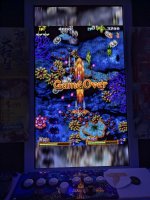
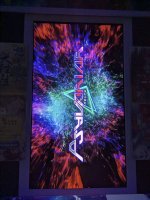
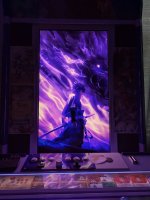
Got my Gigabyte FO32U2 (P version has DP2.1) last night and installed into my Chewlix. I had a LG 850 series IPS in the cabinet prior which was a really nice monitor for viewing angles and color but constrast was 1000:1 with only 165hz (only 120hz as a multiple). I have another Vewlix coming and needed a monitor for it so I decided to move the IPS display to the new cabinet and install an OLED in my current cabinet for an upgrade. Install was pretty straight forward and the results are really nice. I am still configuring stuff, but the difference has been pretty noticeable already, the extra contrast makes everything pop, 4k resolution adds more room for shaders to do their thing, and the non existent pixel response time looks very nice. Next steps is to get CRT Beam Simulator as it matures into games for 240hz support on 60hz which is 75% reduction in motion blur. I do not have a real Vewlix yet, but I know its slightly different in the mounting area, but I can't see it being too much different, I can update once I get my Diamond Blue later this year. Edit: diamond blue method a couple posts below.

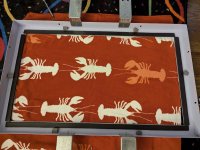
I previously installed some rubber gasket around the inside of the frame to prevent the monitor from hitting metal, also acts as gap reducer.
PXL_20250816_154016638.jpg
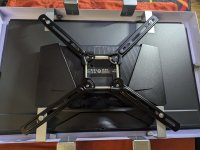
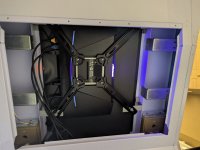
Printed a 15MM VESA spacer to raise the connection point for the arms. I had to bend the bottom silver brackets slighly up by hand to clear the back jut out. I cut my M4 mounting screws with a dremel to get the right size cause I didn't have anything perfect on hand. I think 25MM would have probably worked.
PXL_20250816_201458460.jpg
PXL_20250817_002213458.jpg
Monitor (https://www.rtings.com/monitor/reviews/gigabyte/aorus-fo32u2p)
VESA Spacer (https://www.thingiverse.com/thing:4051778)
VESA Arms (https://www.amazon.com/dp/B07LB4R7GM?ref=ppx_yo2ov_dt_b_fed_asin_title)
PXL_20250817_140901839.jpgPXL_20250817_141259774.jpgPXL_20250817_141317691.MP.jpgPXL_20250817_141322385.MP.jpgPXL_20250817_142745219.jpgPXL_20250817_150615015.jpgPXL_20250817_151702163.jpg
 
Last edited:
Nice work! Any updates on when you are getting that Diamond Blue? I am getting one soon as well & would love to hear any tips you got on putting a 4k monitor into it.
 
Nice work! Any updates on when you are getting that Diamond Blue? I am getting one soon as well & would love to hear any tips you got on putting a 4k monitor into it.
It is supposed to ship at the beginning of November from Japan, so prob not until late December to get to me. I have researched more on the mount, I will probably be using a combination of a monitor mount and 3D printed parts. Or I may cave and get the hadouken mount. Chewlix is way easier to create a custom solution for vs a real vewlix. Hadouken may not work with OLED though, they are typically deeper than LCD.
 
It is supposed to ship at the beginning of November from Japan, so prob not until late December to get to me. I have researched more on the mount, I will probably be using a combination of a monitor mount and 3D printed parts. Or I may cave and get the hadouken mount. Chewlix is way easier to create a custom solution for vs a real vewlix. Hadouken may not work with OLED though, they are typically deeper than LCD.
It really is a buyer’s market right now. So many great cabs that were commanding top dollar at the beginning of the year have really come down in price drastically. So you are smart to buy right now. I still can’t believe that I got an Aero City for a grand just last month.
 
Got my Gigabyte FO32U2 (P version has DP2.1) last night and installed into my Chewlix. I had a LG 850 series IPS in the cabinet prior which was a really nice monitor for viewing angles and color but constrast was 1000:1 with only 165hz (only 120hz as a multiple). I have another Vewlix coming and needed a monitor for it so I decided to move the IPS display to the new cabinet and install an OLED in my current cabinet for an upgrade. Install was pretty straight forward and the results are really nice. I am still configuring stuff, but the difference has been pretty noticeable already, the extra contrast makes everything pop, 4k resolution adds more room for shaders to do their thing, and the non existent pixel response time looks very nice. Next steps is to get CRT Beam Simulator as it matures into games for 240hz support on 60hz which is 75% reduction in motion blur. I do not have a real Vewlix yet, but I know its slightly different in the mounting area, but I can't see it being too much different, I can update once I get my Diamond Blue later this year.

I previously installed some rubber gasket around the inside of the frame to prevent the monitor from hitting metal, also acts as gap reducer.
PXL_20250816_154016638.jpg
Printed a 15MM VESA spacer to raise the connection point for the arms. I had to bend the bottom silver brackets slighly up by hand to clear the back jut out. I cut my M4 mounting screws with a dremel to get the right size cause I didn't have anything perfect on hand. I think 25MM would have probably worked.
PXL_20250816_201458460.jpg
PXL_20250817_002213458.jpg
Monitor (https://www.rtings.com/monitor/reviews/gigabyte/aorus-fo32u2p)
VESA Spacer (https://www.thingiverse.com/thing:4051778)
VESA Arms (https://www.amazon.com/dp/B07LB4R7GM?ref=ppx_yo2ov_dt_b_fed_asin_title)
PXL_20250817_140901839.jpgPXL_20250817_141259774.jpgPXL_20250817_141317691.MP.jpgPXL_20250817_141322385.MP.jpgPXL_20250817_142745219.jpgPXL_20250817_150615015.jpgPXL_20250817_151702163.jpg
Hi, great upgrate!
I am thinking to upgrade my LG UltraGear with an OLED. I wonder if your model has a screen control software accessible from windows and not just from the stick. Can you do the Pixel Care of the monitor from Windows by using the Gigabyte software? Also, does the monitor power on automatically once the power switch is ON? Thanks

There is in promotion the AOC Agon Pro Oled, but unfortunately, from what I can see online, you cannot do the Pixel Care from the G-menu software and you can do that only by using the stick from the back which wouldn't be possible once I install the monitor on the cab...
 
Hi, great upgrate!
I am thinking to upgrade my LG UltraGear with an OLED. I wonder if your model has a screen control software accessible from windows and not just from the stick. Can you do the Pixel Care of the monitor from Windows by using the Gigabyte software? Also, does the monitor power on automatically once the power switch is ON? Thanks

There is in promotion the AOC Agon Pro Oled, but unfortunately, from what I can see online, you cannot do the Pixel Care from the G-menu software and you can do that only by using the stick from the back which wouldn't be possible once I install the monitor on the cab...
You can access basic settings like brightness, color, contrast type things from the software on the PC. You cant access the care stuff, but i have mine all set based on time, so it runs on its own.
 
Great job!
I put a 32" 1440p screen into my Vewlix (thanks to FrancoB's kit) but man, many shmup\beu don't go higher than 1080p...
 
Great job!
I put a 32" 1440p screen into my Vewlix (thanks to FrancoB's kit) but man, many shmup\beu don't go higher than 1080p...
That's one place 4K OLED comes in handy is its an exact 4x integer scale of 1080P for games that are native, so the display will typically scale it pretty nice. For emulation with CRT Geom or similar shaders it just gives a little more room to do the shaders, but 1440p still looked great. I loved my 1440P IPS screen as well, its currently in my Diamond Blue in normal horizontal mode. 4K OLED is just a nice step up if you are looking to upgrade, the color and contrast look more CRT in nature.
 
Yes, I'm keeping 1440p for now because it's 2x720p\6x240p, which is still very versatile (PS360; PS4 and PC Games at 720p).
 
Back
Top