

A little something i made. This tool will ID your Lindbergh keychips, and also it will backup a file which has a bunch of info in it that you can send to me and i'll get it added to the database so we can try to preserve all the info possible on keychips. IT DOES NOT GENERATE A PIC FILE !!! THE FILE GENERATED IS JUST TO SEND TO ME!!! DO NOT TRY TO WRITE TO A PIC!
IT WILL NOT DUMP THE KEYS. It will grab just about everything else though, but you cant grab keys with this tool. PLEASE PLEASE PLEASE send the files it generates to me, i will catalog all the info about the keychip and then update the list for everyone. Or if you just want to submit something privately, that's ok as well, but you will need to tell me you don't want it shared. I would prefer to share all submissions though. You can email them to me on [email protected]. Please don't post the files here, just email them to me OR dm me. Just to keep mods happy.
TOOL IS HERE
https://mega.nz/file/SJYmkSZT#Xnpho3QjhA2wKkMJ2thLYAEvtf84rG41zYWR3ZqbfDI
For example if you have a whole bunch of keychips floating around and you don't know what games they are, this tool will ID them for you, and you should also send to me for cataloging.
HOW TO USE IT: Download the zip file, extract it and there is an img file in the zip. Write that img file to a CF card 128MB minimum and boot your lindbergh from it.
If you get an error about the IDE drive missing, just press CTRL+ALT+S then escape to move past that. It does not need an IDE drive connected. Read the Readme with the tool it has all the steps. If you get stuck you can dm me and i'll try to help.
1. Write the img file to a CF card. It can be 128GB or larger. You can use dd or another tool in windows.
2. Get a usb stick and format it as fat32 with rufus. You need to use rufus because windows fat32 formatting does not work properly on the old linux kernel this tool uses. You MUST use Rufus to format your stick.
3. Insert your rufus fat32 usb stick into one of your sega lindbergh usb ports (you will need to remove the micro usb cover, 2 screws)
4. Boot your sega linbergh with the usb stick and CF card inserted. REMEMBER TO HAVE THE KEYCHIP YOU WANT TO IDENTIFY/DOCUMENT CONNECTED AS WELL!
5. If you get an error message about IDE drive not found, press CTRL+ALT+S and then ESC to move past it.
5. Wait for the boot message to say you are done.
6. Power down, remove the usb stick insert it into a pc and copy the bin file and submit for cataloging.
If you cant see the information on the screen, connect a keyboard before booting and use the following shortcut to scroll up the info on screen SHIFT+ PAGE UP/PAGE DOWN. Sometimes the game code information is further up the screen and you can't see it. Use that keyboard shortcut to jump up a page and see it.
You can save multiple key chip files to one USB stick, there's logic in there for it, sub folders per chip, if file already exists it'll create new ones
It will boot to this
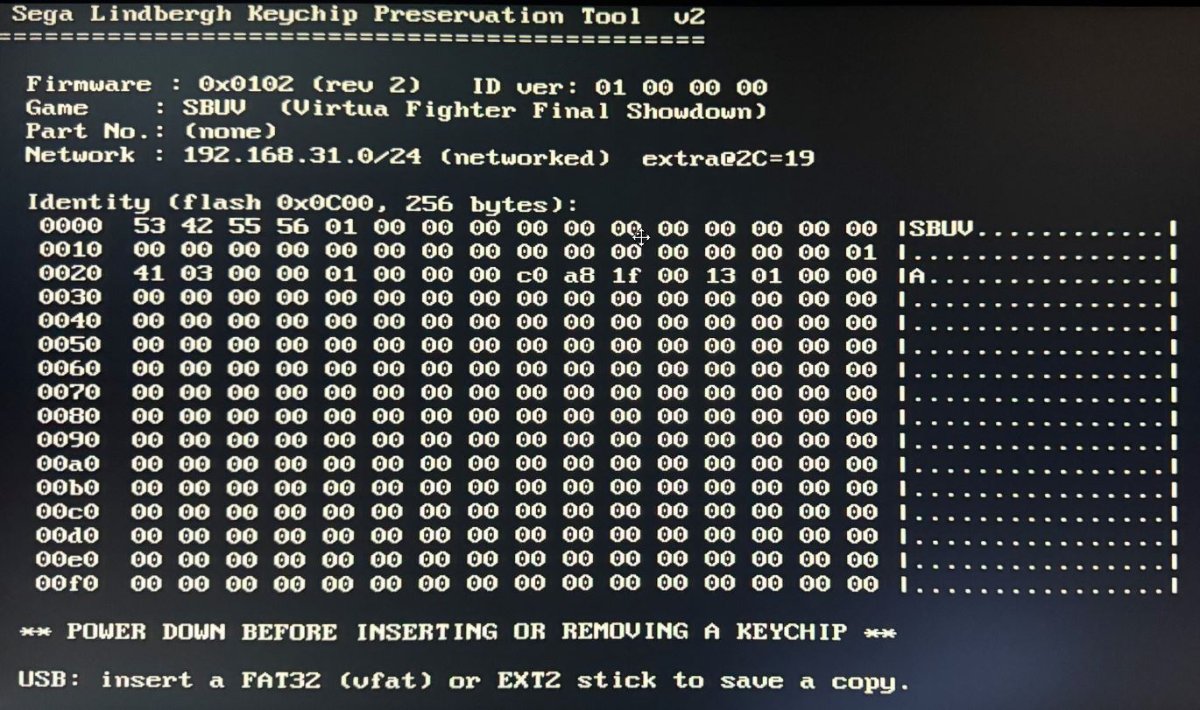
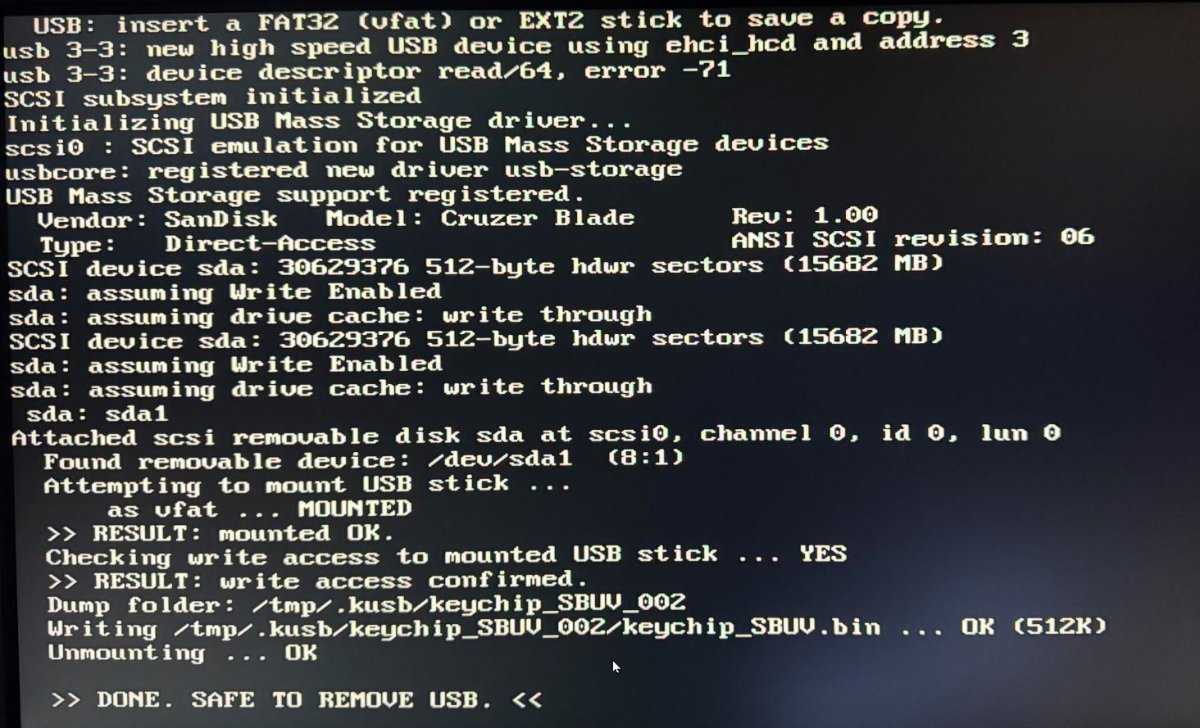
At this point you can insert a FAT32 usb stick in and it will auto write the keychip info file to that so you can easily email to me. Below is what it will look like when you insert a USB stick. You need to use RUFUS to format the stick, windows fat32 formatting doesn't work on the old linux kernel. Instructions and rufus included.
IT WILL NOT DUMP THE KEYS. It will grab just about everything else though, but you cant grab keys with this tool. PLEASE PLEASE PLEASE send the files it generates to me, i will catalog all the info about the keychip and then update the list for everyone. Or if you just want to submit something privately, that's ok as well, but you will need to tell me you don't want it shared. I would prefer to share all submissions though. You can email them to me on [email protected]. Please don't post the files here, just email them to me OR dm me. Just to keep mods happy.
TOOL IS HERE
https://mega.nz/file/SJYmkSZT#Xnpho3QjhA2wKkMJ2thLYAEvtf84rG41zYWR3ZqbfDI
For example if you have a whole bunch of keychips floating around and you don't know what games they are, this tool will ID them for you, and you should also send to me for cataloging.
HOW TO USE IT: Download the zip file, extract it and there is an img file in the zip. Write that img file to a CF card 128MB minimum and boot your lindbergh from it.
If you get an error about the IDE drive missing, just press CTRL+ALT+S then escape to move past that. It does not need an IDE drive connected. Read the Readme with the tool it has all the steps. If you get stuck you can dm me and i'll try to help.
1. Write the img file to a CF card. It can be 128GB or larger. You can use dd or another tool in windows.
2. Get a usb stick and format it as fat32 with rufus. You need to use rufus because windows fat32 formatting does not work properly on the old linux kernel this tool uses. You MUST use Rufus to format your stick.
3. Insert your rufus fat32 usb stick into one of your sega lindbergh usb ports (you will need to remove the micro usb cover, 2 screws)
4. Boot your sega linbergh with the usb stick and CF card inserted. REMEMBER TO HAVE THE KEYCHIP YOU WANT TO IDENTIFY/DOCUMENT CONNECTED AS WELL!
5. If you get an error message about IDE drive not found, press CTRL+ALT+S and then ESC to move past it.
5. Wait for the boot message to say you are done.
6. Power down, remove the usb stick insert it into a pc and copy the bin file and submit for cataloging.
If you cant see the information on the screen, connect a keyboard before booting and use the following shortcut to scroll up the info on screen SHIFT+ PAGE UP/PAGE DOWN. Sometimes the game code information is further up the screen and you can't see it. Use that keyboard shortcut to jump up a page and see it.
You can save multiple key chip files to one USB stick, there's logic in there for it, sub folders per chip, if file already exists it'll create new ones
It will boot to this
At this point you can insert a FAT32 usb stick in and it will auto write the keychip info file to that so you can easily email to me. Below is what it will look like when you insert a USB stick. You need to use RUFUS to format the stick, windows fat32 formatting doesn't work on the old linux kernel. Instructions and rufus included.