Sega New Versus City Monitor/Wiring issue.

YerpS3s

Enthusiast
Joined
Jan 11, 2022
Messages
156
Reaction score
96
Location
Dearborn Michigan.
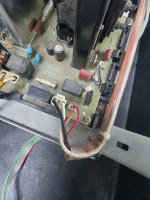
I purchased a New versus city that has an odd issue. When running a monitor in either side its fine. But if both sides have a monitor plugged in and installed, it causes a short on the fly back of any monitor i plug into player 2. It only happens when both monitors are plugged in. I have reason to believe its a wiring issue of some sort, ive tried moving swapping monitor power cables, recapping the PSU.. im not a big specialist in wiring so im not sure if theres maybe a wiring issue somewhere. its all stock.

Ive tried 2930 monitor, 2931, 2933, and even a 2932 using a NAC Splitfire and a GBS-c upscaling to the 2932. All the same Flyback buzzes and i smell burnt smoke. Magic smoke aka.

Heres some videos of the issue, i apologize my phones mic makes me sound so loud LOL.

View: https://youtube.com/shorts/X9_x7fCDz7c


View: https://youtube.com/shorts/GQuDDtQAYms
 
Just based on your two videos, you have one monitor inside that is obviously working, and when you plug in the second monitor, the one on the table, the second monitor buzzes. I would assume the second monitor is therefore shorted.

Or are you saying that the second monitor works if it's plugged in alone? I would be surprised if it did.
 
Just based on your two videos, you have one monitor inside that is obviously working, and when you plug in the second monitor, the one on the table, the second monitor buzzes. I would assume the second monitor is therefore shorted.

Or are you saying that the second monitor works if it's plugged in alone? I would be surprised if it did.
SNAP.
I think we both tried to say the same thing at the same time.
 
So you're saying the monitor on the table functions just fine if plugged in alone?

Really?

The AC for the monitor is split from the PSU. There are no active components in between the cabinet power cable and the monitor power cables. Live and neutral can be swapped with these chassis, so it doesn't matter if one side is flipped for whatever reason.

If both monitor power connectors are proven to work on each side with a single monitor, there is zero reason why they wouldn't work at the same time with two monitors. Unless one monitor is toast, which I still think the case is. Flybacks don't smoke unless there's an actual issue with the chassis.

Before diagnosing this further, can you take a video of the monitor on the table working?
 
Last edited:
So you're saying the monitor on the table functions just fine if plugged in alone?

Really?

The AC for the monitor is split from the PSU. There are no active components in between the cabinet power cable and the monitor power cables. Live and neutral can be swapped with these chassis, so it doesn't matter if one side is flipped for whatever reason.

If both monitor power connectors are proven to work on each side with a single monitor, there is zero reason why they wouldn't work at the same time with two monitors. Unless one monitor is toast, which I still think the case is. Flybacks don't smoke unless there's an actual issue with the chassis.

Before diagnosing this further, can you take a video of the monitor on the table working?
Yes its a little confusing. The only other thing I could even think might be happening, is something with sync termination (maybe because of a dual signal instrad of a split one, or maybe a termination mismatch).
 
So you're saying the monitor on the table functions just fine if plugged in alone?

Really?

The AC for the monitor is split from the PSU. There are no active components in between the cabinet power cable and the monitor power cables. Live and neutral can be swapped with these chassis, so it doesn't matter if one side is flipped for whatever reason.

If both monitor power connectors are proven to work on each side with a single monitor, there is zero reason why they wouldn't work at the same time with two monitors. Unless one monitor is toast, which I still think the case is. Flybacks don't smoke unless there's an actual issue with the chassis.

Before diagnosing this further, can you take a video of the monitor on the table working?
Sure I have a test bench made from a astro city wiring harness and has nanao power and rgb connector. Ill test both outside again
 
Sure I have a test bench made from a astro city wiring harness and has nanao power and rgb connector. Ill test both outside again

I don't understand. Why aren't you testing the monitor on the left side (video left) on the Versus? I thought that was working?
 
Okay, so both monitors work fine when running alone, but when theyre both running at the same time. I get this shortage issue. So player 1 monitor alone in player 2 wiring harness works fine and vice versa, when BOTH are inside the cab at the same time drawing power I get a short.
I don't understand. Why aren't you testing the monitor on the left side (video left) on the Versus? I thought that was working?
 
87500.jpg
 

Attachments

  • 20261003_112346.jpg
    20261003_112346.jpg
    262.9 KB · Views: 10
Let's remove everything except the AC lines from the monitor harness.

Disconnect the 6-pin connector that has video, and depin demag from the 4-pin connector. You can depin the AMP UP connector with a paperclip.

versus_city_monitor_connections.jpg


View: https://www.youtube.com/shorts/5O529Vf0oaM

The AC wires are pink (AC live) and light blue (AC neutral), positions 1 and 2. Demag is 3 and 4, likely brown and black. Check that you have continuity on both 1P and 2P harness ends, pink with pink, blue with blue.

Connect both monitors and turn it on. Both monitors should turn on normally, you will feel static on the face of the tube and you can get a raster to show up if you turn up G2 voltage on the flybacks.
 
Sorry, I deleted my earlier, confusing post. Posted it above, with more succinct instructions.

However, you already noticed a difference:

Youre right, its not the same. Should I swap the ms2930 power with one thats pinned the same as the others?

A-ha. It shouldn't matter, but maybe it does! Yes, try pinning both the same.
 
Back
Top