
System 256 I/O Error

ZODIAK

Student
Joined
Feb 27, 2026
Messages
67
Reaction score
33
Location
California, United States
Hello everyone!

I recently got a System 256 to play some Tekken on my cabinet, however I've ran into an issue.

When I first powered it on, I was able to boot successfully into the game and played through a full run of the arcade mode (beating Jinpachi), seeing the credits. However after trying to do a two player match to see if both players would register input, the game suddenly stopped reading my inputs. I turned off the cab and power cycled, and was met with the error attached. Since then I have not been able to play the game again, I am met with that screen after every power cycle.

I have verified it is not my TD/IO, as I am able to play Marvel 2 on my Naomi just fine on it. I also tried using my JVS to USB which I've used in the past on my TTX2 and Ringedge, this also did not allow me to use any inputs. Curious if anyone has ran into this issue in the past and if there is any resolution, but my hunch is that the JVS I/O board internally has went out. It doesn't look like a separate card though and seems to be attached directly to the motherboard, would I need to get a whole new 256 motherboard?

Let me know what you think, thanks in advance!
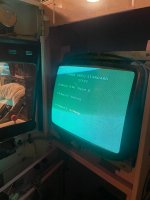
 

Attachments

  • system256 error.jpg
    system256 error.jpg
    178.2 KB · Views: 23
Hello everyone!

I recently got a System 256 to play some Tekken on my cabinet, however I've ran into an issue.

When I first powered it on, I was able to boot successfully into the game and played through a full run of the arcade mode (beating Jinpachi), seeing the credits. However after trying to do a two player match to see if both players would register input, the game suddenly stopped reading my inputs. I turned off the cab and power cycled, and was met with the error attached. Since then I have not been able to play the game again, I am met with that screen after every power cycle.

I have verified it is not my TD/IO, as I am able to play Marvel 2 on my Naomi just fine on it. I also tried using my JVS to USB which I've used in the past on my TTX2 and Ringedge, this also did not allow me to use any inputs. Curious if anyone has ran into this issue in the past and if there is any resolution, but my hunch is that the JVS I/O board internally has went out. It doesn't look like a separate card though and seems to be attached directly to the motherboard, would I need to get a whole new 256 motherboard?

Let me know what you think, thanks in advance!
Hi! :)

a faulty JVS cable "USB"
a power supply issue (+5V )


One important thing to check is the +5V power supply. The Namco System 256 is quite power hungry, drawing around 7A on the +5V rail. A power supply that works fine with other arcade boards may not be sufficient for a System 256 if it cannot provide enough current.

A voltage drop on the +5V rail under load can cause various issues, including JVS detection problems such as "I/O Board 1: Nothing" and "I/O Board 2: Nothing".

It is recommended to measure the +5V directly at the board while the System 256 is running, because a power supply can show 5V with no load but drop when it needs to deliver the required 7A.
 
I did verify that the JVS cable is working, as I tested it with my Naomi right after to make sure it wasn't that. The only thing I can think of is that its an ATX power issue, I'm currently using a modern Corsair PSU rated at 750W, 20A on the +5V. I'm going to try using a Dell PSU as the seller recommended, rated at 22A on the +5V, but if that doesn't work then what power supply is recommended?
 
I did verify that the JVS cable is working, as I tested it with my Naomi right after to make sure it wasn't that. The only thing I can think of is that its an ATX power issue, I'm currently using a modern Corsair PSU rated at 750W, 20A on the +5V. I'm going to try using a Dell PSU as the seller recommended, rated at 22A on the +5V, but if that doesn't work then what power supply is recommended?
A genuine arcade cabinet power supply with adjustable +5V output.
 
Or you could just measure the +5V rail, so you know if it's a PSU issue or not.
It sounds like from his description that I would not measure it from the ATX connector as i need to test it when its under load, would i have to open the PSU to directly check the voltages while its plugged in? I dont see any other way to check but maybe I’m getting confused.
 
A genuine arcade cabinet power supply with adjustable +5V output.
Do you have any examples? Im going to assume a meanwell could work? Something similar to whats used for superguns? I do have one but i dont have any of the associated cables to hook it up to the 256, I assume I need to make a cable for it? I was told this would work with ATX power supplies like the Naomi, was that incorrect advice?
 
I attempted to test the PSU, however when I try the paperclip method the PSU fan spins up for a second then shuts off, and the readings I get on the multimeter are no voltage. Interestingly, when I plug this into the 256 the same thing happens, I'll see the PSU fan spin up then stop. The 256 turns on, but now I noticed the disc drive isn't turning on anymore either. I'm pretty sure I got a bad PSU, I'm going to return it, hoping the Dell PSU works better.
Thanks for the help, hope I can find a better PSU with a more consistent 5V rail.
 
Do you have any examples? Im going to assume a meanwell could work? Something similar to whats used for superguns? I do have one but i dont have any of the associated cables to hook it up to the 256, I assume I need to make a cable for it? I was told this would work with ATX power supplies like the Naomi, was that incorrect advice?
Hi! :)

Honestly, there is a lot of bullshit and misinformation circulating in the arcade community ,"It's like putting Noctua fans everywhere,
for every application, just because they're trendy and silent, at the expense of performance. Noctua isn't what it used to be 20 years ago."

When it comes to powering these systems, people tend to associate arcade hardware with PC hardware simply because they use similar connectors or components.


But the System 256 is not simply a PC. It is an arcade platform with its own specific requirements, particularly when it comes to the power supply, wiring, and JVS. Just because a connector looks like a PC connector, or because an ATX power supply can make the system work, doesn't automatically mean that the setup is correct or reliable.

If ATX power supplies were really that magical for arcade systems, AxunWorks wouldn't go through the trouble of designing their Superguns with regulated power supplies just for fun.


The problem with this way of thinking is that it isn't necessarily stable over time.
A system can work perfectly for a few hours and then start having problems, or it can work for several days before suddenly becoming unreliable.
The fact that "it works" at a given moment doesn't prove that the power supply or wiring is actually suitable.


In the arcade world, there are some basic rules that need to be respected: the correct voltage, sufficient current, a power supply that remains stable under load, the correct wiring, and especially the correct pinout.
You also need to measure the voltages directly at the board while the system is running, rather than simply checking what the power supply shows with no load.


For the System 256, the +5V rail is particularly important, as the system can draw around 7A on this rail.
You therefore need a regulated power supply with a potentiometer for adjusting the voltage, capable of supplying that current while maintaining a genuinely stable voltage during operation.


A properly sized Mean Well can be a good solution, but that doesn't change the basic rule: the +5V rail should be adjustable with a potentiometer, so that you can precisely set the voltage for the System 256.


I would recommend using a Sega Lindbergh arcade cabinet power supply, and then doing a cap kit on it afterwards.
That will give you plenty of headroom and a safe setup for different types of JAMMA PCBs and JVS systems released before the JVS systems based on PC architecture.


The latter systems generally have their own built-in standalone power supply, such as a Flex ATX.


So, before concluding that the System 256 motherboard is dead, I would definitely start by checking the +5V power supply, the voltage directly at the board under load, the wiring, and the pinout.

That's the basic stuff to verify before replacing such an expensive motherboard.;)
 
Last edited:
Back
Top