
Taito Type X3 (TTX3) Round-Up thread

for the group here, i found the issue! when my video card was installed, i didnt reaet my custom resoltions. re entered these and all is good again!
 
Hello new here. I have been looking and asking around about connecting the ttx3 to my monitor and arcade stick. I do not own a cabinet and want to simply connect it to my home ps5 arcade stick. How is this possible? I am very new to this world of PC/Connections/IO, etc. What do I need to connect my ttx3 to my ps5 arcade stick and have it work on the Artax 4.1 image? I think this would be a good place to have that info as this is the round up of this hardware as not all will have a cabinet. Also, if you have any pictures of that connection would be amazing. Thank you.
 
Hello new here. I have been looking and asking around about connecting the ttx3 to my monitor and arcade stick. I do not own a cabinet and want to simply connect it to my home ps5 arcade stick. How is this possible? I am very new to this world of PC/Connections/IO, etc. What do I need to connect my ttx3 to my ps5 arcade stick and have it work on the Artax 4.1 image? I think this would be a good place to have that info as this is the round up of this hardware as not all will have a cabinet. Also, if you have any pictures of that connection would be amazing. Thank you.
connect stick to ttx3 via usb and turn on joy2key on the settings menu. it should reboot and connect.
 
Does anyone know if you can replace the motherboard with a different one other than the taito type x3? Something I can buy on amazon? Broke my motherboard by dropping the cpu in the socket. Thank you.
 
@Luvtorev Not if you are running an original dongle/hdd image.

If you are running the Atrax multi then you can run that on pretty much anything (and certainly something more modern/powerful).
Main constrain will be matching ATX format so it fits the case…
 
You can use fast I/O. Maybe put your image on a SSD. Or maybe it's your monitor that's laggy?
You need to give more information about your setup for people to give you advice.
 
is there any easy way of chaging CPU without removing motherboard
You can easily change the CPU, but only to a compatible one (Socket LGA 1155) . I upgrade to I7-2600 CPU which are perfectly fine and will get you to a solid 60FPS in basically every game with a good GPU upgrade. You simply take off the CPU fan, clean it all up, and swap the CPU out, new thermal paste, plug the fan back in and screw it down. Easy done.
 
@videotronicsuk @brommando

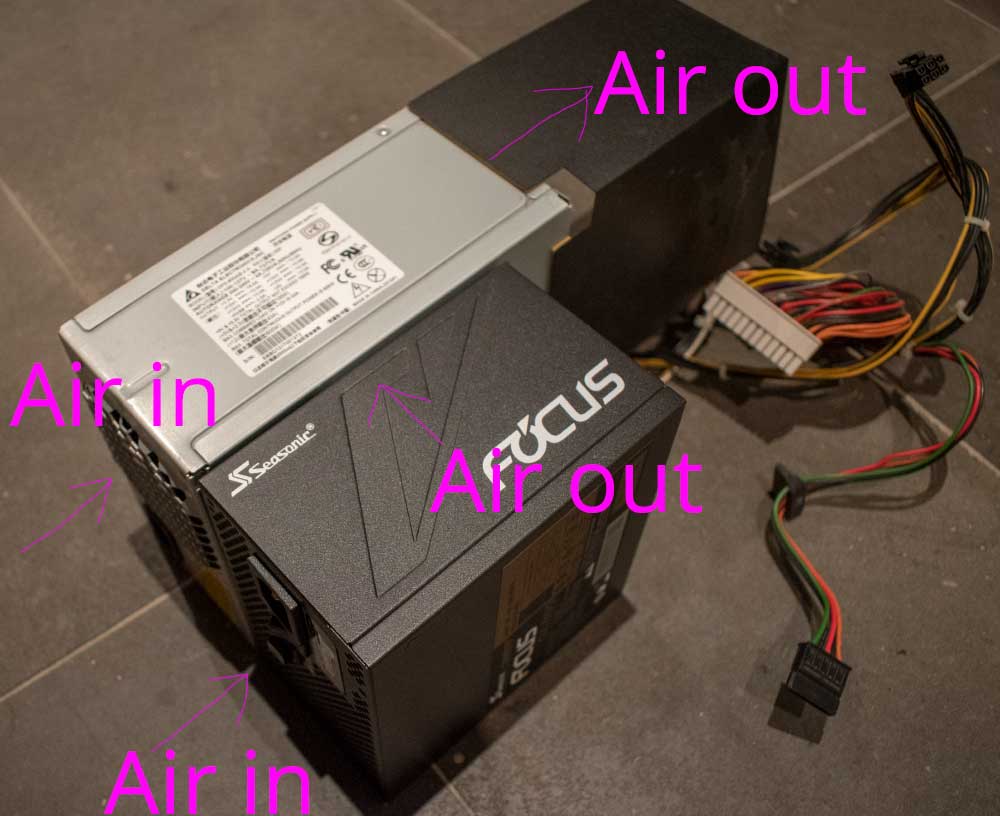
6. Here's the power supply next to an 850w Seasonic ATX power supply from my computer. You can see it's similar fit. BUT.. this is where you will run into problems, the air flows in one end and out the opposite end for the TTX3 PSU. This has vents at the back so the air can escape the case. If you use a PC power supply... there is going to be nowhere for the air to escape, it's going to be blowing into the case. You can wing this if you blow the air into the side of the case where the CPU is, because the exhaust fan at the back should remove the hot air, but just be aware of this. Look at the airflow arrows, you get the idea.
006.jpg

You will have airflow issues with a standard ATX psu... Swapping the fan out may be preferable...
 
Last edited:
Mmhh ?

The Seasonic ATX on the picture shows "Air In" on the back and "Air Out" at the top which is the opposite on standard configuration.
 
This was mostly to illustrate that a Standard ATX PSU works with perpendicular airflow, rather than straight through as with the TTX3.
 
Hi guys,

I have a FASTIO which is working perfectly fine with the TTX3 ARTAX Multi 4.1 image on original TTX3 hardware. I have 2 questions

1. Instead of using the FASTIO, I would like to use my GP2040-CE and upgrade TTX3 to a more powerful system. in game the GP2040-CE works fine after enable the joy2key but I cannot move the cursor in the attract menu. anything Im missing ?
2, for those who tested, how does the input response of the GP2040-CE compares to FASTIO or JVS ?

Thanks !
 
Back
Top