A Freeware Taito TypeX2 Multigame.

Does someone have the dump of Cho Chabudai Gaeshi (the first one ideally, but also cool if it’s the other ones in the series)?

I read the discussion on page 90 regarding it probably being quite impossible to properly emulate it. I’m mainly interested in making sure this is preserved cause sadly it’s not in any of the regular TTX2 archives. Thanks in advance! :)
 
Does someone have the dump of Cho Chabudai Gaeshi (the first one ideally, but also cool if it’s the other ones in the series)?

I read the discussion on page 90 regarding it probably being quite impossible to properly emulate it. I’m mainly interested in making sure this is preserved cause sadly it’s not in any of the regular TTX2 archives. Thanks in advance! :)

Yea I've got it.

If you need it, you can PM me.
 
Running into an issue where even though the dipswitch for 720p is on, games are only rendering in 480p. Any idea on how to fix it? It worked completely fine before.
 
Last edited:
Is DBAC still being hoarded, or is there a chance of making it widely available? Would love to have a single-screen solution (dual is fine too) for this that doesn't require a sole-purpose TX2 and 87 devices in the chain to make it playable.
 
Same issue as per above, my type x2 was in my 31khz cab and everything was ok with good ratio of 4:3.
I try to set up my type x2 in a vewlix and the ratio is bad, seems to be keep in 4:3. I got same issue with a computer screen.

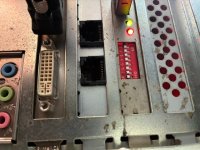
My JVS card dipswitch is not common and I think than my x2 want to boot in 640x480 anyway. I've try to change dips without success.

Here under my jvs card.

Thanks for your support
 

Attachments

  • IMG_0600.jpg
    IMG_0600.jpg
    73.9 KB · Views: 64
I reply to myself after few weeks :
- indeed this kind of JVS card is block to 31khz, I changed all dispwitch without success
- this card was in a Type X2 dedicated to mario coin game.
- if you have this jvs card you're f----- if you want your type x2 in 720p (in vewlix or modern screen)
- I purchase the weird JVS card sells by Yaton : this one with the idea of nothing have to lose (and it's cheap)
- and it's ... ok ! just plug both cables as per former jvs card and you have a great JVS card who allow you to have JVS control and use dip 2 to have 720.

maybe it was known but i didn't find this clear information on this forum or on the web, so, if someone fall here and had the same issue with its type X2 you can follow that ;)
 
hi, I'm experiencing this BSOD on new Multi installations.

20250401_150025-jpg.186763


It only happens with some older SSDs; everything works perfectly with other older SSDs. I have recorded the image several times and I always get that error with those SSDs. With other SSDs it works without problems

Is it because those SSDs are corrupted, or can it be fixed?

thx!!
 
Will USF4 run in 1080p by upgrading hardware? (what hardware?)
Not 1080p, but 720p yes with stock X2 so long as you have the required 1GB RAM.

USF4 has been running in HD (720p) on our stock X2 with 512MB RAM for over a year just fine now.
You'll want to have atleast 1GB of RAM as that is what the game expects.
 
Does any one still have the download from Atrfate for the Nesica Frontend for Niko's Multi? I know this has been brought up before. All the links here and on FrontEnd are dead. Or Niko's image with the front end installed. Thanks.
 
I FINALLY have a Type x2 and got to take Niko's multi for a test drive. Thank you for such awesome work, it's spiffy!

I'm using a SEGA Rev B I/O and I tested it with the stock 512MB of RAM (2x256MB) on a few games to verify things were working before I upgraded to 4GB (2x2GB) but I'm running into some issues. The multi only detects 3GB of RAM and some games won't launch, they try but then loop back to the menu. I re-seated the RAM and also tried it with just 1 2GB stick (it sees 2 in the multi that way too) but same issue. Is the multi supposed to see all 4GB? Do I just need to reimage this SSD? I used the "pre-made" image.

Thanks!
 
If I remember correctly, the displayed RAM limitation is just due to using 32 bit Windows XP. I have 4GB in my TTX2 and it shows the same as you found. No issues with games launching - did you try it with each 2GB stick separately to make sure they both are good individually?
 
Back
Top