
DARKSOFT CPS1 Multi - Support thread

Definitely no spinning on FW for me; the readme on the roll up says it’s the modded version.
Ok, user error. I noticed there are two versions and I was loading the regular one. I just deleted it off my SD card as I will never use it.

So I ran C6&7 to a toggle switch so I can turn them both on or off at the same time. Fun fact: you can change them even if the game is powered. I guess it just checks each cycle to see if they are on.
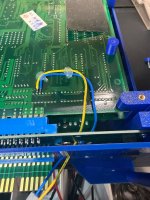
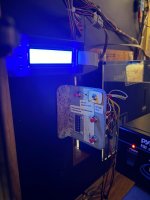
IMG_0059.jpegIMG_0060.jpeg
 
Last edited:
Yo! Sorry for the bother, but I'm worried I mucked something up
The Multi works, but it's very selective about which games do. SF2 is a no go, but SF2HF is fine, Ghouls n Ghosts works but Knights of the Round doesn't display SCR layers (Important cause the game uses those for collision and stuff!)
Basically my question is what could be causing this? Tried 2 C Boards, 90630CA-4 and 92641CA-1 and they're identical, so I can only assume the problem is the Graphics PAL or maybe the SD Card I'm using? Got an Amazon Basics 128gb one, what's the recommended type to use with the Multi? The thing is the games it does work with are perfectly fine so I'm legit confused by what's going on
Any advice would be greatly appreciated
 
Yo! Sorry for the bother, but I'm worried I mucked something up
The Multi works, but it's very selective about which games do. SF2 is a no go, but SF2HF is fine, Ghouls n Ghosts works but Knights of the Round doesn't display SCR layers (Important cause the game uses those for collision and stuff!)
Basically my question is what could be causing this? Tried 2 C Boards, 90630CA-4 and 92641CA-1 and they're identical, so I can only assume the problem is the Graphics PAL or maybe the SD Card I'm using? Got an Amazon Basics 128gb one, what's the recommended type to use with the Multi? The thing is the games it does work with are perfectly fine so I'm legit confused by what's going on
Any advice would be greatly appreciated
Edit: I am wrong so nevermind.
 
Yo! Sorry for the bother, but I'm worried I mucked something up
The Multi works, but it's very selective about which games do. SF2 is a no go, but SF2HF is fine, Ghouls n Ghosts works but Knights of the Round doesn't display SCR layers (Important cause the game uses those for collision and stuff!)
Basically my question is what could be causing this? Tried 2 C Boards, 90630CA-4 and 92641CA-1 and they're identical, so I can only assume the problem is the Graphics PAL or maybe the SD Card I'm using? Got an Amazon Basics 128gb one, what's the recommended type to use with the Multi? The thing is the games it does work with are perfectly fine so I'm legit confused by what's going on
Any advice would be greatly appreciated

Sometimes failing custom can cause issues with games not loading or having issues.

Games use different parts of the motherboard in different ways and having a multi can unearth these problems as you're really putting the A-Board to the test.

Might be the problem, or might not be, just throwing it out there.
 
Hmm, supposing it is a custom, what would the remedy be? Using a CPS-Dash board, 12mhz iirc, can I just swap in customs from other A-Boards to sort it?
 
Tried 2 C Boards, 90630CA-4 and 92641CA-1 and they're identical, so I can only assume the problem is the Graphics PAL or maybe the SD Card I'm using?
I believe that you mean 92641C-1 and 90630C-4. Both should be good if the B-21 is good.

Got an Amazon Basics 128gb one, what's the recommended type to use with the Multi?
Is that a SDHC or SDXC card? Did you copy the games using Windows or Mac? The recommended type is 32GB or less and it MUST be SDHC for it to work.
 
Copied with Windows. Just checked, it was SDXC, that might be the snag, I swear that isn't mentioned anywhere
Does this seem like a good enough replacement?
1776205953640.png
 
Lexar should be good, but Samsung from a trusted source is better. The instructions clearly state that only SDHC are supported.
 
Last edited:
Gotcha, I'll see what I can do, cheers for the suggestion
I don't mean to be rude but it's not obvious at all lol. It isn't mentioned in the vid nor the PDF nor the first page of this or the Official thread. Idk if the instructions are outdated or whatnot but I think that should be mentioned in future
PS: Thank you for the Multi, this thing is godlike, personal problems aside lol
 
Annoyingly, that Lexar card would've cost you around £6 last year, blame AI for that. I usually buy the Sandisk 32 GB cards and they're now tripled in price.

Rather than SDHC vs SDXC, is it just FAT32 vs exFAT, which are the default filesystem/format for their respective standard?
 
It is not possible to hate AI enough lol
Anyway that's the Lexar ordered, fingers crossed that's the fix. In case it is a Custom problem, can ya just swap in ones from other A Boards or are the ones in Dash Boards different in a way I don't know about?
 
Anyway that's the Lexar ordered, fingers crossed that's the fix. In case it is a Custom problem, can ya just swap in ones from other A Boards or are the ones in Dash Boards different in a way I don't know about?
I'm pretty sure that this will fix your problems. Once you get your new microSD, please let us know how it works for you and then we see how to proceed next, based on the symptoms.
 
So good news and bad news
Bad news, SD works the exact same
Good news, I now know why! Somehow BOTH MY C BOARDS have that key writing mod done to them, reckon that's the actual problem. Gonna see a guy about it tomorrow, I'm so sorry for my dumbass blunder. Just to be absolutely CRYSTAL clear, what would a fixed C Board look like? Just so I can give the lad a
solid reference ya know?
My apologies again

1776368423673.png
 
So good news and bad news
Bad news, SD works the exact same
Good news, I now know why! Somehow BOTH MY C BOARDS have that key writing mod done to them, reckon that's the actual problem. Gonna see a guy about it tomorrow, I'm so sorry for my dumbass blunder. Just to be absolutely CRYSTAL clear, what would a fixed C Board look like? Just so I can give the lad a
solid reference ya know?
My apologies again

1776368423673.png

I think you just need to move the end of the black wire at D3 to ground. I used the old battery ground just to the left of the orange filter caps. I had graphics issues and game loading problems a few posts back and it was my c board wiring.
 
Oh that sounds simple enough! Where's ground? Genuinely my eyesight is shite, can't see it 😂
Also quick question, i feel like I'm missing something, if the C Board is responsible for mapping GFX, why would this mod only stop it sometimes? Games like Megaman and Ghouls and Ghosts run fine, what's up with that? 🤔
 
Uh, ok, I fucked up royally somewhere. What part of this is wrong? Have a spare C Board in case this one just bit it but man, this sucks


1776432194869.png
 
Not sure how to link this post for you @Yoshin222

Thanks guys,

EDIT!! Just reseated the c board after taking the pics. And bam we are working
IMG_1257.jpeg


See attached, I’m 99% sure I have it
right. Will blow out the cartridge slot tonight and see if that changes anything.

IMG_1255.jpeg
IMG_1253.jpeg
IMG_1254.jpeg


Can the c board cause such wonky graphics?
 
Back
Top