
You are using an out of date browser. It may not display this or other websites correctly.
You should upgrade or use an alternative browser.
You should upgrade or use an alternative browser.
DARKSOFT CPS2 Champion Multi: Instructions and tips (new Version after 10.2020)
- Thread starter Darksoft
- Start date


msamiullah
Grand Master
I have an unlabeled blue cps2 case with VS conversion roms thats begging for a multi for sometime now 


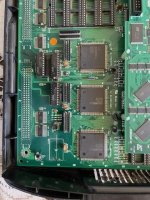
Why does the program rom pcb look like its missing a bunch of pins?
Last edited:
Kit was purchased new from candycabclub the Australian distributor in November 2021. Only got around to fitting it now as I've been searching for compatible A and B boards.
Attachments
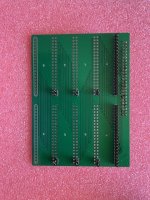
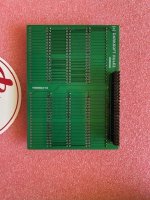
You are missing the entire bottom row of pins. Somehow they didn't get installed.

Hey mate, crazy you been sitting on that kit for over 4 yearsKit was purchased new from candycabclub the Australian distributor in November 2021. Only got around to fitting it now as I've been searching for compatible A and B boards.
 I have projects like that too…
Very sorry about this: we usually check kits for completeness prior to shipping and this one must have escaped not only us, but the quality checks at the multi factory.
Let’s wait to see what @Darksoft says but either way, I will personally get this sorted for you and have you up and running ASAP.
Yeah, been in contact with him, will be sending it todayLooks like @djsheep has no more extra PCBs, can you please send yours to him and he'll send back fixed?
Cool. Glad you’re sorted!

Thanks for your help @djsheepCool. Glad you’re sorted!
For background, the multi was purchased from the store a whopping 4 years ago!Thanks for your help @djsheep
Due to the manufacturing fault, @Darksoft paid for overnight postage of the board back to me, I installed the missing pins, and we posted it overnight back to the customer.
Nice to have the level of support so many years later don't you say?

kernelchagi
Student
Hello. I just installed the multi and it seems to work fine, its flashing the roms properly and booting them. The only problem i have is that i dont have any sound either from the rca or from the jamma. Could be that my A board is faulty but there is no way i can test it and i was not able to test it beforehand. The physical buttons (test and volume up and down) of the A board are not doing anything.
Also i used an spare SD card that i have at home without brand but i dont think that could be the issue no?
Also i used an spare SD card that i have at home without brand but i dont think that could be the issue no?
Last edited:
Common issue with CPS-2, not related to the multi, and thankfully a relatively easy fix.
You can reset the motherboards volume parameters by holding the volume down button and powering up the game. Let go of the button once the game starts and adjust volume as per normal.
If that doesn’t work you probably need to change out the Supercap on your motherboard.
If either of those things don’t work, we can deep dive further, but I’m pretty certain one of those two things will fix your issue.
You can reset the motherboards volume parameters by holding the volume down button and powering up the game. Let go of the button once the game starts and adjust volume as per normal.
If that doesn’t work you probably need to change out the Supercap on your motherboard.
If either of those things don’t work, we can deep dive further, but I’m pretty certain one of those two things will fix your issue.
Last edited:
kernelchagi
Student
Thanks! It doesnt do anything, noone of the buttons respond. It has nothing to do with the multi or with the B board right?Common issue with CPS-2, not related to the multi, and thankfully a relatively easy fix.
You can reset the motherboards sounds settings / volume parameters by holding volume down and powering up the game. Let go once the game starts and adjust volume as per normal.
If that doesn’t work you probably need to change out the Supercap on your motherboard.
If either of those things don’t work, we can deep dive further, but I’m pretty certain one of those two things will fix your issue.