CPS3 Not enough memory error (Simms 3-6 not showing name)

Harineto

Enthusiast
Joined
May 17, 2024
Messages
115
Reaction score
202
Location
Gold Coast, Australia
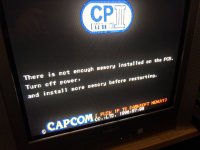
Was testing the CPS3 yesterday and noticed it stopped working it simply says Not enough memory I booted into Darksoft menu and it looks like the photo only Simm 1 and 2 are showing name.

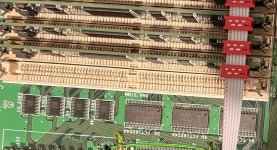
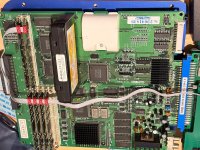
I've tried cleaning the contacts on Simms and Cart with no luck. Any ideas would be appreciated.
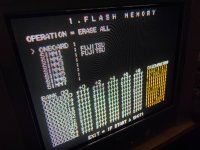
 

Attachments

  • IMG_0134.jpeg
    IMG_0134.jpeg
    492.6 KB · Views: 63
  • IMG_0133.jpeg
    IMG_0133.jpeg
    392.2 KB · Views: 55
Checked PSU's and both are showing the same issue. I don't think it's PSU issue since CPS1 2 and NeoGeo all working as expected.
 
Your problem is either the level shifters or the buffers adjacent to the SIMMs. Could be both. Switching carts will not help you, if you have no SIMM detect after it was previously working okay, either the buffers or the level shifters failed.

Have you confirmed your PSU is outputting ~5V? Best not to assume, check it with a multimeter. Adjusting the voltage now won't make it work if they've already failed. It is also possible there are corroded traces, but it is more likely to be failed ICs, given that it was working previously.

You might want to reach out to someone like Xodara who is based in AU and might be able to help you get it sorted.
 
In the picture that I got from @djsheep, it didn't show ANY simm recognized at all. That's why I said that could be an issue with the cart BIOS. Here you can clearly see 2 original simms working. What do you have installed in the other 4 slots? Original simms as well? To me, I agree with what @kazuo said and it looks like a buffer problem. Those tiny chips that have 18 or 20 pins and are used to buffer the signal.
 
Hi, I had the same issue, message, when i tried running a multi cps3 with a superbios instead of ultrabios, so maybe the cart yes.
 
Your problem is either the level shifters or the buffers adjacent to the SIMMs. Could be both. Switching carts will not help you, if you have no SIMM detect after it was previously working okay, either the buffers or the level shifters failed.
^ 100% this.
If it's not the buffers and shifters, check for trace damage going to the SIMMs. But it's very common for these buffers to start failing, from age, or if the board has been running hot from overvoltage.

It's definitely not the cart. you wouldn't even be able to get far enough into booting to check the simms if the cart bios failed. You would get scramble rug pattern if that's the case. That happened to one of my carts a few years ago, bad cart bios => triggered suicide => no boot.
 
Thanks for the replies everyone. Xodara is gonna take a look at the cart itself.

What is the go to if it's a buffer problem? What would I need to get done.
 
This can be caused by a bad simm too. Try removing simm 3 through 6 and installing them one at a time and test.
 
Ok. Let's do this right.
1) Do you have all original simms? What happens with original simms? Which ones are recognized?
2) the same with ultrasimms
3) which bios has your cartridge?
4) complete picture of your cps3 setup.
 
Yes I have all the original Simms the photo in first post is of original Simms as you can see it only shows the name of 1 and 2 not the others however if I change the Simms to slot 1 2 or 7 it shows the name.

Cartridge is not with me atm I'll report back on it once Xodara gets it back to me.

Older photo of complete setup.
 

Attachments

  • IMG_0138.jpeg
    IMG_0138.jpeg
    372.7 KB · Views: 23
That picture shows UltraSimms not original Simms.

however if I change the Simms to slot 1 2 or 7 it shows the name.
Can you tell me what do you mean with that? You can't exchange simms, the pinout is completely different, the ones on the right will only work there and they have 4 chips only one side and they go in positions SIMM1 and SIMM2.
The ones that go on the left, where you can fill up to 5 SIMMS, those have either 2 chips or 8 chips and they can't go on the other side.
 
Back
Top