Remedy944
Beginner
Hey guys,
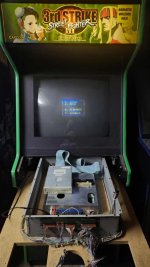
My Darksoft CPS3 has been working great forawhile. I decided to replace the original CD drive with a Bluescsi to prevent eventual future failing. So I attached the Bluesci and turned it on. Street Fighter III: 2nd Impact popped up as that what was loaded prior and it plays fine. Afterwards I decided to switch to Third Strike. Third Strike loads/writes to 100% and then the region select pops up. I select a region and it just freezes at that screen. I know from prior experience that this can happen due to incompatibility if you use the wrong image for your cart. So I take off the Bluesci to burn a different cd image and try again. The same thing happens, it still freezes. At this point I am kind of frustrated so I hookup the original CD drive again that worked perfect prior, and now THAT freezes. How can this be? It just skips the darksoft menu and goes to the region select where it continues to freeze when I select an option. Any feedback or help is appreciated. Thank you for reading.
My Darksoft CPS3 has been working great forawhile. I decided to replace the original CD drive with a Bluescsi to prevent eventual future failing. So I attached the Bluesci and turned it on. Street Fighter III: 2nd Impact popped up as that what was loaded prior and it plays fine. Afterwards I decided to switch to Third Strike. Third Strike loads/writes to 100% and then the region select pops up. I select a region and it just freezes at that screen. I know from prior experience that this can happen due to incompatibility if you use the wrong image for your cart. So I take off the Bluesci to burn a different cd image and try again. The same thing happens, it still freezes. At this point I am kind of frustrated so I hookup the original CD drive again that worked perfect prior, and now THAT freezes. How can this be? It just skips the darksoft menu and goes to the region select where it continues to freeze when I select an option. Any feedback or help is appreciated. Thank you for reading.