Is there an SCSI ODE with Audio Support?

twistedsymphony

Enlightened
Staff member
Immortal
Joined
Jul 21, 2015
Messages
12,944
Reaction score
16,450
Location
NH, USA
I recently picked up a Konami GV System, specifically Susume! Taisen Puzzle Dama. This system uses an SCSI CD-ROM drive similar to CPS3, UNLIKE CPS3 however it does use the CD for in-game music. So it's got your typical data-track with the game code then a series of audio tracks on the disc.

The drive on the unit I bought was dead, I did swap in my CPS3 drive to and got the game booting. The jumpers have to be configured for termination, as well as drive ID "2" and the parity jumper needs to be set as well.
This was enough to use the CPS3 drive on this hardware and get the game playing, but unfortunately the CPS3 drive uses a non-standard Audio connector so I couldn't get that in and the game was missing music.

I managed to find another drive of the same model as the original GV drive on eBay to replace it, but I'd like to use an SCSI ODE for easy game swapping, faster loading etc.
Unfortunately it seems that most of the SCSI ODEs don't actually have support for audio.

The one I did find was MacSD https://www.tindie.com/products/ymkdevices/macsd/
Contacting the shop selling this it seems however that it doesn't support the parity function for CDROM emulation, which makes it a non-starter.

Anyone know of any other alternatives here?

There aren't a whole lot of titles on this platform, and even fewer good one but the only thing that needs changing per game is the EEPROM and disc. So I do wonder if some simple disc patching and then an ODE with a disc selector would essentially allow you to DIY a multi here.
 
I managed to find another drive of the same model as the original GV drive on eBay to replace it
for anyone interested I got the drive in today and got the game fully working again. Would still love to replace with an ODE. the game actually had the classic PS1 era freeze for 2 seconds when switching scenes as it spins up the drive and then delayed music start as it seeks to the right position, so an ODE would make a nice upgrade.

I did also swap from the JP version of "Susume! Taisen Puzzle-Dama" to the English Language Asia version "Let's Attack Crazy Cross" by just burning a new disc. Most games can be swapped by changing the disc and re-flashing the EEPROM. the region swap on this game though didn't require an EEPROM update. though I did have to boot up while holding the test button to reset the settings portion of the EEPROM before the game would boot with the new disc.
 
Doing some more searching I came across this thread: https://www.vogons.org/viewtopic.php?t=94513
which lead here: https://68kmla.org/bb/index.php?threads/dac-attack-for-zuluscsi-audio.44480/
and here: https://github.com/saybur/dac-attack

basically a newer ZuluSCSI firmware added audio support and this person designed an add-on board called "DAC Attack" to add in add in the necessary hardware and connector.

Two problems with this
1 is that I would have to fab this add on board myself (not a big problem but annoying and time consuming), and
2 the ZuluSCSI RP2040 board needed as the base was sold out nearly everywhere unless I wanted to pay some way inflated prices.

So I contacted Rabbit Hole Computing asking when they'd get more in stock and asked if they were considering carrying the DAC Attack board only to discover that they were literally releasing a new Zulu SCSI board TODAY that includes an optional audio board:
https://shop.rabbitholecomputing.com/products/zuluscsi-blaster

it's called the ZuluSCSI-Blaster or the ZuluSCSI RP2350B

The reason the older ZuluSCSI RP2040 was sold out is that they were depleting stock of the old version before releasing the new. So I've just placed my order and will report back once I get it in and have a chance to set it up.
 
Last edited:
I got in the new ZuluSCSI with the Zulu Blaster Audio DAC Unfortunately I haven't got it to work with the Konami GV yet.

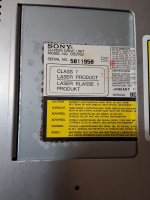
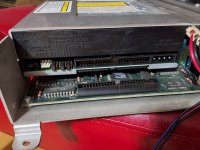
The specific drive that my hardware uses is the Sony CDU76S: http://insight.actapricot.org/insight/common/drives/cd/so76sc.htm
The jumpers in the back have "Parity", "ID2" " and "Test Mode" jumped (unsure what test mode does).
The Prevent/Allow Jumper is removed (which disables the eject button on the drive).
The Bin/Cue Image I'm using with the Zulu for the disc is the same bin/cue I used to burn a CD-R to play in the drive so I know that's correct. and I have it labeled CD2.cue and CD2.bin (this is the way the new firmware sets the drive ID)

When you boot up this hardware it does some system checks then does a "Media Check" where it compares some data on the CD to data stored on the GV board in an EEPROM as a security check, so if the drive is bad or you're using the wrong disc then it fails this check and the system reboots and starts over. and it's failing that check.

I don't think it's locked to any specific model CD-ROM drive as these GV systems also sometimes shipped with a Toshiba XM-5401B and I did grab a completely different model drive from a Capcom CPS3 setup (Panasonic / Matsushita CR504-KCM) and it ran from that drive fine once I configured the parity and ID jumpers correctly (it's worth noting that the CPS3 drive does not have a "test mode" jumper nor a prevent/allow jumper).

I've attached a couple of log files from my attempts one where I used an ini file and one where I didn't (the settings seem to match all the defaults)

this is the log file I'm getting when the system reports "BAD" on the media check step
Code:
[10ms] Platform: ZuluSCSI Blaster
[10ms] FW Version: 25.03.10-release Mar 10 2025 21:46:43
[11ms] DIP switch settings: debug log 1, termination 1
[11ms] SCSI termination is enabled
[12ms] Flash chip size: 16384 kB
[12ms] SCSI target/disk mode selected by DIP switch, acting as a SCSI disk
[13ms] I2S audio to expansion header enabled
[13ms] Reclocking with these settings are compatible with CD audio playback
[14ms] Initial Clock set to 150000000Hz
[15ms] Reclocking the MCU to 200400000Hz
[15ms] Setting the SDIO clock to 40MHz
[16ms] After reclocking, system reports clock set to 200400000Hz
[16ms] Starting Core1 for audio
[154ms] SD card detected, FAT32 volume size: 30497 MB
[154ms] SD MID: 0x1B, OID: 0x53 0x4D
[154ms] SD Name: GB1QT
[154ms] SD Date: 1/2018
[155ms] SD Serial: 0xDD9D5D87
[2694ms] Reading configuration from zuluscsi.ini
[3008ms] Active configuration:
[3008ms] -- SelectionDelay = 255
[3009ms] -- EnableUnitAttention = No
[3009ms] -- EnableSCSI2 = Yes
[3009ms] -- EnableSelLatch = No
[3010ms] -- MapLunsToIDs = No
[3010ms] -- EnableParity = Yes
[4619ms] Finding images in directory /:
[4799ms] -- Opening /CD2.bin for id:2 lun:0
[4949ms] DBG ---- Image file is contiguous, SD card sectors 63198 to 1067694
[4950ms] ---- Configuring as CD-ROM drive
[4950ms] ---- Read prefetch enabled: 8192 bytes
[4950ms] ---- Found CD-ROM CUE sheet at /CD2.cue
[4954ms] ---- Cue sheet loaded with 35 tracks
[5040ms] -- Platform supports ROM drive up to 15804 kB
[5041ms] ---- ROM drive image not detected
[5041ms] SCSI ID: 2, BlockSize: 2048, Type: 2, Quirks: 0, Size: 502248kB, Removable
[5042ms] Found 1 removable device, to set an eject button see EjectButton in the 'zuluscsi.ini', or the http://zuluscsi.com/manual
[5225ms] Clock set to: 200400000Hz
[5225ms] Initialization complete!
[17938ms] DBG BUS RESET
[19305ms] DBG -- BUS_BUSY
[19305ms] DBG -- BUS_FREE
[19573ms] DBG -- BUS_BUSY
[19573ms] DBG -- BUS_FREE
[19840ms] DBG -- BUS_BUSY
[19840ms] DBG -- BUS_FREE
[23317ms] DBG -- BUS_BUSY
[23317ms] DBG -- BUS_FREE
[23584ms] DBG -- BUS_BUSY
[23584ms] DBG -- BUS_FREE
[23852ms] DBG -- BUS_BUSY
[23852ms] DBG -- BUS_FREE
[24119ms] DBG -- BUS_BUSY
[24119ms] DBG -- BUS_FREE
[24387ms] DBG -- BUS_BUSY
[24387ms] DBG -- BUS_FREE
[25724ms] DBG -- BUS_BUSY
[25724ms] DBG -- BUS_FREE
[26526ms] DBG -- BUS_BUSY
[26526ms] DBG -- BUS_FREE
[27863ms] DBG -- BUS_BUSY
[27863ms] DBG -- BUS_FREE
[28666ms] DBG -- BUS_BUSY
[28666ms] DBG -- BUS_FREE
[30003ms] DBG -- BUS_BUSY
[30003ms] DBG -- BUS_FREE
[31608ms] DBG -- BUS_BUSY
[31608ms] DBG -- BUS_FREE
[32143ms] DBG -- BUS_BUSY
[32143ms] DBG -- BUS_FREE
[32410ms] DBG -- BUS_BUSY
[32410ms] DBG -- BUS_FREE
[32677ms] DBG -- BUS_BUSY
[32678ms] DBG -- BUS_FREE
[32945ms] DBG -- BUS_BUSY
[32945ms] DBG -- BUS_FREE

anyone have experience with the Zulu or any other SCSI emulator that sees anything obvious I might be missing?
 
I came across this thread last night when I was researching replacement options for my Konami GV's disc drive.

Curious to see if anyone ever was able to find a way to get ZuluSCSI to work as a replacement.

FYI, my PCB is also a Susume! Taisen Puzzle Dama, and looks to have the same type of CDU76S-01 drive that twistedsymphony mentioned.
 

Attachments

  • 17785511245147827725869918720615.jpg
    17785511245147827725869918720615.jpg
    185.4 KB · Views: 13
  • 17785511540936955532279596195924.jpg
    17785511540936955532279596195924.jpg
    214.8 KB · Views: 15
So I think there is something funny with the English region disc dump of Puzzle Dama in MAME.

it works in MAME and burning that image works in the drive, but the audio doesn't work properly on Zulu.

The formatting on the Japanese region disc is a bit different and works properly on Zulu.

So right now I'm running a burned English region disc as that's more interesting to me Japanese region on Zulu.

I haven't tested out any other games on the platform.
 
So I think there is something funny with the English region disc dump of Puzzle Dama in MAME.

it works in MAME and burning that image works in the drive, but the audio doesn't work properly on Zulu.

The formatting on the Japanese region disc is a bit different and works properly on Zulu.

So right now I'm running a burned English region disc as that's more interesting to me Japanese region on Zulu.

I haven't tested out any other games on the platform.

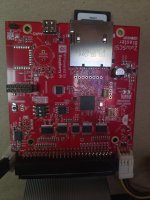
The ZuluSCSI Blaster (Built-in DAC / no Wi-Fi module) that I ordered arrived today and I can't seem to get the Konami GV past the drive check "BAD" screen. I ripped my Japanese Susume! Taisen Puzzle Dama disc (bin/cue) with ImgBurn and also tried converting the MAME lacrazyc/gv027j1.chd via chdman to bin/cue as well. I updated the firmware, tried combinations of the 3 dip switches, with and without an ini file in the root, and tried different SD cards, but nothing in my testing seems to work. (Posting a picture of my board and one of my zulu log files.)

Do you recall what you did to the Japanese version of Susume to boot on your Zulu?
 

Attachments

  • 20260518_184334.jpg
    20260518_184334.jpg
    173.1 KB · Views: 9
  • zululog(9).txt
    zululog(9).txt
    4.7 KB · Views: 13
Just wanted to interject that there is another SCSI with Audio ODE out there now that may be worth looking into. I got one for my retro PC, but seeing you discuss about audio reminded me of this one's capabilities. The audio and wifi are expansion boards, so you have to buy the base and the extras to enable the features.
https://jcm-1.com/product/bluescsi-ultra-narrow-50-pin/
 
Do you recall what you did to the Japanese version of Susume to boot on your Zulu?
Here are my notes:
1. Use a ZuluSCSI RP2350B with ZuluSCSI Blaster

2. set the dips to
off - Initiator
off - Debug
on - Terminator

3. if starting from a CHD extract the CHD to a Bin/Cue named "CD4" with the following command:
chdman extractcd -i gv027-a1.chd -o CD4.cue -ob CD4.bin
-----
if starting from a bin/cue
Rename the Bin/Cue to
CD4.bin
CD4.cue

be sure to modify the first line of the .cue file to point to CD4.bin

4. format an SD card as Fat32
place your Bin/Cue files in the root
place the zuluscsi.ini to the root

If I recall you MUST name the bin/cue to CD4 due to the way the System GV accesses the drive.
you must set the dips properly and you MUST have a proper .ini file to configure the blaster.
I'm uploading the .ini file I have with my notes but I'm sure if this was the working configuration or not.

Also if you're changing discs, even from susume to lacrazyc then you need to reflash the EEPROM on the mobo as that has a security key that is tied to the specific disc.
 

Attachments

Oh wow, that .ini file worked like a charm. Thank you so much for sharing that!

My Susume disc rip passed the drive check with green and booted right into the game. Audio works also.

I only ever got to play this twice before my drive died, so awesome to finally have it back in playable form. Thanks again for the help with this.
 
Last edited:
Back
Top