Lindbergh Compatible External DVD Drives

had a broken videocard in a spare lindbergh so after receiving a spare, it's now working and I can confirm ( as if it was needed from that author! ) that the ebau108 is indeed working:
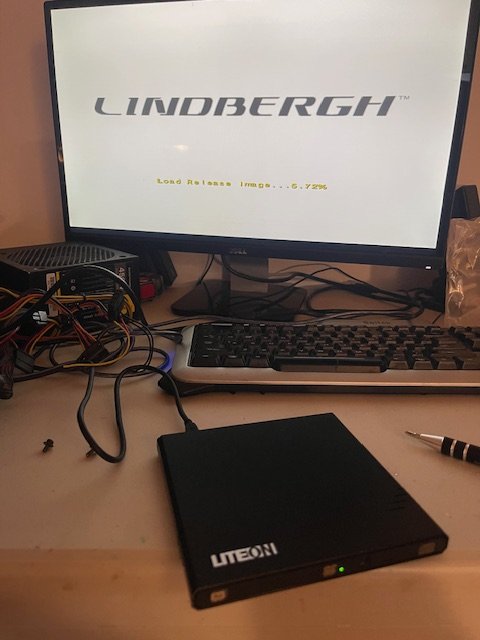
IMG_9368.jpg


then I get a i/o not found ! :( Swapped it from a working setup, goes all the way, game is working.

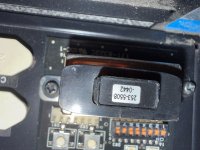
I have a i/o in my ali express cart and I see from the picture it doesn't have the "super cap" on ...so before pressing checkout, I go and remove the cap from my "broken i/o", stick it back and ... it's working ! take it for what it's worth! ( well 65$ actually!)
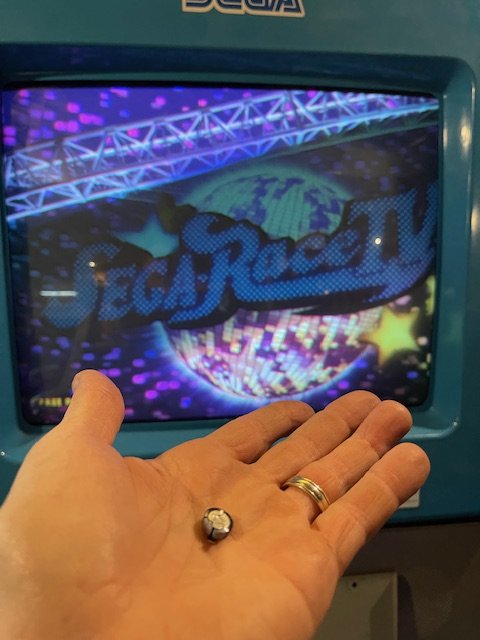
IMG_9367.jpg
Só a bad super cap on the I/o is enough to stop it working ?
And just needs to be removed ?
 
Is their any specific requirements when using the external DVD drive apart from plugging it in? USB port to use, buttons to be pressed, jumpers required?

My unit had that small USB block removed already so i'm plugged straight into the regular USB ports with a LG GP60NB50 and the drive isn't recognised at all in the bios. I do get a beep acknowledgment from the PCB when I plug/unplug it though. If I let the Lindbergh POST it just boots off the compact flash and reports error 26 storage drive not found (which i'd expect as the drive is blank and i'm trying to do a fresh install).
I am having the exact same issue with the same dvd drive. I have downloaded lets go image from preservation archive and burned it with imgburn at 6x speed. However my bios sees the dvd drive but its listed under hard drive in bios and it never boots from dvd no matter what i have tried. If someone knows how i can fix this issue or what i can try please let me know!
 
That is the correct key, which DVP image are you using (link) ?

Also you do not "boot" from the DVD. Segaboot will install the game if the keychip matches the DVD.
 
Last edited:
These are the keys which match the images you listed:

DVP-0036A SBNR 253-5508-0492
DVP-0011 SBLU 253-5508-0442
DVP-0011A SBLU 253-5508-0442

Are you installing on a yellow Lindbergh ?
 

These are the keys which match the images you listed:

DVP-0036A SBNR 253-5508-0492
DVP-0011 SBLU 253-5508-0442
DVP-0011A SBLU 253-5508-0442

Are you installing on a yellow Lindbergh ?
Yes its a yellow. I have tried on two different motherboard i have as well. By the way what does the screen say when the disk is installing?
Is there a speed i hae to burn the disk at to do it properly? Or any other step of this process i may be missing?

Does the dvp number or sbnr/sblu hae any meaning that matters?

Also i know this pc works cause i have a hard drive that boots im just trying to reinstall the software on my other hard drive with the same keychip same game all origional.
 
Last edited:
Okay
Im using a hard drive that boots into looking for io board so it works.
Using that same dvd drive as recommended.
Fresh burn of DVP-0011A SBLU 253-5508-0442 with the correct keychip
Game skips passed any mention of disc and boots straight into looking for jvs io.
Im not sure whats going on.
Burned with imgBurn

Does it have to be plugged into the i/o?
Do i need to have it on original power supply?

Update edit after posting this.
I just tried again with different motherboard/keychip/caseboard/sd card with the same result am i going to assume the image from the archive does not work?
 

Attachments

  • IMG_1699.jpeg
    IMG_1699.jpeg
    225.7 KB · Views: 22
Last edited:
Some tips

When the Lindbergh is booting, and the progress bar is filling - with a USB DVD connector you should hear an audible beep - just like you get a beep if you have a USB keyboard connected.

The DVD activity LED should flash when the Lindbergh white screen is up, just before setup for source disk wording - setup for source disk is when it searches DVD media for install.
 
Okay
Im using a hard drive that boots into looking for io board so it works.
Using that same dvd drive as recommended.
Fresh burn of DVP-0011A SBLU 253-5508-0442 with the correct keychip
Game skips passed any mention of disc and boots straight into looking for jvs io.
Im not sure whats going on.
Burned with imgBurn

Does it have to be plugged into the i/o?
Do i need to have it on original power supply?

Some tips

When the Lindbergh is booting, and the progress bar is filling - with a USB DVD connector you should hear an audible beep - just like you get a beep if you have a USB keyboard connected.

The DVD activity LED should flash when the Lindbergh white screen is up, just before setup for source disk wording - setup for source disk is when it searches DVD media for install.
Bios detect the DVD drive. It’s listed under hard drive for some reason and I do get the beep and even if it’s booting and I unplugged the DVD drive I also get a B the DVD drive lights up shortly after I turn on the computer power so I guess I’m just gonna assume the image from archive is no good. Does anybody have a working? Let’s go to jungle software disc image
 
i just went to the location and pulled out the io board and everything I’m gonna try to install the software with the Io board connected. I’ve just never seen Arcade Games that required the io board to reinstall software.
 
Okay can confirm with io board recommended dvd drive and image from archive and original power supply it will not reinstall the game. Its booted all the way to insert coin every time.

Does anyone know if you have to use a specific type of blank dvd?

Or does anyone have a known tested working image?
 
Last edited:
Or does anyone have a known tested working image?
Probably it detects that the version of the DVD matches the one from the HDD. Why don't you try installing again but use blank IDE HDD of 40/80/160Gb and see what it does? Probably @AndyGeezer will have some better tips.
 
Okay everyone my spamming is over but ill put some info fore future people inquiring because i couldn't find this info anywhere.

At no point in the installation does it tell you its actually installing from a disk.
I could not get it to install the game on a hard drive that already had that same game on it so you need to go into the menu and click uninstall game.
Additionally if the hard drive has any bad sectors at all even if the sector is not used it will fail.
Hitachi deskstar 41.1gb hdd works.
The images from the preservation project archive do work i confirmed.
I was able to purchase a brand new in the box old stock DVD drive kit and used that.
Will not install on any hdd or sdd plugged into SATA port that i can find so far.

When I get this special IDE PATA ssd i will attempt to install on that and provide link if it works. I have been told it works.
 
Last edited:
When I get this special IDE PATA ssd i will attempt to install on that and provide link if it works. I have been told it works.

I tried to do this with a cheap Aliexpress PATA SSD and Afterburner Climax ran like a dog on it. The FMV intro would skip and it had audio stuttering.
 
Back
Top