

Sounds like a nice setup ! I'd like to stick with the mister as a io device with native cores, and complete with whatever not supported by the mister through this (naomi, dreamcast, or whatever else not ported yet). I'm interested to see your setup working through a video
You are using an out of date browser. It may not display this or other websites correctly.
You should upgrade or use an alternative browser.
You should upgrade or use an alternative browser.
MiSTer FPGA
- Thread starter djsheep
- Start date

Here's a video, hopefully it explains it better! This is pretty much what you're describing. (I cant attach the video file here due to the size but was able to upload it here, let me know if it works:
View: https://www.youtube.com/watch?v=PNnsJaSVTeU
I'm opening my “New Astro City” folder, which I'm getting ready for the cabinet. It's a mix of native MiSTer games and PC-emulated streamed games, all in the same menu. Pick a streamed game and it tells my PC to launch it, then the picture and sound come through on the CRT.
The PC emulation game runs on my little side screen so I can still use my main screen.
That 10–15 second pause is something I've deliberately added: a little script closes the previous PC game and stream before starting the next one. I'll shorten that once I've tidied it up, it isn't gameplay lag!
I reckon multiple VMs could work for separate cabinets too, with enough PC power and each one set up with its own controls and destination. I haven't tested that myself, though. The nice part is having everything in one MiSTer menu without swapping systems or JAMMA connections.
I'm opening my “New Astro City” folder, which I'm getting ready for the cabinet. It's a mix of native MiSTer games and PC-emulated streamed games, all in the same menu. Pick a streamed game and it tells my PC to launch it, then the picture and sound come through on the CRT.
The PC emulation game runs on my little side screen so I can still use my main screen.
That 10–15 second pause is something I've deliberately added: a little script closes the previous PC game and stream before starting the next one. I'll shorten that once I've tidied it up, it isn't gameplay lag!
I reckon multiple VMs could work for separate cabinets too, with enough PC power and each one set up with its own controls and destination. I haven't tested that myself, though. The nice part is having everything in one MiSTer menu without swapping systems or JAMMA connections.
Thanks that's exactly what I want to achieve, without doing multiple vm, can it handle multiple instances on the same session ? Can you share an exemple of the files present on the mister and on retroarch side for a game ? let's say Ikaruga, i'll give it a try from my steamdeck.
Nice setup by the way !
Nice setup by the way !
Cheers! I've attached two small ZIPs for Ikaruga, one for the MiSTer and one with the PC settings and instructions.
You'll need the PC launcher:
https://github.com/BossRighteous/GroovyMiSTerCommand/releases
You'll also need the GroovyMiSTer-compatible RetroArch build and Flycast core. I'm using Windows, are you running Windows on your Steam Deck too, or SteamOS? I've included examples for both, but only my Windows setup has been tested.
Change mister_host in the launcher config and mister_ip in the RetroArch config to your MiSTer's IP, then update the emulator and game paths.
For multiple cabinets, the idea would be to run a separate launcher and emulator instance for each MiSTer, each configured with its destination IP, without needing VMs. I haven't tested them simultaneously yet, so you'd need to check for port conflicts and make sure each launcher only manages its own game. But in theory, if you have 4 MiSTers each with their own IP address, then on your PC you'd have 4 listeners, each listening to the instructions/games to play
Give it a go and let me know how you get on!
You'll need the PC launcher:
https://github.com/BossRighteous/GroovyMiSTerCommand/releases
You'll also need the GroovyMiSTer-compatible RetroArch build and Flycast core. I'm using Windows, are you running Windows on your Steam Deck too, or SteamOS? I've included examples for both, but only my Windows setup has been tested.
Change mister_host in the launcher config and mister_ip in the RetroArch config to your MiSTer's IP, then update the emulator and game paths.
For multiple cabinets, the idea would be to run a separate launcher and emulator instance for each MiSTer, each configured with its destination IP, without needing VMs. I haven't tested them simultaneously yet, so you'd need to check for port conflicts and make sure each launcher only manages its own game. But in theory, if you have 4 MiSTers each with their own IP address, then on your PC you'd have 4 listeners, each listening to the instructions/games to play
Give it a go and let me know how you get on!
Attachments
Thank you very much ! i'm on steam os, but since the code is open source things can be adapted easily, how do you manage controls ?Cheers! I've attached two small ZIPs for Ikaruga, one for the MiSTer and one with the PC settings and instructions.
You'll need the PC launcher:
https://github.com/BossRighteous/GroovyMiSTerCommand/releases
You'll also need the GroovyMiSTer-compatible RetroArch build and Flycast core. I'm using Windows, are you running Windows on your Steam Deck too, or SteamOS? I've included examples for both, but only my Windows setup has been tested.
Change mister_host in the launcher config and mister_ip in the RetroArch config to your MiSTer's IP, then update the emulator and game paths.
For multiple cabinets, the idea would be to run a separate launcher and emulator instance for each MiSTer, each configured with its destination IP, without needing VMs. I haven't tested them simultaneously yet, so you'd need to check for port conflicts and make sure each launcher only manages its own game. But in theory, if you have 4 MiSTers each with their own IP address, then on your PC you'd have 4 listeners, each listening to the instructions/games to play
Give it a go and let me know how you get on!
My controls are connected to the MiSTer, not the PC. I set up the buttons through GroovyMiSTer (in the menu under server, PS2: Ive selected (Keyboard & Mouse) and under Joysticks: (Analog), which sends the inputs over the network to RetroArch. RetroArch uses the “mister” input and joypad drivers, with the game buttons mapped there as needed.Thank you very much ! i'm on steam os, but since the code is open source things can be adapted easily, how do you manage controls ?
So I use the same controller to navigate the MiSTer menu and play the streamed game, no separate controller plugged into the PC. There's also a copy of my button mappings in the PC ZIP as a reference.
@GF77 Yep, that's the setting, I'm using 3800. Jumbo frames basically carry more data per packet, so fewer packets need processing for the same amount of video. You need support enabled at both ends and on any switch in between.Your PC is already running-->you turn on the cab+Mister-->you choose in MIster the "Groovy" core/application (bouncing ball appears when connection is established)-->you start modified Retroarch--> RA frontend on desktop and on CRT appears.
Multiple RA instances on one desktop won't work. Only one window can be active, the other pauses. With multiple VMs it should be possible.
Another very nice touch is that if you set up a 320x224 picture most other resolutions like 256x224 or 288x224 or 384x224 will display at least centered with litlle to no H/V stretching.
in R-Type (384x256) I have to adjust vertical height though.
Also, this might be important. Stock Mister has only 18bit color output via analog RGB. This can result in uneven and slightly less color gradients in some systems that use a 24bit master color palette like Namco System2. In Ordyne it's visible in some scenes if you compare it to a PC LCD. Konami GX should also be 24bit color.
The solution is a like 24bit analog video board for like 50 bucks or so. MisterCade though is already 24bit I believe.
@wizardee What is jumbo frames exactly? I know there is a parameter set to 1500 which can be modified to 3800 max.
I'm using a direct Ethernet connection from the PC to MiSTer. Before enabling jumbo frames, I was seeing red numbers in the Vsync overlay; now they are consistently blue so no skipped frames.
I have successfully recompiled calamity's retroarch fork for steamos, my steamdeck is now playing on my mister setup, with mister controllers. I saw you have Xbox 360 and Switch on your mister menu ? How does it work ?
@archimage Nice, glad you got it working on the Steam Deck!I have successfully recompiled calamity's retroarch fork for steamos, my steamdeck is now playing on my mister setup, with mister controllers. I saw you have Xbox 360 and Switch on your mister menu ? How does it work ?
I've integrated Xbox 360 through Xenia Canary, Switch through Yuzu, Dreamcast/Naomi through RetroArch with Flycast, PS5 game through KytyPS5, usual arcade games through Groovymame and stuff like Sega Lindbergh and Taito X through TeknoParrot.
For those emulators outside of Retroarch & Groovymame, I've built Windows bridges that launches the emulator, captures its picture and sound, and sends them to GroovyMiSTer. It takes the controls coming back from MiSTer and presents them to the emulator as a virtual Xbox controller.
In plays and feels just as responsive to me as GroovyMAME or RetroArch. I haven't noticed any extra lag. That's from playing on my CRT rather than a measured latency comparison.
The MGL/GMC launches the bridge. Its catalog.json holds the emulator path, game path and launch arguments, while display-settings.json holds the MiSTer IP. GroovyMiSTerCommand's config.json tells it how to start the bridge. You need the bridge program too, it isn't just editing those configs.
GPT-6 Astra has been a massive help with this: connecting to MiSTer over SSH, sorting out configs, setting up the PC and helping build the scripts and bridge. I explain what I want, then test the picture, sound and controls and work through any problems with it.
Might be worth trying for your setup too. Mine is Windows based, so the capture and controller parts would need adapting for SteamOS.
@GF77 I've checked my config - you also need to tell RetroArch to receive the controls from MiSTer. In the RetroArch config you're actually launching with, mine has:I have successfully recompiled calamity's retroarch fork for steamos, my steamdeck is now playing on my mister setup, with mister controllers. I saw you have Xbox 360 and Switch on your mister menu ? How does it work ?
input_driver = "mister"
input_joypad_driver = "mister"
input_player1_joypad_index = "0"
menu_driver = "rgui"
mister_ip = "192.168.50.2"
Replace that IP with yours. Close RetroArch before editing, then restart it.
On the MiSTer side, I've got Joysticks set to Analog under Groovy's Server menu. Close the MiSTer menu before testing the controls in RetroArch.
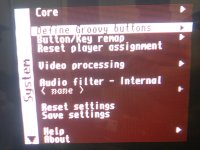
try to define the buttons in the groovy core, then set analog and keyboard+mouse, save settings, reload core, on the mister side controller should be mister and input x (i'm on steamdeck IDK what windows should be maybe dinput ?)@wizardee keyboard works now but controller still not detected. All it does is bringing up Mister menus. Thanks for you suggestions
@GF77 - as @archimage mentioned, first define your controller buttons (up, down, left, right, buton1, 2, etc....) then save settings in the groovy core. then restart the core. then load up RetroArch, under Settings > Input > RetroPad Bindings > Port 1 Controls (for P1) > Device Index should say MiSTer (1) . similiar cxoncept for groovymame also@wizardee keyboard works now but controller still not detected. All it does is bringing up Mister menus. Thanks for you suggestions
Attachments
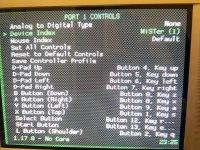
@archimage Here you go- the bridge source, build notes and example configs are attached. It’s Windows-based, so adapting it for SteamOS will be something to work through on your side.@wizardee "I've built Windows bridges that launches the emulator, captures its picture and sound, and sends them to GroovyMiSTer" is there any source code so I can build the same thing on my side ?
I’m still working on my own cabinet setup, so I won’t have time to help with porting or troubleshooting, but hopefully this gives you enough to get started. Good luck with it!

Attachments
@wizardee It works now! Groovy core button mapping was in place but the global RA button mapping was missing. I thought it would be taken over from my "pad over PC" button coniguration but it wasn't. Thank you alltry to define the buttons in the groovy core, then set analog and keyboard+mouse, save settings, reload core, on the mister side controller should be mister and input x (i'm on steamdeck IDK what windows should be maybe dinput ?)
Last edited: