MVS conversion Kabuki Klash on Progtop/cha256

Joined
May 4, 2026
Messages
40
Reaction score
42
Location
Poland
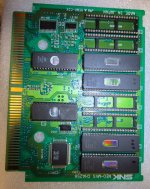
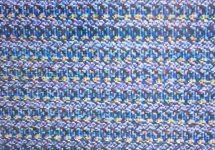
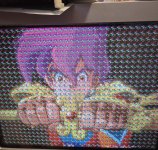
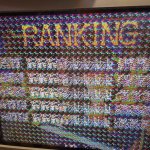
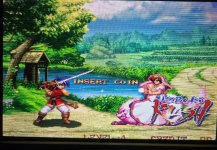
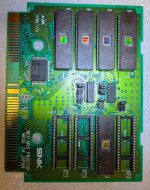
Hi. Can someone tell me what the problem might be? The game starts, there are sounds, controls work, but the graphics are just pixelated. The game is Far East of Eden - Kabuki Klash / Tengai Makyou - Shin Den, an MVS conversion from Puzzle Bubble by progtop/cha256. I also tried byte swapping on c-rom, but that didn't help either. Does anyone have any ideas?
 

Attachments

  • 20260616_190024.jpg
    20260616_190024.jpg
    275.9 KB · Views: 26
  • 20260616_190013.jpg
    20260616_190013.jpg
    288.6 KB · Views: 24
  • Screenshot_20260616_195149_Gallery.jpg
    Screenshot_20260616_195149_Gallery.jpg
    156 KB · Views: 22
hi, roms from the mame database. Is Kabuki Klash encrypted? If so, I'll die of embarrassment.

Encryption was introduced later. It's definitely not encrypted.
 
Last edited:
hi, roms from the mame database. Is Kabuki Klash encrypted? If so, I'll die of embarrassment.

Encryption was introduced later. It's definitely not encrypted.
As I understand it, the MAME ROMs are "decrypted" (its not really encryption). Serialization is the technical term, then the ZMC or CT0 chips (can't recall) unshuffle the graphics. On the MVS this is on motherboard so for a MVS cart you can't use the MAME ROMs and need to find the original files.

I don't know if this is the issue, but it's the first possibility that comes to mind.
 
As I understand it, the MAME ROMs are "decrypted" (its not really encryption). Serialization is the technical term, then the ZMC or CT0 chips (can't recall) unshuffle the graphics. On the MVS this is on motherboard so for a MVS cart you can't use the MAME ROMs and need to find the original files.
so mame roms won't work on original cartridges?

@tovar - doesn't work:(
 
so mame roms won't work on original cartridges?

@tovar - doesn't work:(
All mame rom is perfect for conversione, just take the last good version, i'm using only planetemu repository.
This is the ProgBoard
https://www.mvs-scans.com/images/8/82/Kabuki_klash_set2_b1_front.jpg
Since its already exist just copy jumper config.
also for CHA: https://www.mvs-scans.com/images/0/01/Kabuki_klash_set2_b2_front.jpg
Your jumper config is complete wrong for P rom (start from this)
But when you have wrong P rom jumper, game wont start or crash in middle.
So its not explain your problem.

Your garbage screen problem isn't caused by a ROM or jumper, but rather by a malfunctioning card.
Everything in the photo is distorted, the sprites aren't fixed, and the graphics in the C are all garbage.
Unsolder everything and try another card.
Test your card before using it for a conversion.
Clean everything.
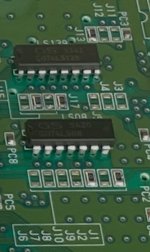
Keep it simple, you added the socket... jumpers... too much modification and soldering, are you sure you didn't do something wrong?


Check here for last CRC version of file:
https://adb.arcadeitalia.net/dettaglio_mame.php?game_name=kabukikl&arcade_only=0&autosearch=1
 
Last edited:
Here you have mame definition so:
No weird offset, all really simple.


<dataarea name="maincpu" width="16" endianness="big" size="0x200000">
<rom loadflag="load16_word_swap" name="092-p1.p1" offset="0x100000" size="0x100000" crc="28ec9b77" sha1="7cdc789a99f8127f437d68cbc41278c926be9efd" />
<rom size="0x100000" offset="0x000000" loadflag="continue" />
</dataarea>

<dataarea name="ymsnd:adpcma" size="0x700000">
<rom name="092-v1.v1" offset="0x000000" size="0x200000" crc="69e90596" sha1="1a2007d7784b3ce90d115980c3353862f1664d45" />
<rom name="092-v2.v2" offset="0x200000" size="0x200000" crc="7abdb75d" sha1="0bff764889fe02f37877514c7fc450250839f632" />
<rom name="092-v3.v3" offset="0x400000" size="0x200000" crc="eccc98d3" sha1="b0dfbdb1ea045cb961323ac6906ab342256c3dc7" />
<rom name="092-v4.v4" offset="0x600000" size="0x100000" crc="a7c9c949" sha1="574bc55b45e81ce357b14f5992426115de25cd35" />
</dataarea>

<dataarea name="sprites" size="0x1000000">
<rom loadflag="load16_byte" name="092-c1.c1" offset="0x000000" size="0x400000" crc="2a9fab01" sha1="aa9f037df33ae0575b328734c76c0918ae1917e9" />
<rom loadflag="load16_byte" name="092-c2.c2" offset="0x000001" size="0x400000" crc="6d2bac02" sha1="dfe96b62883333872be432e8af1ae617c9e62698" />
<rom loadflag="load16_byte" name="092-c3.c3" offset="0x800000" size="0x400000" crc="5da735d6" sha1="f1c05a73794ece15576a0a30c81f4a44faac475a" />
<rom loadflag="load16_byte" name="092-c4.c4" offset="0x800001" size="0x400000" crc="de07f997" sha1="c27a4d4bef868eed38dc152ff37d4135b16cc991" />
 
@pierpa86 Thanks for the reply. I soldered the sockets in because they were supposed to be test boards. I have 25 pieces of Puzzle Bobble and wanted to make other games and learn something.

One more question: do I need to byteswap with any of the C or V ROMs?
 
@pierpa86 Thanks for the reply. I soldered the sockets in because they were supposed to be test boards. I have 25 pieces of Puzzle Bobble and wanted to make other games and learn something.

One more question: do I need to byteswap with any of the C or V ROMs?
No, its a linear conversion 1:1
Use the slots indicated in the files, and use the right-sized EPROMs for each file—no less, no more, 1:1.
The v4 is 1MB, but I recommend using a 2MB one with padding at the end.
Only in this case, because it's the last of the V ROMs.

1781683461619.png
 
I used these EPROMs:
c1-c4 - 27c322
m1 - 27c010
s1 - 271000
V1-V4 - 27c160
P1 - 27c160

I understand that I'm burning the same thing twice on V4, or should I add FF to the second half?
 
It's better. I adjusted the jumpers. I re-recorded the C1-C4 eproms. The pixel grid doesn't change; it's constant.
 

Attachments

  • 20260617_131941.jpg
    20260617_131941.jpg
    509.7 KB · Views: 15
  • 20260617_132035.jpg
    20260617_132035.jpg
    608.6 KB · Views: 15
It's better. I adjusted the jumpers. I re-recorded the C1-C4 eproms. The pixel grid doesn't change; it's constant.
You can try with another cha board, or better test your mvs board with another game.
Are you sure that problem doesn’t come from your mvs ?
Game start so p rom is ok
Audio is ok ? I think can be

It’s seems an mvs problem.
It’s not releated to a sprite or a fix layer from cha board so test your mvs whit another game.
 
Last edited:
Back
Top