NAC Monitor Issue

If you don't want to replace the entire remote board and keep it original, I sale the kits to replace all the pots and capacitor for the MS9. I sell them on my ebay store or I can give you a discounted price here through Paypal F&F. Let me know and I can sell you a kit.
 
If the remote was the issue, wouldn't manipulating it even slightly (whether adjusting pots or simply tapping it) be a way to reproduce the problem? I've had remotes with faulty pots before, and even touching them slightly would cause all sorts of problems including stuff that looks like H/V collapse. Also had one where the connector for the remote harness was bad, so I wouldn't zero too much on just the pots.
 
Was able to test again today, tapping the chassis frame did indeed temporarily fix the screen, and while the screen was fixed all of the remote board knobs worked correctly.

At least got to play on it for a bit with everything working perfectly, so that was nice.
 
Was able to test again today, tapping the chassis frame did indeed temporarily fix the screen, and while the screen was fixed all of the remote board knobs worked correctly.

At least got to play on it for a bit with everything working perfectly, so that was nice.
So that is a good indicator of cold solder joints. Weak contact points.
 
If you're going to replace the remote board completely, you can get Snakegrunger's repro. Slightly cheaper, after currency conversion and you will save on shipping since it's coming from within Cali.
https://pxlmod.com/products/nanao-ms9-29-arcade-crt-remote-board


BUT, those Size/Position pots are easily replaceable and cheaper than buying a full repro remote board.
https://www.digikey.com/en/products...B103/PTV09A-4015F-B103-ND/3781113?so=59270420
Thanks for the link, I picked up a pair to have as spares.
 
This is almost 100% a bad solder joint or two somewhere. I doubt the monitor was really mishandled but in my/@aperturegrillz's experience on maybe 100 of these it's very common to run into this issue and it would not surprise me to see it pop up after being moved. Is this an MS8 or MS9? Both are pretty commonly found in NACs as operators never seemed to really care about downgrading them to MS8s; if you let me know which it is I can give you some points to look at that are likely to be the cause. The shutdown / not powering up for a while thing is a built in protection to stop the monitor chassis from blowing itself up spectacularly under certain modes of failure (locked transistors, no horizontal deflection etc), so don't worry too much about that happening as it will go away when the underlying cause is solved.

Hey kevinddr,

I wanted to check and see if you could point to where the problem spots might be more an MS9? I finally got a soldering station set up and did enough research to feel comfortable pulling the monitor this weekend to attempt a repair.
 
Udually its the little gray H drive trasformer , it is placed Just near the hot, you have to reflow all solder joints and if you have still.not fone replace the two caps on 200v line to the neck board both 10uf 160v they not cause the issue but whrn it is present they are always in bad shape
 
Udually its the little gray H drive trasformer , it is placed Just near the hot, you have to reflow all solder joints and if you have still.not fone replace the two caps on 200v line to the neck board both 10uf 160v they not cause the issue but whrn it is present they are always in bad shape
Thank you I appreciate it! Just got the monitor out today and will have the board out tomorrow so I can work on it. Luckily, from what I am seeing, the majority of capacitors have been recapped, which makes sense as it was owned by someone in the hobby previously. I'll throw some pics in tomorrow and see if I can get this up and running.

Really appreciate everyone's help
 
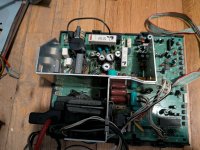
Okay so the board is almost out, just need to work on freeing it from the plastic undercarriage, which has been more difficult than I expected. Glad I got everything safely disconnected and off the monitor at least though.

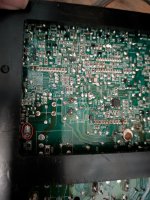
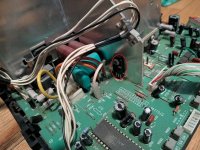
I took a few pics in the meantime while I work on getting the board loose. I believe the part I circled on the top of the board is where the jumper issues usually come from? Not 100% sure, been learning what I can but this is all new to me.

I did notice that the underside of the PCB, where that piece is going into the board, it looks quite different, almost hot-gluey. Not sure if that is normal.

Will keep crackin away at this
 

Attachments

  • under.jpg
    under.jpg
    196.4 KB · Views: 26
  • whole board.jpg
    whole board.jpg
    192.5 KB · Views: 28
  • over.jpg
    over.jpg
    229.5 KB · Views: 26
Made some progress on this. I ended up reflowing a bunch of bad looking solder joints, and got the horizontal collapsing to stop happening. Screen wasn't perfect but I was able to play on it for about a week, until the screen shut off today and won't come back on.

The screen had two issues that might be related that I think I need to fix. One is that the edge of the screen looked like it was wrapping back around itself. Saw that this could be a deflection issue? The other is that the image gets squished the closer it gets to the edge of the screen. Not sure if the deflection could cause that or if its a linearity issue.

If anyone could point me to where on the board would be a good place to look for bad solder joints for those issues, or any other tips, I'd greatly appreciate it!
 
I am also now hearing two pretty loud clicks or noises whenever I power on the cab that I don't recall hearing before, not sure if thats just because the tube is not turning on or something else. I'm still getting power to the lights and through jamma

edit: tried this last night without success, but today was able to get the monitor back on by knocking the frame and then trying power, so fingers crossed its just another bad solder joint somewhere, which now I know I can fix at least
 
Last edited:
Broken soder joints under the little grey H driver transformer , you will find this Just in front of the HOT.
 
Back
Top