Namco System 11 - Dancing eyes - not able to get into test mode

mawrick

Student
Joined
Nov 20, 2021
Messages
80
Reaction score
13
Location
Norway
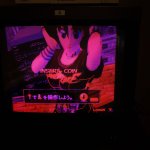
Have a Namco System 11 - Dancing eyes (that came with a cab I bough) and thought I'd try to get it up and running, the game seem to run, at least the attract mode, but the screen colors are way of, from what I'v seen online it's possible to adjust colors on these systems from the test menu ?

However if I put the Dip 1 to on and reboot it won't go into test mode, when measuring the switch it does seem to work.

Any tips on what might cause this, and also if there is any other ways to get into test mode when using a HAS Supergun ?
 
1773251838005.png

Check one this two pins R or 15
In some game you have to keep it press.
 
1773251838005.png

Check one this two pins R or 15
In some game you have to keep it press.

ok, seem there is no connection between R and gnd, or 15 and gnd, with the switch in different position, would guess I would need to jump between those (I tried holding in the switches on the has, but not sure if that would register on this setup).


thanks
 
ok, seem there is no connection between R and gnd, or 15 and gnd, with the switch in different position, would guess I would need to jump between those (I tried holding in the switches on the has, but not sure if that would register on this setup)
Yes take one of that two pin and put on gnd, if not work try the other, it should be pin15
 
I'd have to check my Dancing Eyes board but I don't think you can adjust colors from the menu.

I do know it just goes into test mode as soon as the test button on my cabinet is pressed.
 
Have a Namco System 11 - Dancing eyes (that came with a cab I bough) and thought I'd try to get it up and running, the game seem to run, at least the attract mode, but the screen colors are way of, from what I'v seen online it's possible to adjust colors on these systems from the test menu ?

However if I put the Dip 1 to on and reboot it won't go into test mode, when measuring the switch it does seem to work.

Any tips on what might cause this, and also if there is any other ways to get into test mode when using a HAS Supergun ?
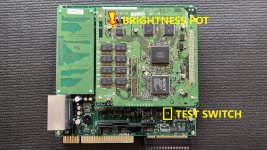
To get into test mode without holding test switch in the cabinet/supergun you need to flip a little switch on the PCB

You can adjust brightness with the pot on the top GPU/CPU PCB.

See picture attached.
 

Attachments

  • namco SYSTEM11 Brightness Adjustment Pot Test Switch.jpeg
    namco SYSTEM11 Brightness Adjustment Pot Test Switch.jpeg
    331.2 KB · Views: 23
Haven't checked by briding yet, but the dip switches has been tried and it does not boot into service menu as I expected, so might be something wrong there also (though the switch itself do work it seem).

Not 100% sure (as I'v never seen this game in person), but just thought the colors seem very "vacky" so doubt they where supposed to be ike this ?..


edit1.jpg


Reason I thought the board had an adjustment for colors was this video:


from a tekken which seem to be a system 11 board....
 

Attachments

  • edit2.jpg
    edit2.jpg
    144.6 KB · Views: 11

Attachments

  • 20260312_203020.jpg
    20260312_203020.jpg
    391.5 KB · Views: 17
  • 20260312_203014.jpg
    20260312_203014.jpg
    373.9 KB · Views: 16
  • 20260312_203007.jpg
    20260312_203007.jpg
    409.7 KB · Views: 13
  • 20260312_203002.jpg
    20260312_203002.jpg
    358.2 KB · Views: 15
  • 20260312_202957.jpg
    20260312_202957.jpg
    473.6 KB · Views: 13
Back
Top