Need help with some jitter on the far right side of the monitor after a full recap of a Nanao MS9-29 (New Astro City)

CoolSpy

Beginner
Joined
Mar 6, 2025
Messages
6
Reaction score
1
Location
Toulouse, France
Hi guys. I just did a full recap of my MS9-29 chassis using Nichicon capacitors. Everything boots up fine, but I have an issue with slight horizontal image "jitter" (a few pixels) on the right edge. I believe this is related to horizontal sync, which tends to make such issues appear on that side of the screen. I’ve tried adjusting HH15, the B+ (which is at 76.00V), and the screen control on the flyback; I also double-checked all the capacitors and their polarity, but nothing fixes it. The only thing I did besides the recap was reflow a solder joint on one of Q508's legs—it looked messy and didn't turn out much better (the solder didn't adhere perfectly to a tiny part of the pad, though overall I think it's okay), but I don't think that would cause this specific issue (I believe that would affect pincushion distortion instead).

Before I spend hours troubleshooting in vain, do you have any suggestions or leads to help me out? Thanks in advance! :) Here is a video of the problem.

View: https://youtu.be/8HvgC94bl3M
 
A cold solder joint on the horizontal side of the chassis could be the issue. I would reflow that area especially the yoke connection for horizontal. Did you change the big filter capacitors?
 
A cold solder joint on the horizontal side of the chassis could be the issue. I would reflow that area especially the yoke connection for horizontal. Did you change the big filter capacitors?
Thanks for your answer.
Sorry, but what do you mean by the area on the yoke connection for horizontal ?
I changed C911 yes... also I changed the capacitor on the neck board (can it be the source of the problem? I haven't double checked that one yet).
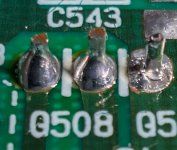
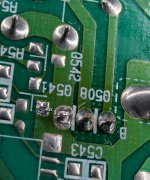
I got a poor joint on the Q508 but no matter what I do I can't get a perfectly clean one (a small section of the solder pad never fills with solder even if I tried to clean it with a fiber glass pen)... would that be a good suspect too?
Also, could it be a cold joint on the HH15 pot ? It seems to be influencing the severity of the problem when I change the pot level
 
Check for cold solder joints and lifted solderpads around this area marked with a blue circle. Yoke connection for horizontal is circled in red.

IMG_3430.jpeg


Regarding Q508. Could this solderpad be lifted or damaged? Does it move when you press down on the component on the parts side? Do you use flux and leaded solder?

Reflowing the HH15 pot with fresh solder is highly recommended.
 
Check for cold solder joints and lifted solderpads around this area marked with a blue circle. Yoke connection for horizontal is circled in red.
Regarding Q508. Could this solderpad be lifted or damaged? Does it move when you press down on the component on the parts side? Do you use flux and leaded solder?

Reflowing the HH15 pot with fresh solder is highly recommended.

It's hard to tell but it does not move and I use flux and leaded solder and 350°C on a 60W soldering iron. It takes alot of time to melt the solder on that point because the track is huge and it"s a transistor.... no matter my efforts, that small section won't accept solder :( ... I am not too used to soldering yet even if I did a decent job on the rest I guess since the 40 capacitors I soldered let the monitor work almost perfectly... but I messed at some point on a detail and Q508 really looks awful to me... here is 2 pictures. I will reflow HH15 as you advised.
Screenshot-2026-10-03-143459.jpg

Screenshot-2026-10-03-143543.jpg
 
You could try to remove all old solder using lots of flux and some solder wick or whatever desolder tool you have and than apply only fresh solder. Still… I have seen way worse soldering than that. I don’t think Q508 is your problem.
 
You could try to remove all old solder using lots of flux and some solder wick or whatever desolder tool you have and than apply only fresh solder. Still… I have seen way worse soldering than that. I don’t think Q508 is your problem.
As you advised, I checked the blue circle area for cold solder joints and reflowed the red area and HH15.

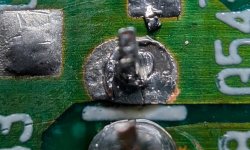
I tried to clean the Q508 pad but it does not look too good right ? I am not sure but it looks like a lifted solder pad, what do you think ? Can it explain why the connection is so poor even if it did not seem that bad ?

If you think the pad is wasted, what is the best option ? Scrap the green resin around to make a solid connection with solder ? Create a jumper with a wire (which AWG btw knowing it is a transistor and the PCB track is huge and connected to the ground and big aluminium radiator) to a nearby point (there are some easy connections possible it seems and not far away)?

Or should I attempt one more time to make a good solder ?

BTW I know the nearby small solder to the left look bad but I planned to fix it later :)
 

Attachments

  • Screenshot 2026-10-08 195916.jpg
    Screenshot 2026-10-08 195916.jpg
    143.9 KB · Views: 10
  • Screenshot 2026-10-08 200425.jpg
    Screenshot 2026-10-08 200425.jpg
    233 KB · Views: 11
  • Screenshot 2026-10-08 201930.jpg
    Screenshot 2026-10-08 201930.jpg
    166.3 KB · Views: 9
Last edited:
Looks worse now than in the other picture. Try to remove as much of the old solder as you can and hit it with lots of flux and new solder.
 
So, a quick update on my problem!
I reflowed all the solder joints that looked suspicious. The Q508 looks good now thanks to your help!
The issue persisted, and it was driving me crazy! (I took the chassis out and put it back in at least five or six times).
By fine-tuning the HH15 potentiometer, I managed to minimize the problem, but it’s still there.
Here’s where it gets interesting—and baffling: I plugged in a different chassis... and the problem was *still* there!
So, I kept obsessively troubleshooting the chassis, when in fact the issue stems from either the yoke or the cabinet's power supply (I’m going to do a cap kit on it while I'm at it). Do you think it is some kind of PSU problem (or a signal interference)?
 
I dont think the yoke is the culprit, but recapping the PSU is always a smart move. Fingers crossed 🤞🏻
 
Back
Top