Puzzle Bobble B System conversion help

Yeah, The game have no "Free Play" option. I could add one later to the patch if you want.
How I patched the roms? You mean explain the needed code modifications and how to find them?
 
Yeah, The game have no "Free Play" option. I could add one later to the patch if you want.
How I patched the roms? You mean explain the needed code modifications and how to find them?
Yes, how you patched the roms. If it's too involved, don't worry about it.

If you have a rom patch for free play selectable in the test menu, I'd be interested. Thanks for offering.
 
Yes, I was thinking an option added to the "Coin/Credit" settings in configuration menu. Can start to look at this during the weekend.
And also explain what to change in the rom, etc
 
Getting closer. It boots to:

BACKUP DATA FAILED PUSH TEST SWITCH

white text with alternating grey and black screen. Pushing the test button on the PCB does nothing, nor does booting with it held.
I found out why this did not work. There was two instructions that had not been properly disassembled. So i had missed them in my patch. :huh:
 
Yes, how you patched the roms. If it's too involved, don't worry about it.

If you have a rom patch for free play selectable in the test menu, I'd be interested. Thanks for offering.

Ok, First take a look at the "Memory Maps" in the Mame Driver source.
Puzzle Bobble and Quiz Sekai wa SHOW by shobai As you can see they are mostly identical except for three of the read/writes for the custom chips.

tc0640fio: (IO / EEProm) $5000xx vs. $2000xx
mb87078: (Volume Ctrl) $6000xx vs. $7000xx
tc0140syt: (Sound) $7000xx vs $6000xx

Those memory read and writes need to changed so they match the Memory Maps of "Quiz Sekai wa SHOW by shobai"

There will be about 60 instructions that needs to be patched....

Here's some examples: (before the patch and after the patch applied)

tc0640fio: (IO / EEProm): $5000xx -> $2000xx
$10BE: 08B9 0002 0050 0008 bclr #$2, $500008 -> 08B9 0002 0020 0008 bclr #$2, $200008
$1130: 1039 0050 0002 move.b $500002, D0 -> 1039 0020 0002 move.b $200002, D0

mb87078: (Volume Ctrl): $6000xx -> $7000xx
$21C2: 13C1 0060 0002 move.b D1, $600002 -> 21C2: 13C1 0070 0002 move.b D1, $700002

tc0140syt: (Sound): $7000xx -> $6000xx
$374A: 41F9 0070 0000 lea $700000, A0 -> 41F9 0060 0000 lea $600000, A0

Have a closer look at the driver source and compare them and also take a look at the dissasembled instructions for the adresses above in the Mame debugger and I think you will understand the logic behind those changes.

...I have also started to look at the Free Play coding. In this case it is little more tricky than the changes above, but I have some ideas I going to test later tonight. :)
 
Last edited:
Ok, First take a look at the "Memory Maps" in the Mame Driver source.
Puzzle Bobble and Quiz Sekai wa SHOW by shobai As you can see they are mostly identical except for three of the read/writes for the custom chips.

Thanks very much for that explanation. I know it'll be helpful to me and others going forward.

Do you have any thoughts on the brightness "bug" previously mentioned that fixes itself in Test Menu and returns upon exit?
 
Do you have any thoughts on the brightness "bug" previously mentioned that fixes itself in Test Menu and returns upon exit?
Not yet. It might be tricky to find this bug since Mame does not emulate this "feature". But I can look at the routines for the Service Mode and see if there are any clues to be found that can be tested on the hardware...
 
Ok, We need to narrow it down a little.

I can see in the video that by entering the "Configuration" options and select "<Yes>", when asked to save data, the brightness problem disappear.
Does the same thing happens when <No> is selected?

Can you do the same tests by selecting the "Sound Test" Option, and see if the same thing happens there?
 
BTW: Do you know what test program this is? Are there any dump of it available?
Not sure, maybe F2 test menu option?

Ok, We need to narrow it down a little.

I can see in the video that by entering the "Configuration" options and select "<Yes>", when asked to save data, the brightness problem disappear.
Does the same thing happens when <No> is selected?

Can you do the same tests by selecting the "Sound Test" Option, and see if the same thing happens there?

Happens when user selects "Yes" in either "Configuration" or "Sound Test." Does not happen when "No" is selected.
 
Very strange. Too bad that the 260DAR is not emulated in Mame.
The test program is not a part of the Service Mode. I can't find anything about it. Too bad. because it seems it would be possible to find out about the brightness thing with that program...
 
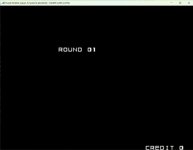
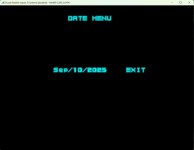
During my digging did I find some codes that activates "Round Select" and "Date Menu".

The Date that you can change, and that is saved to the EEProm, is just for the T-shirt Competition and is shown when you have completed all levels in the US version.

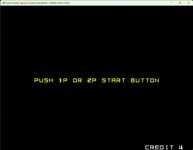
Round Select.jpgDate Menu.jpgT-Shirt Comp.jpg

To activate Round Select:
Keep Service button down during boot until "Service Switch Error" is displayed.
During the time the error message is displayed you push: P1 Start, P1 Start, P1 Start, Service, P1 Start.
If the code is entered successfully the Round select will be shown after the game select screen.

To Enter Date Menu:
Enter Service mode, Select configuration, Exit configuration, At the screen where you are asked if you want to save changes,
hold down: P1 Joy Up, P1 Button 1, P1 Start and P2 Start And the date menu will be displayed.
 
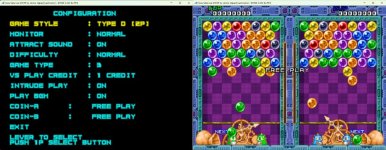
Here is the most recent patch of Puzzle Bobble with Free Play and other improvements ^^ Next version will include a region switch and a something more...:whistling:

Edit: Uploaded a small fix, now the "Free Play" text is properly displayed in attract mode...
 
Last edited:
@daskrabs Have you got time to test the latest patch? Good to know if there are any issues before I release the next update. :D
 
Back
Top