Sega Outrun 2 restoration.

Those boards can only be found in European cabs. It has test, service and demag buttons, volume pots and a credit board for the coin mech.

If you need to link the motherboards, you just need to connect them together with an ethernet cable (crossover will definitely work, maybe a straight through one will too) and set the network options in the test menu on both sides.
So, i dont need Link pcb? The way to connect them is to plug the ethernet cable into the chihiro and the other side of the cable to the other chihiro, right?
Thanks for your help.
 
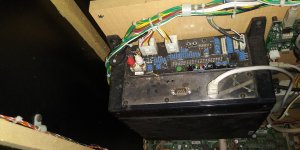
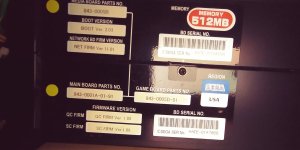
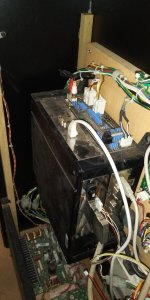
I'm going to start with the most complete machine. It has a sticker that says MASTER, so I understand that it is the main machine. I have the chihiro board and I have the I/O that I got from internet store. I put a photo in case you see that I need something more.
P.D.: If you look at the photo, on the wooden board there is a white shadow, of what seems to be something that I don't have. Maybe a power source for the GD rom?

1yX346Qy8HZqDm2?width=495&height=660&cropmode=none.jpg
 
The white part is where the Sun PSU should be (mounted on a vertical mounting plate).

The way to connect them is to plug the ethernet cable into the chihiro and the other side of the cable to the other chihiro, right?

Correct.
 
The white part is where the Sun PSU should be (mounted on a vertical mounting plate).
Ok. so i need to find 2 PSU 400-5443. I just did a google search.... and they are expensive and out of stock right now. At this point, I'm going to put this project on hold for a while until I resolve the monitor and power supply issues. Maybe i will do the pc psu conversion, as @Mrhide told me. Also need to find LCD conversion info.
Thanks for your help again
 
Any one can help in LCD conversion? If any one can help with brands, models etc... In ebay, i have seen selling some driving machines with LG 32" but not idea the model. I think must be 720P 60Hz and must have D-Sub (vga)
 
Hello again.
I have had this project stopped while waiting for a solution from the monitors. It seems that I have found a couple of monitors and I am waiting for the seller to meet me and show them to me and bring them home.
If everything goes well, I will soon start with all the restoration, since I did not want to start until I had all the pieces.
All the best.
 
Well
This pcb, supose to be the LINK? i think no. Maybe i need to find the pcb to link machine 1 with 2.

wReHuKPELX0B0oU?width=660&height=495&cropmode=none.jpg


yesterday i was cheacking cabinets again, and still a lot of work to have all the hardware. I dont know how i will solve the monitors problem....
Did you ever get the crt changed out for lcd? I 'm helping a church camp do the same thing. No video after connecting to vga port and crt to hdmi interface board. Using pin 1 for Red, 2 Green, 3 Blue, 4 ground, 13 & 14 horizontal & vertical sync all into Jamma connector. Not sure the vga connector is where the crt got video signal. Walked into retrofit blind. Any help or suggestions appreciated.
 
Did you ever get the crt changed out for lcd? I 'm helping a church camp do the same thing. No video after connecting to vga port and crt to hdmi interface board. Using pin 1 for Red, 2 Green, 3 Blue, 4 ground, 13 & 14 horizontal & vertical sync all into Jamma connector. Not sure the vga connector is where the crt got video signal. Walked into retrofit blind. Any help or suggestions appreciated.
Can you send pics? I tested in LCD and all works ok.
 
Looks like there is nothing plugged in the vga out
Sorry. With 100 kids running around I couldn't leave it out. The schematics of the game gave me pin outs as listed above. When I connect it to the vga port I get no video signal to the LCD. The status light blink red-green for several minutes then goto solid ON. Standard vga has pin 4 NC and ground on pin 5. I tried different combinations by rearranging the sync & gnd wires in the Jamma connector with no luck. Stupid question - do I need the crt to vga converter? First thing I tried was connecting straight from Sega vga to lcd. That didn't work. Ohmed vga cable - straight through pin to pin. I never saw game working. Crt was gone when I got there. Back on road tomorrow. Any suggestions greatly appreciated. Thanks.
 
Sorry. With 100 kids running around I couldn't leave it out. The schematics of the game gave me pin outs as listed above. When I connect it to the vga port I get no video signal to the LCD. The status light blink red-green for several minutes then goto solid ON. Standard vga has pin 4 NC and ground on pin 5. I tried different combinations by rearranging the sync & gnd wires in the Jamma connector with no luck. Stupid question - do I need the crt to vga converter? First thing I tried was connecting straight from Sega vga to lcd. That didn't work. Ohmed vga cable - straight through pin to pin. I never saw game working. Crt was gone when I got there. Back on road tomorrow. Any suggestions greatly appreciated. Thanks.
Can you send pics? I tested in LCD and all works ok.
Sorry. Not sure if you had time or desire to read any more of my post about changing out Crt for Led/lcd monitor but I'm at a deadend. Schematics I found in service manual are the only thing I have to go on and the video signal does not seem to be getting to the converter board. Still unsure if I need converter board. The red & green status lights flashing for a few minutes then both staying on makes me think there is an error in the game? Any suggestions how I can help this church camp get their game up and running???
 
Sorry. Not sure if you had time or desire to read any more of my post about changing out Crt for Led/lcd monitor but I'm at a deadend. Schematics I found in service manual are the only thing I have to go on and the video signal does not seem to be getting to the converter board. Still unsure if I need converter board. The red & green status lights flashing for a few minutes then both staying on makes me think there is an error in the game? Any suggestions how I can help this church camp get their game up and running???
Hi, I've been out of the arcade world for a while. Personal problems.
Basically, if with your VGA cable is connected to the Chihiro and to your LCD, if you don't see an image it can only be two things.
The cable is broken or the Chihiro does not get an image. Changing the CRT for LCD is plug and play, you don't have to do anything. It is a different thing to configure the output resolution, but the image has to give yes or yes. I don't remember if chihiro uses micro switches, but I don't think so. If so, look for the resolution setting.
If you have lights flashing, it means that Chihiro is giving an error. Surely video output.
 
Hello again.
It's been quite a while since I opened this post and said I was going to start restoring the two outrun2 cabs. For reasons of priorities, I have been focusing on other matters, until I have been freed from them. It's time to get back to the cabin project and today I've started to dismantle the first one.
They have some rust and a lot of restoration work. I also had one of the chihiro ones checked that doesn't give me a sign of image. The lights flicker but it doesn't give an image.
Here are some pictures of how far I've come in the MASTER cab

537%2110265&authkey=%21ANS0ZtW605buMCY&height=1024.jpg


537%2110229&authkey=%21ADnHHUTYxsUkdeY&height=1024.jpg


537%2110227&authkey=%21AFITpp6HOomRF0g&height=1024.jpg


537%2110219&authkey=%21AJzUiWngBlgF6PM&height=1024.jpg


537%2110214&authkey=%21AGGTOTPmXTa1chA&height=1024.jpg


In short, what I've done today, is disassemble all the components, take everything out of the metal chassis, remove the legs, the wheels, put the chassis on two support bases and start sanding. I've been gone all day in this process. It seems like a small thing, but I really have lost Sunday in this. The positive part is that I've already started working on them and now I just have to move on. I'll be posting more content throughout the week. Best regards
:):):):)
 
Hello again. It has been some time since my last update, but honestly I had abandoned the restoration until I had the energy and desire to keep pushing. Meanwhile, I have restored other cabinets that frustrated me less (Astro City, Net City, etc.)

From what I see in my last posted message, I was sanding and removing rust from the Master container and applying primer and paint. I will leave some photos of how it turned out, although I do not rule out painting it again because it did not turn out one hundred percent as I want. I also painted the CRT / dashboard stand in the original gray color.

photo_1_2026-03-29_19-19-18.jpg


The next step is to assemble the board with the electronic components and wiring. I had to buy the I/O and repair the FFB which had a burnt component. All the electronic boards have been cleaned and placed in their original location.


photo_2_2026-03-29_19-19-18.jpg


photo_3_2026-03-29_19-19-18.jpg


Now let's move on to my next stumbling block. I bought a CRT for the Master cabinet, but I thought I could use one of the nano chassis I have around here. To my surprise, the yoke on the Samsung A68KVL74X01 is high impedance 4 Ω / V 19–21 Ω

I need find a SANWA PM1745, that doesn't cost me a kidney, since this restoration has been a bottomless pit. I have positioned the CRT in its place while I find a chassis.


photo_6_2026-03-29_19-19-18.jpg


The following question comes up. What is the order of the supports that screw the CRT in place? I leave a photo to make it easier to understand. The same order for the two on top and bottom? Thanks. ;)


photo_4_2026-03-29_19-19-18.jpg
 
Last edited:
If it's anything like the Initial D cabinets (which are basically the same as Outrun 2 SP), its either a Sanwa 29E31S or a Weiya/makvision 3129D
 
Back
Top