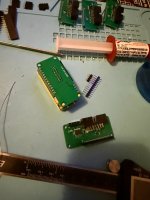
Universal Multi-Kit LCD Selector

Ah I didn't realize they finally released 10.x for this I haven't tested it but there's no harm in trying.
 
Ah I didn't realize they finally released 10.x for this I haven't tested it but there's no harm in trying.
Circling back to say that 10.x didn't work. Rebooted back to "FTHRS2BOOT" after dropping it over.

Using the suggested version on Git worked a treat and rebooted to "CIRCUIT PY" with no issue.

Also reporting in that the process works just fine on a Mac.

Loaded up System 2, System 18, M92 and MVG460 sets with no issues. Looks fantastic in person. Can't wait to finish these off and get them up and running. Great work @twistedsymphony, and thanks for sharing!
 
Circling back to say that 10.x didn't work. Rebooted back to "FTHRS2BOOT" after dropping it over.
that's a shame as I think that 10.x includes some improvements that might fix the web-interface issues. I'll have to see what's up with it once I have some time.
 
Keen to see how they turn out for M92 usage 👍
The clarity of the screen is amazing and the supplied M92 logos look great.

The selector is a lot smaller than standard selectors. But that’s not a bad thing.

I’ll hopefully have yours finished by the weekend and off.
 
The clarity of the screen is amazing
these screens continue to impress me, seriously pictures I've been able to take don't do it justice.
Circling back to say that 10.x didn't work. Rebooted back to "FTHRS2BOOT" after dropping it over.
I had some time to investigate the python 10.2.x release.
it seems that 10.x uses an updated UF2 bootloader. so the bootloader needs to be updated before circuit python 10 it can be installed.

Initial tests seem to show my current selector code running on it ok.

I'd recommend people stick with 9.8 for now as there are a couple of extra steps involved to get 10.x running and there's little benefit to it right now.
 
I made a quick jig stl to align the two halves when soldering. Photo shows soldering the interface PCB, but I would solder the ESP first, then flip it over to do the interface PCB.
 

Attachments

  • IMG_8554(2).jpg
    IMG_8554(2).jpg
    150.1 KB · Views: 47
  • Universal Selector (twisted) Jig.zip
    Universal Selector (twisted) Jig.zip
    46.3 KB · Views: 30
@twistedsymphony Have you tried getting this to work on the psikyo multi using the OLED ext connector? Not sure how much data is being transferred on that or not (haven't researched yet), but a remote access to game selection would be nice. I'm modifying a shell right now to house your selector, but I guess I should ask if it's even possible since you have one.
 
@twistedsymphony Have you tried getting this to work on the psikyo multi using the OLED ext connector?
I have not tried but, again it's the same situation as the older DS multis, where I'd need detailed technical information from aje_fr.

the existing selector design is made to work with Dip-switch based multis... that's what makes it "universal" in that if your multi uses dip switchs and you can wire it up then it can work. Getting it to work with more complicated multis that do SD card loading and their own existing LCD interface will need ground up customization... anything is possible but the work requires knowledge of how the existing system works.
 
Finally got these made up. @xodaraP assisted with the fabricating and tiny parts install on the controller PCB (my eyes are shit).

Tested on M92 and S18 Multis and it works absolutely lovely. Photos don't do the screen justice, looks much better IRL.

Shouts to @hatmoose for printing off the cradles too...

Looking forward to the release of CAERTF v1.3, so I can get this running on my System 2 Multi, and your stuff when it drops also @twistedsymphony - thanks for creating this!

IMG_1117.JPG
IMG_1120.JPG
IMG_1124.JPG
IMG_1125.JPG
IMG_E1114.JPG
 
Finally got these made up. @xodaraP assisted with the fabricating and tiny parts install on the controller PCB (my eyes are shit).

Tested on M92 and S18 Multis and it works absolutely lovely. Photos don't do the screen justice, looks much better IRL.

Shouts to @hatmoose for printing off the cradles too...

Looking forward to the release of CAERTF v1.3, so I can get this running on my System 2 Multi, and your stuff when it drops also @twistedsymphony - thanks for creating this!
Glad you like it!

For anyone who doesn't want to assemble by hand I have these for sale on bit-district.com
original selector: https://bit-district.com/optional-multi-lcd-selector.html
Apocalypse System 18/M92 selector: https://bit-district.com/lcd-selector-for-apocalypse-multis.html


Also the V1.3 is coming very soon. I just finished testing some production units on my own Namco System 2 Multi :D
caertf_darksoft_namco_system_2_multi_lcd_selector.jpg
caertf_darksoft_namco_system_2_multi_lcd_selector_back.jpg
caertf_darksoft_namco_system_2_multi_lcd_selector_finest_hour.jpg
caertf_darksoft_namco_system_2_multi_lcd_selector_front.jpg
caertf_darksoft_namco_system_2_multi_lcd_selector_installation.jpg
caertf_darksoft_namco_system_2_multi_lcd_selector_rolling_thunder_2.jpg
 
Nice! Does it also work for the System 1 Multi?
No, system 1 multi selector port is pinned differently and does not include power or reset pins.

So a small adapter board would need to be added to add in those connections.
 
Back
Top