BladeZX
Champion
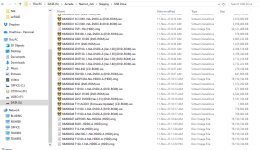
I ran the ps1 script on the folder from archive.org and there are 80 files that are over 750gb
Is that normal?
Is that normal?

4. 2x6 dongle flashed by Pi with SC2 image + ODE with only SC2 ISO image on thumb drive: NO GOODThanks for the thoughtful reply!
I updated the firmware after coming across this thread on the RPi forums. According to that thread, there was a hardware revision that necessitated updating the firmware. So, it wouldn't be necessary if you were running an older rev.
Yep, all of the images are in the root directory.
Reset wire works as expected.
I did some troubleshooting that points to an issue with the ODE image selection:
1. ODE on separate 256 with production GvG Next dongle and only GvG Next HDD image on thumb drive: OK => ODE is OK
2. Production SC2 dongle + SC2 CD in a CD drive on 246 hardware: OK => 246 HW is OK
3. 2x6 dongle flashed by Pi with SC2 image + SC2 CD in a CD drive: OK => 2x6 dongle is OK
4. 2x6 dongle flashed by Pi with SC2 image + ODE with only SC2 ISO image on thumb drive: NO GOOD
5. 2x6 dongle flashed by Pi with SC2 image + ODE with only SC2 ISO image on thumb drive + autorun.txt: OK => ODE is OK on 246
6. 2x6 dongle flashed by Pi with SC2 image + ODE with all all images on thumb drive + Pi: NO GOOD (with or without autorun.txt)
Step 6 has the same behavior as before: after rebooting, the JVS init screen etc. comes up, but it never progresses further from there. The ODE LEDs show initial activity while booting, but eventually it appears to get stuck and the X led flashes briefly every 5 seconds or so.
I grabbed the log file after step 6 (see attached). I don't see any obvious errors, though this line might be suspect?
pi-monitor: mysimulatordrive=USB:
Should this be showing a specific USB port likeUSB0orUSB1or something?
Assuming the logs look okay, the next step is to inspect the ODE; I found info on the CLI interface here and can try that out tonight.
I'll post some pics later, but I stripped everything down to the bare minimum for these tests and I'm pretty sure everything's correct. One question: does the Pi<->ODE USB-A to microUSB cable need to be plugged into a specific USB port on the Pi? Apart from that, I don't see what could be wrong.

Yeah, just that. The specific commands in the file are:Remind me what is in the autorun.txt - it sets master/slave right? So if that is the case, yeah i would agree this all looks good with all the different devices working. (great job on all the combinations - let's us quickly narrow this down).
interface set slavedisk searchGreat, I will do that tonight. Thanks!I think somehow/somewhere the disk selection isn't happening correctly on the ODE. So I would get it all booted up, and the disconnect the Rpi microsd card, and then connect a PC to it via microsd and use Putty to connect (serial) to the com port that pops up, and use the CLI to see what disk image has been selected. Let us know what you see there. I think "status" will give you that information and "interface" will give you information on master/slave, etc.
I ran it in a power shell window as adminNo - the USB Drive folder should contain (after its all done running) about 220GB of files.
80 files sounds right - but as its converting it should be deleting the old files from the working directory and putting the new files in "USB Drive". Maybe you didn't run the script with admin rights - so it can't delete the old working files out of the original directory?
Ok - and in the "USB Drive" folder - you are saying that you have 750GB of files, not 220GB? Can you show a screenshot of what is in that folder with the sizes?I ran it in a power shell window as admin
THIS is the link I got the files from
I downloaded the torrent
Thanks for the thoughtful reply!
I updated the firmware after coming across this thread on the RPi forums. According to that thread, there was a hardware revision that necessitated updating the firmware. So, it wouldn't be necessary if you were running an older rev.
Yep, all of the images are in the root directory.
Reset wire works as expected.
I did some troubleshooting that points to an issue with the ODE image selection:
1. ODE on separate 256 with production GvG Next dongle and only GvG Next HDD image on thumb drive: OK => ODE is OK
2. Production SC2 dongle + SC2 CD in a CD drive on 246 hardware: OK => 246 HW is OK
3. 2x6 dongle flashed by Pi with SC2 image + SC2 CD in a CD drive: OK => 2x6 dongle is OK
4. 2x6 dongle flashed by Pi with SC2 image + ODE with only SC2 ISO image on thumb drive: NO GOOD
5. 2x6 dongle flashed by Pi with SC2 image + ODE with only SC2 ISO image on thumb drive + autorun.txt: OK => ODE is OK on 246
6. 2x6 dongle flashed by Pi with SC2 image + ODE with all all images on thumb drive + Pi: NO GOOD (with or without autorun.txt)
Step 6 has the same behavior as before: after rebooting, the JVS init screen etc. comes up, but it never progresses further from there. The ODE LEDs show initial activity while booting, but eventually it appears to get stuck and the X led flashes briefly every 5 seconds or so.
I grabbed the log file after step 6 (see attached). I don't see any obvious errors, though this line might be suspect?
pi-monitor: mysimulatordrive=USB:
Should this be showing a specific USB port likeUSB0orUSB1or something?
Assuming the logs look okay, the next step is to inspect the ODE; I found info on the CLI interface here and can try that out tonight.
I'll post some pics later, but I stripped everything down to the bare minimum for these tests and I'm pretty sure everything's correct. One question: does the Pi<->ODE USB-A to microUSB cable need to be plugged into a specific USB port on the Pi? Apart from that, I don't see what could be wrong.
Awesome - that was my guess - I also had a usb drive that just didn't work - same as you, no reason why, but glad you got it figured out!I got it working! The reason it wasn't booting was equal parts silly and strange - it was the USB flash drive that holds the game images.
I have three identical flash drives, which I bought at the same time. Two of them work fine, but the third - the one I had loaded with all the 2x6 images - isn't readable by the ODE. It's readable on every other computer I plug it into, but not the ODE, not even after reformatting. I figured this out by connecting to the ODE via USB with minicom on my Mac and running the `disk search` command. With the bad drive, the command would always fail with no files found. On the other drives, it discovered a disk image to load.
Anyway, I loaded all of the images onto one of the good flash drives, and now everything works perfectly.
Thanks again for all the help, Matt! It took me longer to get there than I would have liked, but I'm very happy to finally have this working.
Yes, the archive.org has not been updatedBy any chance did you have to copy those CD images over with the separate link, or did that work from the archive.org set as-is?

 \o/ yeah.