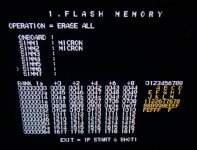
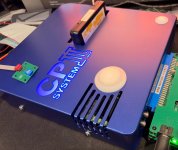
CPS3 Not enough memory error (Simms 3-6 not showing name)

That picture shows UltraSimms not original Simms.


Can you tell me what do you mean with that? You can't exchange simms, the pinout is completely different, the ones on the right will only work there and they have 4 chips only one side and they go in positions SIMM1 and SIMM2.
The ones that go on the left, where you can fill up to 5 SIMMS, those have either 2 chips or 8 chips and they can't go on the other side.

I packed away the OG Simms. What I did was put 1 Simm at a time on the board and it would show the name but when I fill the Simms properly altogether they don't show up it looks like photo on first page. Sorry for confusion.

Wait and see now what needs to happen.
 
I packed away the OG Simms. What I did was put 1 Simm at a time on the board and it would show the name but when I fill the Simms properly altogether they don't show up it looks like photo on first page. Sorry for confusion.
OK, so if it fails with original SIMMS, then the problem is either with simm slot or buffers. Check those or have someone checking them.
 
Xodara flashed the cart to Ultra Bios now the Micron Simms (first two) show up others do not.

As you all said it's most likely the buffers, slot, or other.

When Xodara has more free time I'll drop off the CPS3 board to him.

Thank you everyone for amazing help wait and see what happens next.
 

Attachments

  • Error-Micron.jpg
    Error-Micron.jpg
    358.2 KB · Views: 18
We are glad that you've narrowed down the issues. Now let's hope for a nice and quick fix of your PCB.
 
Back
Top