DSB Clone (Digital Sound Board SEGA)

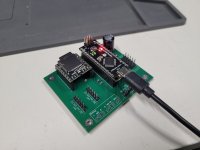
Unfortunately I haven't had much luck getting my DIY board to work. I did find out the ground traces for the DFPlayer were missing, I added some botch wires but no difference. I also struggled to program the Arduino with XLoader - it required 57600 baud rate to even attempt to upload the .hex file and it would always fail at the end, ended up compiling and uploading the code through the IDE instead. Are any of the LEDs on the Arduino supposed to light up (besides RX from game commands) when attempting to play music?
 
Can you show what you built ?

Xloader might not work with new board without an update. But as you said, code is available so you can use Arduino IDE.
LED should blink when a command is received.
 
Can you show what you built ?

Xloader might not work with new board without an update. But as you said, code is available so you can use Arduino IDE.
LED should blink when a command is received.
I've done another inspection on the board and found out that the diodes were bringing the DFPlayer voltage down to 1.3v. I've cut the VCC trace off and connected it directly to the Arduino's 3.3v output, I am finally able to view the blue light activity on the DFPlayer! Will be testing on a machine tomorrow to ensure all is good 🙂
 

Attachments

  • 20251002_214918.jpg
    20251002_214918.jpg
    122 KB · Views: 27
I don't know how you could have this kind of errors on power rails if PCB files are untouched.

From my memory the dfplayer is powered from 5v with a diode only to lower a little bit so it avoids noise.
 
Can I operate the DSBClone by powering it through Arduino and its USB port rather than through its CN5 connector, the IDC 2x5 vertical connector?

The CN5's 4 ground pins aren't connected to anything as far as I could tell when I checked the DSBClone repo's Kicad files, so I don't really trust using that CN5 connector as intended.
 
Can I operate the DSBClone by powering it through Arduino and its USB port rather than through its CN5 connector, the IDC 2x5 vertical connector?

The CN5's 4 ground pins aren't connected to anything as far as I could tell when I checked the DSBClone repo's Kicad files, so I don't really trust using that CN5 connector as intended.

Short answer: no.

CN5 is indeed connected to ground by the ground plane: change your kicad setup to display it.
Powering the board with the VCC plug of the Arduino might actually work, but this is not designed for it.
 
Can you show me how/where the CN5 is connected to the ground plane? I would show pics but I don't have availability to a computer with Kicad right now.

IIRC I tried clicking on the visibility masks of the Kicad PCB viewer and can't seem to confirm that on my end. It seems to show the 4 ground pins on their lonesome, not part of the ground plane somehow.
 
Enable the ground plane display (on the left toolbar), look at DRC, look a schematic.
Sure it's connected, if you don't believe me... then show me it's not connected ?
 
Okay I turned on "Draw Zone FIlls" on the left toolbar and now it shoes that the ground pins are indeed connected to the global ground plane shown there. Sorry for the accusation
1764521437239.png
 
Should I be using the "20240104-spikeout.hex" firmware for "Spikeout: Digital Battle Online" or is it only meant for "Spikeout: Final Edition" specifically?

Should I be compiling and running the firmware from the "fix/latency-race-conditions" branch or is that untrustworthy due to being made from a AI coding agent apparently?
 
This hex is made especially for Spikeout. This game have a strange behavior with fade in/out and repeating of BGM.
Simply use the main hex and see if they work fine: if it ain't broke, don't fix it.
 
Is anyone else running this with two cabinets? I built a few of these and whatever cabinet is set as slave always seems to go out of sync and run behind eventually. I tried debugging it a bit with Rom1 and I tried multiple different micro SD cards of all different sizes and brands, tried MP3 and WAV, tried swapping the boards themselves and it always seemed to be the slave cabinet. Unfortunately this makes them kinda unusable at the moment. If anyone has any input I'd love to know!
 
tried swapping the boards themselves and it always seemed to be the slave cabinet.

I assume you also tried swapping Master and Slave settings in the test menu? That should prove pretty conclusively whether it's the boards or something else.
 
I don't think it's related to the DSB itself: it just play when asked for. There is no difference from master to slave from the DSB point of view.
It's been used on a Sega Rally "4 cab setup" for years. Also many people took 2 or 4 more boards, without issue.

Maybe the game is bugged and for whatever reason the slave cabinet gets laggy over time.
 
Is anyone else running this with two cabinets? I built a few of these and whatever cabinet is set as slave always seems to go out of sync and run behind eventually. I tried debugging it a bit with Rom1 and I tried multiple different micro SD cards of all different sizes and brands, tried MP3 and WAV, tried swapping the boards themselves and it always seemed to be the slave cabinet. Unfortunately this makes them kinda unusable at the moment. If anyone has any input I'd love to know!
Which games have you tried? Standard original Chihiro linked OR2 cabs through crossover cable do tend to get out of sync sometimes - you probably already know this but worth bearing in mind if you are only trying Chihiro games.
 
cable too long? or not shielded?

It's all original wiring in a JP Daytona 2 Twin, which is the same on both sides.

I assume you also tried swapping Master and Slave settings in the test menu? That should prove pretty conclusively whether it's the boards or something else.

So I have and it mostly follows the slave setting but seemingly not always. It sometimes will randomly go behind on the master cabinet as well and it depends on what screen you're on.

And again, I've tried multiple matched SD cards of varying sizes. Sandisk, PNY, no-name small ones. Tried MP3, WAV, tried swapping the DSBClone boards and the game boards around, even tried another model 3 stack and swapping between the 3 and it does it on all of them. The only thing I have not done yet is pulling the program ROMs off the ROM boards and comparing to ensure they're the exactly the same (don't have a ton of time these days). But at the moment this is not usable for me.
 
One more test you can do: resetting DSB board in game

When the bgm are out of sync, simply reset the board by pressing the reset button. The dsb will reboot, without affecting the game at all.

If the bgm get synced, then it's DSB fault.
If the bgm are still ouf of sync, it's the game.
 
Last edited:
Back
Top