DARKSOFT Games Fixed to work with DIMM

Hello! Long time lurker and buyer, (almost) first time poster. Does anyone know if the Japanese version of Ninja Assault (ninjasltj) has a proper netboot version? Been searching everywhere for it and am coming up completely empty...I find the typical mame romset but nothing more. I have the cab for it, now just need the Japanese bin...
 
So I've been playing the Ninja Assault bin on Netboot, and after about thirty minutes of attract mode, it locks up and won't play unless I restart the cab. It's being played on original hardware (inside an original cab), and both my WORLD version cartridge and the Japanese version cartridge don't have this issue. Just thought I'd report this in case it helps anyone in the future.
 
So I've been playing the Ninja Assault bin on Netboot, and after about thirty minutes of attract mode, it locks up and won't play unless I restart the cab.
interesting... is this hang issue 100% reproducible and happen all the time?

which BIOS is in use? iirc this game is buggy and does weird R/W, so may rely on some specific version
 
If the game works with the original cart it should be good. Ninja Assault requires a specific BIOS for the colours to render correctly.

Found my noes the following BIOS versions work with Ninja Assault:

NAOMI1:
21576D - OK
21576E - OK
21576G - BAD
 
Last edited:
interesting... is this hang issue 100% reproducible and happen all the time?

which BIOS is in use? iirc this game is buggy and does weird R/W, so may rely on some specific version
It was, yes. I ran it four times recently and it hung at 26 minutes, 5 minutes (weirdly), then 30 minutes. The fourth time is ongoing right now. I didn't time it the first time it happened but it was roughly between 20-30 minutes, I think. Each hang occurred while the NAMCO logo was onscreen--it never froze during any other parts of the attract mode. No buttons worked, including menu and the start buttons (in fact the flashing of the start buttons themselves on the cabinet stopped).

Just as a test, I disabled the NAMCO high score screen from the test menu and, as of writing, the game's been running in attract mode for 40 minutes without issue. Gonna keep it going and see if that cleared it up! I'll get the BIOS info for you after that but I know it's a multibios. My dip switches are set for Japan on the Naomi.

Hope any of that helps!
 
That's the multi region BIOS, right?
Yes, it is. I can grab a picture of it in a minute. And unfortunately, the game locked up again, this time around the hour-fifteen minute mark :/ that's at least a good bit longer than usual. But it's ALWAYS on this same screen:

EDIT: Added picture of the BIOS.

IMG_7703.jpg
IMG_7704.jpeg
 
Last edited:
so i tried for a few hours to install and run WS99 but i think I've done something silly! i have a baseball panel in my Nac currently so thought it would be good to test out.

steps so far
-downloaded new rom
-extracted with 7z
-added .gz to end of file name as it ended in .bin ( probably where i have gone wrong)
-used ssh to add file to Pi boot/roms
-edited wipi .csv config file to add a new line for the game and added file ending in.gz Copied world series baseball csv line and just changed game name and file names
-in wipi menu clicked on the import csv from boot ( or similiar wording)
-new game shows in games list menu
-click run and world series baseball runs. wrong game 😒

Sega Naomin1-smlg99_cracked.bin.gzwsbbgd.pngwsbbgd.mp3World Series Baseball / Super Major League 1999World Series\nBaseball 1999SegaSportsAAMA - Green (Suitable For All Ages)HorizontalDigital (Stick)YesNogenericnoneBDH1n1-smlg99_cracked.bin.gz
[td width="27pt"]
1999​
[/td]​
cheers
 
so i tried for a few hours to install and run WS99 but i think I've done something silly! i have a baseball panel in my Nac currently so thought it would be good to test out.

steps so far
-downloaded new rom
-extracted with 7z
-added .gz to end of file name as it ended in .bin ( probably where i have gone wrong)
-used ssh to add file to Pi boot/roms
-edited wipi .csv config file to add a new line for the game and added file ending in.gz Copied world series baseball csv line and just changed game name and file names
-in wipi menu clicked on the import csv from boot ( or similiar wording)
-new game shows in games list menu
-click run and world series baseball runs. wrong game 😒

Sega Naomin1-smlg99_cracked.bin.gzwsbbgd.pngwsbbgd.mp3World Series Baseball / Super Major League 1999World Series\nBaseball 1999SegaSportsAAMA - Green (Suitable For All Ages)HorizontalDigital (Stick)YesNogenericnoneBDH1n1-smlg99_cracked.bin.gz
[td width="27pt"]
1999​
[/td]​
cheers

I cant help you setting that up. Seems complicated but bin is a standard format for images like this. Not sure why it would need to be gz?

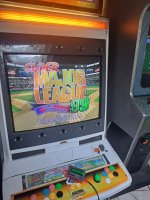
Regardless it works great on CF kit! Thanks @MetalliC!

20260218_040931.jpg
 
I am playing Ninja Assault with MP07-IONA-US set to JYU.
Since I play on the LCD, the screen flashing action the moment I pull the trigger is no longer necessary, but this flashing easily tires my eyes.
I wonder if there might be a patch that bypasses the flashing operation and eliminates flashing.
 
I'm using the old piforcetools.
Just edit the gamelist.py with notepad to add more titles.
Maybe wipi will be similar
 
Back
Top