
You are using an out of date browser. It may not display this or other websites correctly.
You should upgrade or use an alternative browser.
You should upgrade or use an alternative browser.
Home Arcade System
- Thread starter RGB
- Start date

Thank you for the Quick Replypin out is in the HAS manualMay I please kindly ask - Which is the 1 Player and Coin Button on my Joystick ?
I have connected 1 Undamed DB15 USB Decoder to the H.A.S.
I have connected a Hori Joystick to the DB15 USB Decoder
I would like to know which buttons are the 1 Player and the 1 Coin Buttons ?
Thank You Sir
Well I was thinking that since I have the Undamed DB15 USB Decoder attached to my XBox360 Pad
I do not need to have any poking around with wires
Does the Start and Select buttons on the XBox360 now become the 1 Player and Coin Buttons ?
Is this how it works ?
Thank you and kind regards Sir

Yes it should be. That's how the layout is on my 360 TE fightstick.Does the Start and Select buttons on the XBox360 now become the 1 Player and Coin Buttons ?
Is this how it works ?

mathewbeall
Enlightened
Checking on this again.... this pinout didn't work....If I were to get this:
https://www.amazon.com/Uxcell-a1501...+breakout&qid=1572230959&s=electronics&sr=1-2
Are the pinouts this?
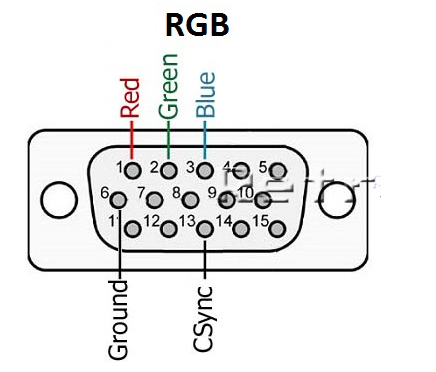
mathewbeall
Enlightened
Figured it out - the diagram above *is* correct - but to hook up to an arcade monitor - you need to change CSYNC to "TTL" instead of "75R".
Now I can throw away my old www.retroelectronik.com supergun
Matt
Now I can throw away my old www.retroelectronik.com supergun
Matt
I am connect my HAS with a VGA Cable to the OSSC using the HAS Video Port
Everything works
but just that I get no sound
Does the VGA Cable from the HAS to the OSSC carry Audio signals transmissions ?
My OSSC is connected to my LCD Monitor with a HDMI Cable
I was wondering if the HDMI Cable carries Audio signals transmissions ?
How do I get Audio with my currently Setup ?
Thanks
Everything works
but just that I get no sound
Does the VGA Cable from the HAS to the OSSC carry Audio signals transmissions ?
My OSSC is connected to my LCD Monitor with a HDMI Cable
I was wondering if the HDMI Cable carries Audio signals transmissions ?
How do I get Audio with my currently Setup ?
Thanks

VGA does not carry audio. Use the 3.5mm audio jack from your HAS to your OSSC. You may need to alter the settings in your OSSC to set audio input to the 3.5mm audio jack.
mathewbeall
Enlightened
VGA connections do not, and have never carried audio signals.
There is an 1/8 stereo mini plug on the HAS, and at least on my OSSC - VGA is V3-IN, and on the other side there is a A3-IN that is also a 1/8 stereo mini plug.
I am guessing you just need a 1/8" stereo male to male cable and you should get audio.
Matt
There is an 1/8 stereo mini plug on the HAS, and at least on my OSSC - VGA is V3-IN, and on the other side there is a A3-IN that is also a 1/8 stereo mini plug.
I am guessing you just need a 1/8" stereo male to male cable and you should get audio.
Matt

XtraSmiley
Legendary
As others have said, VGA does NOT carry audio, use the 3.5 jack.I am connect my HAS with a VGA Cable to the OSSC using the HAS Video Port
Everything works
but just that I get no sound
Does the VGA Cable from the HAS to the OSSC carry Audio signals transmissions ?
My OSSC is connected to my LCD Monitor with a HDMI Cable
I was wondering if the HDMI Cable carries Audio signals transmissions ?
How do I get Audio with my currently Setup ?
Thanks
HDMI DOES carry audio out, but of course you need to get audio to the OSSC first.
Finally, if you update your OSSC firmware, make sure you use the version with a lower case "a" with it, example, 81a, 84a, not 81, 84 etc. The "a" is the firmware with audio integrated.

hoagtech
Enlightened
I couldn't find the recommended PSU other than the Meanwell RT-65A.
I am looking for a recommendation for a decent one on ebay in the US that supports more than 65w.
or at US based arcade company that is reliable and ships fast.
I am looking for a recommendation for a decent one on ebay in the US that supports more than 65w.
or at US based arcade company that is reliable and ships fast.


jord4n313
Beginner
i just got mine from twisted quarter last week, it came in fast and is working great with my HAS and CPS2 Multi
hoagtech
Enlightened
HASburger


Brentradio
Champion
That's F'n Sweet!
HASburgerWcheese...


.
HASburgerWcheese...
.
Last edited:

kryssss
Enthusiast
HAS received !
I thank you Mike, great job !
I thank you Mike, great job !

captain-graubart
New User
- Joined
- Nov 29, 2016
- Messages
- 5
- Reaction score
- 1
Still waiting for the next pre-order window. 

mugen_ketsueki
Professional
Can’t wait for mines. Pre ordered mines during the June/July Pre Order. Hope I get an email soon.
Yeah same here! I’m still really excited for it!Can’t wait for mines. Pre ordered mines during the June/July Pre Order. Hope I get an email soon.

metro_digital
Beginner
Also pre ordered around July, but no email yet. Thought I might have missed out, but it's reassuring to see others still waiting from then.