Home Arcade System

I associate Old Skool with cheap third packaged accessories on Amazon, but I'm guessing you're talking about the UK-based modder. I haven't used cables from either, though.

Do you have another cable you can try? I've always used Retro Gaming Cables (UK), Insurrection Industries (US), and Retro Access (US).
Yeah, it’s the UK folk… unfortunately I have no other cables. I’m tempted to buy a Packapunch cable, but it takes ages to ship from UK to EU (thanks to brexit) and it’s a little bit expensive for diagnosing the issue. A friend of mine said it “could” be normal that arcade boards may require CRT calibration on a per PCB basis, but I don’t know. I get white whites with home consoles (which don’t use the supergun and that cable).
But I have a nice Fluke multimeter… I lack electronic skills (I’m a software guy) but I can follow indications 😃.
 
I just received my HAS 5.1,

What's the pin out on the HD-15 video conector ?

What's the easiest way to get component video out?

Thanks
The pinout is "RGBS" and matches this - https://consolemods.org/wiki/AV:RetroTINK-4K#HD-15

With the exception that the HAS outputs +5V on pin #9.

Thanks ,what if I get the SNES adapter RGB sells, would that work with my SNES HD retrovision cable?
It should, but to make sure I'd ask if the cable uses only RGBS signals. Some Component Video adapters rely on Luma for Y (like the NESRGB Component adapter).

It would be better to just get a VGA (RGBS compatible) to Component Video adapter, that's less expensive and less adapters total.

@Locutus73 - tough to say really, could be the cable, could be the pot on the HAS. Have you tried to wiggle the brightness pot on the HAS? Maybe some contacts in the potentiometers have corroded after so many years of no use and being in the same position? Just a guess, I haven't got reports on anything like that yet. I'm happy to have a look at that unit if nothing helps, or send a replacement 3-gang pot if you can solder.
 
But I have a nice Fluke multimeter… I lack electronic skills (I’m a software guy) but I can follow indications 😃.
It might be tricky with just a multimeter. To test it, I'd disconnect the HAS from the PCB game, accessories etc., feed the RGB on the JAMMA connector (pins #N, #12, #13) with a stable 3V, and measure voltage at the video output connector and see if it's the same/similar on all three signals.
 
Last edited:
@Locutus73 - tough to say really, could be the cable, could be the pot on the HAS. Have you tried to wiggle the brightness pot on the HAS? Maybe some contacts in the potentiometers have corroded after so many years of no use and being in the same position? Just a guess, I haven't got reports on anything like that yet. I'm happy to have a look at that unit if nothing helps, or send a replacement 3-gang pot if you can solder.
Ok, I’ll try to diagnose it somehow… I should get another arcade PCB in the near future and if it’s not yellowish so it’s the MVS. At least I’ll be able to determine which side of the JAMMA interface is the culprit.
But I appreciate your offer, I might consider shipping the supergun (and the cable) to you if I’m not able to sort it out.


It might be tricky with just a multimeter. To test it, I'd disconnect the HAS from the PCB game, accessories etc., feed the RGB on the JAMMA connector (pins #N, #12, #13) with a stable 3V, and measure voltage at the video output connector and see if it's the same/similar on all three signals.

That’s interesting and I think I might try it when in my office.

Thank you for the tip.

I’ll report back (as soon I find out something)
 
Ok, I’ll try to diagnose it somehow… I should get another arcade PCB in the near future and if it’s not yellowish so it’s the MVS. At least I’ll be able to determine which side of the JAMMA interface is the culprit.
But I appreciate your offer, I might consider shipping the supergun (and the cable) to you if I’m not able to sort it out.


That’s interesting and I think I might try it when in my office.

Thank you for the tip.

I’ll report back (as soon I find out something)
I should add that the supergun must be powered (the +5V rail is enough), and the GND of the HAS PSU and the GND of the 3V supply should be tied.
 
About the HAS JAMMA extension cable :

Should I adjust the voltage according to the reading on the extension cable or the reading on the HAS itself?

Right now it shows different values on both.
IMG_8965.jpeg
 
I should add that the supergun must be powered (the +5V rail is enough), and the GND of the HAS PSU and the GND of the 3V supply should be tied.
I see, thank you.
I was thinking: what if I buy a JAMMA male connector like this
IMG_1087.jpeg

and wire it to a female SCART connector (pin 7 blue, 11 green, 15 red, 20 csync and ground on 5, 9, 13 and 17) and I feed the whole HAS->minidin-scart cable soldered by me->scart switch->scart-bnc cable soldered by me->PVM with the Super Famicom since I know that connecting it to the switch I get white whites?
Just to exclude the MVS is the cause? What are the chances of the MVS having unbalanced RGB?

TIA
 
BTW, I use a DarkSoft MVS cart on the MV2FS so I could run Artemio’s test suite with a 100% white screen and use the Fluke to test R, G and B in various points: at the JAMMA end, anfter the JAMMA-MVS adapter I forgot to mention, at the minidin end and at the SCART end.
Is it useful? Will I get meaningful values with the Fluke 117 (I read it’s more an electrician tool rather than an electronic one)?

TIA
 
@RGB so, I was able to perform a "simple" test, not exactly yours tho.
I used the Artemio's 240p test suite and I displayed a 100% white screen; I measured the voltage between the video ground (JAMMA pin 14) and Red (pin 12) and I got 2.33V, then Green (pin N) and I got 2.4V and finally Blue (pin 13), but I got 1.5V... I think my MVS is messed up. Am I right or it could still be something in the HAS/SCART dropping the voltage?
I'm a software guy, I only know electrons somehow spin and goes around circuits...

TIA
 
I am interest in getting a HAS 5.1. But unsure of what would be the best way to hook it up to my CRT Sony Wega via Component.
For me the easiest i think would be, is to hook it up via HD retrovision cables. I have all the misc dongles for the Mini-Din 9 cable and I have the SNES cable.

the above Quote from RGB and merrygoomba says ...

Thanks ,what if I get the SNES adapter RGB sells, would that work with my SNES HD retrovision cable?
It should, but to make sure I'd ask if the cable uses only RGBS signals. Some Component Video adapters rely on Luma for Y (like the NESRGB Component adapter).

but on the website says for the adapter it says the following.

  • Compatible with the SNES NTSC US/JP RGB Scart cables.
  • Compatible with the third-party SNES plugs only, the official Nintendo-branded plug will not fit.
  • It does not work with Composite Video, S-Video or Component Video cables.
So am a little confused, the hd retrovision is a third-party so it should fit ? and i assume it has the correct circuitry to convert this RGB to Component? but then site goes on to say will not work with Component video cables. i assume that is mentioned to let you know you can just some kind of regular pass-thru cables ?

My main question is can anyone confirm that this RGB SNES adapter on the HAS site does work with SNES HD retrovision Cables ?

or is the other option to get the HD-15 to SCART cable from HAS and then use the RGB2COMP from Retrotink
this option is fine i just like to Save some money on buying The RGB2COMP if the HD retrovison cable do work?
 
So a quick recap: with few electronics experience (again, I’m a software guy), but a lot of patience, will to learn and understand and the help of a good multimeter and ChatGPT I traced down the problem to the HD74LS05P after tracing all the paths between the DAC resistors and several ICs… basically it handles the common dark bit and the shadow register… it seems to be stuck on the pins for the blue channel, resulting in darker blues and therefore in a yellowish image.

My technician will replace it and possibly socket it along with the two HD74LS273P.
 
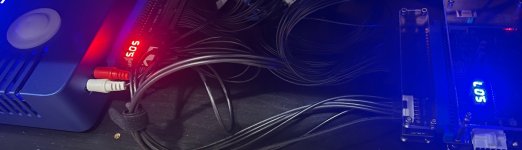
@merrygoomba - that's a large voltage drop. At this point I'd use a multimeter to check voltage on both the JAMMA extension and the HAS. Also, make sure the 6pin power cable of the extension is oriented correctly - the connector on one end should be marked and the mark must face the JAMMA PCB game.

@Jxmx3 - I just checked the retrovision page, and it looks like their adapter/cable takes RGBS, so it should work fine (as long as your TV accepts low-res Component Video signal).

@Locutus73 - The HAS shouldn't cause such a voltage drop on the blue channel, but before touching anything on the MVS, I'd perform a test to see if the HAS really outputs equal video levels.
 
@merrygoomba - that's a large voltage drop. At this point I'd use a multimeter to check voltage on both the JAMMA extension and the HAS. Also, make sure the 6pin power cable of the extension is oriented correctly - the connector on one end should be marked and the mark must face the JAMMA PCB game.

@Jxmx3 - I just checked the retrovision page, and it looks like their adapter/cable takes RGBS, so it should work fine (as long as your TV accepts low-res Component Video signal).

@Locutus73 - The HAS shouldn't cause such a voltage drop on the blue channel, but before touching anything on the MVS, I'd perform a test to see if the HAS really outputs equal video levels.
@RGB Thanks,after moving the cables around and unplugging and re-plugging the harnesses,I'm getting voltage readings that are closer.
 

Attachments

  • IMG_9027.jpeg
    IMG_9027.jpeg
    112 KB · Views: 33
@Jxmx3 - I just checked the retrovision page, and it looks like their adapter/cable takes RGBS, so it should work fine (as long as your TV accepts low-res Component Video signal).

Awesome !! Yeah TV will accept 240/480i over component.
I’ll place an order. Thanks for the help.
 
Back
Top