
You are using an out of date browser. It may not display this or other websites correctly.
You should upgrade or use an alternative browser.
You should upgrade or use an alternative browser.
How to Create a Zero Key (PIC) For Net Booting and CF on NAOMI Chihiro and Triforce
- Thread starter rtw
- Start date


Those were two different cfs so two different sectorsThe sector you used in the other thread was:
gcfi -r -p -s 0x3434 -d v:\ -l ABC.BIN -g ck.bin
Which is not the same as posted above
Thanks

skate323k137
Enlightened
Glad you finally got it sorted.
When I made cards I had one computer which would read the sector right and one computer which would write the cards right. What a silly dance.
When I made cards I had one computer which would read the sector right and one computer which would write the cards right. What a silly dance.

Someone should just make an adapter and programmer for the Raspberry Pi. I'm pretty sure you can bit-bang PATA over the GPIO header it would make a cheap and simple way to read and write these things.


Mrhide
Legendary
this works for me: (your first one)

WellandGardner
Beginner
So what’s the consensus here? Using gq4x4 and wanting to boot cf. I’m assuming that idc’s byteswapped hex is appropriate for my setup? Naomi 2… has anyone tried idc’s hex’s with NetBoot ?
WellandGardner
Beginner
Bump

So what’s the consensus here? Using gq4x4 and wanting to boot cf. I’m assuming that idc’s byteswapped hex is appropriate for my setup? Naomi 2… has anyone tried idc’s hex’s with NetBoot ?
Yes, the byteswapped hex should be fine with the GQ-4x4 and NAOMI 2. I have this exact setup, albeit the older GQ-4X.
This hex will allow both netboot and CF loading (ABC.BIN) on NAOMI 2 with Net DIMM jumpers set accordingly.
WellandGardner
Beginner
Thank youYes, the byteswapped hex should be fine with the GQ-4x4 and NAOMI 2. I have this exact setup, albeit the older GQ-4X.
This hex will allow both netboot and CF loading (ABC.BIN) on NAOMI 2 with Net DIMM jumpers set accordingly.

nipple
Enthusiast
Ok i have been trying to burn a pic for a Naomi to NetBoot, with a current GQ4x4 for a few hours.
I tried the .bin from the first post with all the settings and could not get it to work.
The only file that has worked is @idc and the byte swapped version they provided.
I kept all programming settings as per the file, but the only change I made was to drop the speed down to 0 for reliability on the verify stage on the right hand side of the software.
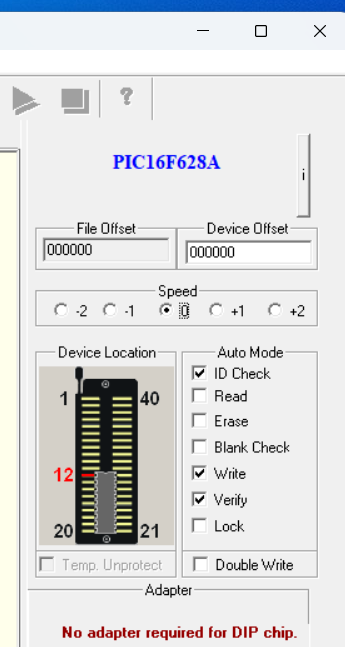
cheers
I tried the .bin from the first post with all the settings and could not get it to work.
The only file that has worked is @idc and the byte swapped version they provided.
I kept all programming settings as per the file, but the only change I made was to drop the speed down to 0 for reliability on the verify stage on the right hand side of the software.
cheers
Can I ask a few more questions?Let me try explaining.
Every GD-ROM title is encrypted using a unique encryption key (think very long password) the key chip stores the decryption key (password). You can't mix and match keys and titles.
The deal with the zero key is for preservation using copied titles. GD-ROMs at this point are dying like flies. Naomi etc don't have an option to *not* decrypt titles. So, the community agreed that all copied titles would be encrypted using the same key (password): all zeros. Zero key.

So, the ROMs found for the various emulators work with the "Zero Key," meaning the PIC chip setup for the emulator and Zero Key works too?
Since the Net DIMM version 4.03 supports CD-Rs, could I burn a CD from the ROM and use the Zero Key?
Is it possible to make a backup copy of one of my GD-ROMs in a format that I can then burn onto a CD-ROM?
Thanks in advance for any reply.
Can I ask a few more questions?
So, the ROMs found for the various emulators work with the "Zero Key," meaning the PIC chip setup for the emulator and Zero Key works too?
Since the Net DIMM version 4.03 supports CD-Rs, could I burn a CD from the ROM and use the Zero Key?
Is it possible to make a backup copy of one of my GD-ROMs in a format that I can then burn onto a CD-ROM?
Thanks in advance for any reply.
So, the ROMs found for the various emulators work with the "Zero Key," meaning the PIC chip setup for the emulator and Zero Key works too?
Since the Net DIMM version 4.03 supports CD-Rs, could I burn a CD from the ROM and use the Zero Key?
Is it possible to make a backup copy of one of my GD-ROMs in a format that I can then burn onto a CD-ROM?
Thanks in advance for any reply.

the Goat
Grand Master
Works with "Zero Key" means it has been encrypted with a password of all zeros. ie. "00000000000" So you need a PIC with all zeros on it.So, the ROMs found for the various emulators work with the "Zero Key," meaning the PIC chip setup for the emulator and Zero Key works too?
Not all DIMM cartridges are NetDIMMs. NetDIMM loads the game over the network. If you want to use the a GD-ROM drive, you can save money and get a regular DIMM cartridge.Since the Net DIMM version 4.03 supports CD-Rs, could I burn a CD from the ROM and use the Zero Key?
I have no idea about using a CD-R in a GD-ROM drive or what ROMs to use in order to burn on a CD-R.
I'm sure it is possible. But I have no idea how to go about that.Is it possible to make a backup copy of one of my GD-ROMs in a format that I can then burn onto a CD-ROM?

Hi, I'm new to the Naomi scene. I got a Naomi 2 with a 256MB NetDIMM and updated it to version 4.02; I'm using the EPR-23605C multibios and a NetDIMM zero key, but I'm running into two issues with netbooting.
First, when I send a command to load an Atomiswave game and it's running, I can't send another game—it becomes unresponsive; this only happens with installed Atomiswave games. The second problem is that *Ikaruga* freezes just a few seconds after starting. Has anyone else experienced these issues, and how can I fix them?
I should mention that I'm doing all this from my PC using transfergame.exe.
Thanks.
First, when I send a command to load an Atomiswave game and it's running, I can't send another game—it becomes unresponsive; this only happens with installed Atomiswave games. The second problem is that *Ikaruga* freezes just a few seconds after starting. Has anyone else experienced these issues, and how can I fix them?
I should mention that I'm doing all this from my PC using transfergame.exe.
Thanks.
