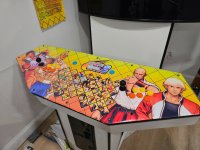
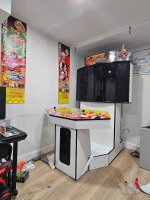
MiSTer JAMMA options?

At least this will confirm if its your Ali express
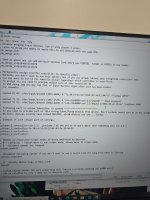
Or the settings .ini
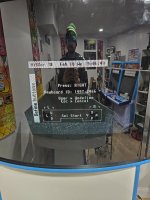
I'm still having keyboard as main buttons.

Video works audio works.

I went to the ini files and played 1 and 2 have the keyboard assigned. Dobjust delete all the words? I'm kinda lost
 

Attachments
  • 20260218_140641.jpg
    20260218_140641.jpg
    212.5 KB · Views: 58
  • 20260218_140651.jpg
    20260218_140651.jpg
    232.7 KB · Views: 59
  • 20260218_144450.jpg
    20260218_144450.jpg
    227.8 KB · Views: 57
Last edited:
I'm still having keyboard as main buttons.

Video works audio works.

I went to the ini files and played 1 and 2 have the keyboard assigned. Dobjust delete all the words? I'm kinda lost
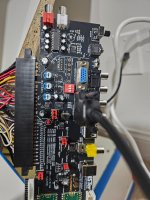
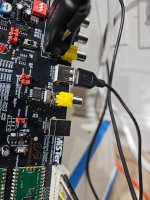
You need run a USB cable from thr mister to the jamma adapter, thr input to the right of the yellow av connector.
 
You need run a USB cable from thr mister to the jamma adapter, thr input to the right of the yellow av connector.
O wow thank you!!

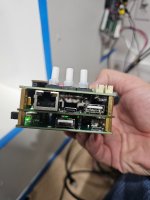
What part of the mister am I connecting it to? Is it just USB to USB or is it the type c ?
 

Attachments

  • 20260218_202740.jpg
    20260218_202740.jpg
    205.5 KB · Views: 39
  • 20260218_202827.jpg
    20260218_202827.jpg
    128.6 KB · Views: 37
Thats not the right way, you either connect a usb b port on board to mister usb a or usb c (rpi) on board to usb a mister
 
Sweet! If you use a kick harness and the buttons are wrong you may need to remove the jumpers to the right of the jamma connector.
I got the kick harness working and finally updated my set up. Being able to play fightcade from my cab is a dream
 

Attachments

  • 20260417_220315.jpg
    20260417_220315.jpg
    199.4 KB · Views: 43
  • 20260417_220445.jpg
    20260417_220445.jpg
    211.6 KB · Views: 42
Sweet! If you use a kick harness and the buttons are wrong you may need to remove the jumpers to the right of the jamma connector.
One problem I'm having is when I try to play 2 players , both my stick and buttons control 1 player. How can I get player 2 to work?
 
One problem I'm having is when I try to play 2 players , both my stick and buttons control 1 player. How can I get player 2 to work?
On Mister , go the ini and you had to un comment the merge lines that were embossed on the back.
1776904610986.png
 
To get 2-player mode working on MiSTer when both sticks control Player 1, you must map each controller individually in the main menu, not just inside the game core. Properly define P1/P2 joysticks and buttons, and consider using the no_merge_vidpid setting in your mister.ini file if using identical encoders to stop input merging.
MiSTer FPGA Forum
MiSTer FPGA Forum +1
Steps to Fix 2-Player Controls:
  • Map Controllers Individually: Go to the main MiSTer menu, press F12 (or your menu button), and select "Define Joystick Buttons." Map Player 1 first, then map Player 2.
  • Test Input: Use the InputTestcore under Utilities to confirm that the MiSTer sees both devices as distinct inputs.
  • Identify Encoders: If you are using dual USB arcade encoders (like Zero Delay USB), the system might treat them as the same device. You may need to identify their Vendor ID/Product ID (VIDPID) to map them separately.
  • mister.ini Configuration: Open your mister.ini file and ensure input mapping allows for multiple controllers, as suggested in discussions about 2Player Arcade games on the MiSTer FPGA Forum.
  • Arcade Core Specifics: Some cores, like Neo Geo, require you to map both players within the core menu (OSD -> Menu -> Map P2 Buttons) even if you have mapped them in the main
 
I'm confused by un comment, do I just get rid of all the numbers?
If it has a ; in front of the line that means the line is commented out. You would make sure those lines don't have comments, then when you launch a game you need map player 1 and player 2 in the controller mappings of the game. When you start a game, if you hit a button on p1 side you should see a pop up at the top saying a controller was detected for p1, then if you hit a button on p2 side it should said the same for p2. Then open the menu and map both controllers for the game.
 
Back
Top