FS MP07-IONA-US JVS/USB I/O Board v3.11: Worldwide Sales & Troubleshooting Thread

For Sale
I'm not sure if this has any negative effect if you just always select the maxium?

It's mentioned in the instructions. Setting 0 for unused special inputs will optimize performance.

Analog, rotary and screen position inputs are normal JVS functions, as are analog and character outputs. JVS Dash is exA-Arcadia's own JVS protocal that allows faster response times.

ArcadeOtaku lists capabilities of most common JVS boards:

https://wiki.arcadeotaku.com/w/JVS

A translated English version of the Jamma Video Standard can be found on trap15's site:

http://daifukkat.su/files/jvs_wip.pdf
 
That's a good idea :)
Hi all,
Is this "MP07-IONA-US JVS/USB I/O Board" device still available for purchase ?
I'm interested in getting one or two of these.
Hi Rafo ^^
C'est de la bombe, j'en ai un c'est le top tout passe ttx, ttx2 , es3 ..... fonce :D
 
Hi from Barcelona, Spain

I just got a Taito Type X2 board, and wanted to use USB controllers on it. I bought a v2 in ali-express, but I couldn't manage to make it work, the led would blink all the time, but the board would never detect it, and just booted to a "no I/O detected" error.

I have now bought a v3 in red sun systems, and it works fine, a regular USB controller is detected and I have 6 buttons + coin + start in games like SF4. However, the button configuration is not great, as, using an xbox controller layout, I get:
X=1 Y=4
A=2 B=3
LB=5 LR=6

According to the manual, you can change the button layout:

② Layout config mode (LED - fast blink)​

On pushing TEST and SERVICE together, it enters the layout config mode.After firmware ver 1.22, you need to press them together over 0.5 second to enter the layout config mode.After firmware ver 1.40, you need to press both for at least 0.5 and at most 5 seconds together.You don’t need to push them exactly together, e.g. keeping TEST down and clicking SERVICE will work.
In the button layuout mode, you will choose physical buttons in the following order, coin, start, button1 to 10. If you push multiple buttons together, you can assign multiple physical buttons into one button. You don’t need to push them at the eaxctly timing as well. When you press a button, IONA starts recording all pressed buttons until all buttons are released, then assign them all to the target button. You continue this sequence until all 12 buttons are mapped. If you leave this mode before settings all, remaining buttons are remained to have no assignment. If you configure no button, exceptionally IONA doesn’t update layout at all and move to the next mode.


However, I haven't managed to make this work. If I press TEST and SERVICE together, I think I get in the "customize settings" instead, as explained here:

https://toyoshim.github.io/iona-us/papers/us_v3_11.pdf

Any idea on how could I change the button layout? Thanks!

On another note, I have also tried it with a mini-PAC from ultimarc, which encodes two controllers in a single USB, and it doesn't work. It has a LED which gives a green light when powered on and used with a PC, but when connected to the MP07, the light is off.
 
Last edited:
What firmware does your device have and what revision PCB is it?

Just update the firmware on the PCB and hopefully that will make it work as expected. Something may have glitched out and hopefully it just works as described. Failing that, toyoshima is very helpful if you reach out, and if it's a broken unit, I'm sure he will replace it.

It’s a high level device which takes a bit of smarts to navigate if you want to delve deeper into the heart of its functionality; but it’s had good testing and functionally works. Hopefully someone chimes in with a fix.
 
Last edited:
Thanks for your reply! Don't worry for the cloned device.

About the genuine unit, it is v3.11 with latest firmware, but I currently don't have a USB A to A cable to check it. I'll try to get one and see if it helps.

I think it works as expected, but just as @notmurray mentions in the previous page, it is hard to figure how to navigate the options. In the instructions, pressing TEST+SERVICE together, seems to be the same command to both "transit operation modes", and select one of the 6 customizable settings, so it is not clear how to enter the "layout config mode" I am interested in.

When I press TEST+SERVICE, I believe I enter the selection of the customizable settings, since it blinks once, twice, thrice... up to 6 times each time I press a button, so I undestand it is cycling through these 6 customizable settings.

So what I want to know, is how to enter "layout config mode". If somebody can give me particular directions, that would be very helpful. Thanks in advance!
 
Thanks for your reply! Don't worry for the cloned device.

About the genuine unit, it is v3.11 with latest firmware, but I currently don't have a USB A to A cable to check it. I'll try to get one and see if it helps.

I think it works as expected, but just as @notmurray mentions in the previous page, it is hard to figure how to navigate the options. In the instructions, pressing TEST+SERVICE together, seems to be the same command to both "transit operation modes", and select one of the 6 customizable settings, so it is not clear how to enter the "layout config mode" I am interested in.

When I press TEST+SERVICE, I believe I enter the selection of the customizable settings, since it blinks once, twice, thrice... up to 6 times each time I press a button, so I undestand it is cycling through these 6 customizable settings.

So what I want to know, is how to enter "layout config mode". If somebody can give me particular directions, that would be very helpful. Thanks in advance!
I would really recommend picking up a USB A-A wire, because the best way to configure the IONA would be via. WebUI. You're able to change through various pre-set configurations on the WebUI and re-flash in a few seconds according to the game you'd like to play. You could also look at the Github thread for supplemental pre-sets that haven't been pushed to the live version yet.

If you could tell me the exact source controllers you intend to use (Xbox or Playstation), I can upload the configuration/flash file that covers both Player 1 and Player 2 on here. I have various pre-sets like the default three - six button games (i.e. TGM3, CvS2, etc.) or special cases (i.e. Monkey Ball, Power Stone, Crazy Taxi 1/3, OutRun2) that should work with both Playstation and Xbox controllers out the box.
 
Thanks for your reply, I will get a USB A-A cable and have a look at the configuration tools. I currently use an 8bitdo controller with Xbox layout, but I also have other controllers and arcade sticks. The current default configuration in my Xbox controller is good for most games that use up to 4 buttons, except for 6 button fighting games like SF4. So I think I will be fine, thanks again!

Just one more question: the 6 configurations by default, that are cyclable using TEST+SERVICE, do they have different button layouts? Just to check if one of them may work better in some games.
 
Thanks for your reply, I will get a USB A-A cable and have a look at the configuration tools. I currently use an 8bitdo controller with Xbox layout, but I also have other controllers and arcade sticks. The current default configuration in my Xbox controller is good for most games that use up to 4 buttons, except for 6 button fighting games like SF4. So I think I will be fine, thanks again!

Just one more question: the 6 configurations by default, that are cyclable using TEST+SERVICE, do they have different button layouts? Just to check if one of them may work better in some games.

From what i can tell, and i could be completely wrong here, but it seems that the diagram that shows you all the TEST+SERVICE buttons maps is outdated and does nothing? Which is really confusing. I configure it through the web interface as mentioned, and then the TEST+SERVICE buttons only seem to allow you to switch through the profile numbers you created. So You press it and it flashes once, you are in profile 1, press it again and it flashes twice, now profile 2. But this diagram here just seems to not do anything now and ends up just making it confusing for a noob like me, even though it says version 1.40 and later.

So if you use the web interface, YOU set the config for each profile, then you save it and write to the device. So the 6 profiles can be completely different based on what you setup.

1772118599820.png
 
Yes, that is the same conclusion I reached, it looks like that diagram is outdated and TEST+SERVICE only cycles the 6 configuration profiles, which you can tell by the number of flashes. I will make more tests when possible. Thanks!
 
Hey I'm trying to add USB controller functionality to a couple of my JVS cabs (Vewlix L and New Net City). Would I be able to use the "additional JVS" port to plug in a SEGA IO board for passthrough? Or is that port only for adding support for Player 3 and Player 4? I want to be able to use the controls on the cabinet and USB controllers simultaneously for Players 1 and 2. That way players can hotswap between controller and cabinet controls.
 
Last edited:
Hi all! Hope that this thread is still open.
I got a little problem with my MP07 v2. I have a well working TTX2
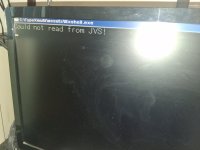
I followed the guide for a right firmware flash then I choose 1.48, flashed it for good, JVS assign the address (led stop blinking) for the MP07 but then an error accured:

COULD NOT READ FROM JVS!

What can I do to pass this problem?

Thanks a lot for your time and sorry for my bad english (I'm italian :))
 

Attachments

  • 20260323_083457.jpg
    20260323_083457.jpg
    123.9 KB · Views: 23
Last edited:
Tested : ES3X with Tekken 7 and PS3 DualShock 3 - fw 2.22 - working fine.

Is MP07-IONA-US working with a Lindy mobo ? (shooting games...)
If it's working, do I have to press HiD (hardware id) or USB button at the bottom of this page to add a new device ? https://toyoshim.github.io/iona-us/setting_en
 
Qu: I have the 3.0 ford, and I booted up house of the dead 2 with guncon3 and sensors plugged in in 1P and 2P.

The trigger and screen in our map to different buttons, but most importantly the gun XY is not registering at all no matter how move the sensors or guns .

I've read that the board would automatically detect the guncon3 and sensors .

What should I be doing differently?
 
Qu: I have the 3.0 ford, and I booted up house of the dead 2 with guncon3 and sensors plugged in in 1P and 2P.

The trigger and screen in our map to different buttons, but most importantly the gun XY is not registering at all no matter how move the sensors or guns .

I've read that the board would automatically detect the guncon3 and sensors .

What should I be doing differently?

It seems X & Y axis "are not set at all" in the GC 3 profile... and the Guncon 3 couldn't be set like a mouse absolute.

You should try Cobra the Arcade profile, but it should be the same thing...
 
@system11 I've entered the options config mode, but unsure how to set button 3 to on. I have the USB-C for power, USB A>B cable plugged in the JVS port of the IONA and the other side to the Naomi's USB port & a Xbox 360 controller with a play & charge kit USB cable connected to USB port 1. The Xbox light comes up, but other than that it's unresponsive. With which controller did you set button 3 to ON?

EDIT: tried a PS4 controller as well. I think button 3 should be circle. So I press circle on the PS4 controller and keep it pressed while pressing TEST on the IONA to exit the options config mode right?

EDIT2: the PS4 controller maps fine whereas the X360 one won't. But still can't get the option config set. I give up for now.. :/
Years later but I’m trying to do this now
 
Back
Top