Namco System ES3 Teardown and some basic info

so latest attempt with new memory got me to the part where it erifies disk, etc (doing a green ok at each) but it failed at mounting game image saying it could not be found.
Again, this is going super slow (like 30 minutes to get to this point).
every power cycle attempt yield a diff error.
My thoughts are that either the HD is dying, or is currumpted.

Is it posible to clone the HF to. diff HD OR SSD? or what are my options?
 
I have a mario Kart that when I received it was missing the video card and bitlocker was tripped.
I installed a new OS and have it running on tecknoparrot but was hoping to find some help with the jvs io board.
I can not figure out how to configure it or see if it works.
Any help would be greatly appreciated.

I found Niko's tool but both apps freeze when I try to inject the dll.
I founded a newer repo of the older version but cant get it to compile under x86.
 
so i sent my lost land adventure for repair, and namco is saying the mobo needs to be replaced and want to charge me over $1000, because it has corrosion.
any ideas before i break the bank? :(
 
Hi guys, just wanted to share my experience with the ES3 platform. But first I truly want to express my gratitude to everyone on this post who helped me fix my game!! Thanks a lot.
I'm a game operator in France and we have a Time Crisis 5 since it came out. 2 Weeks ago the GPU of one of the pc died ||
Not the first time I had an issue with an ES3 game, a RAM stick from our Mario Kart DX died, but it was a really easy fix compared to this.
So I naturally ordered a new GPU on Ebay, it was a MSI GTX760, different from the one I saw on this post, mine had the white MSI marking on the fan & on the side.
And Bitlocker triggered, that's when I found this post and helped me a ton.
First thing I did was trying other vbios by using an USB stick running FreedOS with nvflash on it but no luck..
So then I had 2 options that were also mentionned here :
1: Get a CH341a, grab the vbios from the old card
2: Desolder the U505 memory from the old gpu and solder it on the new one
I went with option 1 since I really didn't wanted to damage it, because I guess if you somehow loose the good vbios you are screwed.
Here's how I did it
Have a bootable USB key with Linux mint, install flashrom on the usb, plug your ch341a, somehow pray that the clip that goes onto the U505 have a good contact otherwise the command to grab the vbios will just not work.
After a few tries it worked, had my vbios.
went back on the ES3, plugged my freedos USB with nvflash, flashed the old bios and VICTORY! :thumbsup:
Thanks again to everyone who helped on this topic, I wouldn't have made it without all the research you guys did.
If anybody in the future needs help regarding this issue I'll gladly help.
But I'm wondering, If the U505 memory was dead, there is no possible way to get the right vbios right?
a581a5b6-3157-40bb-8d11-ff53d0748a74.jpg


(Don't mind the dying left screen, this also has to be done :) )
 
You can get this bios from another card. The ES3 share only 2 bios versions: one for "green marked" cards and the other for the "no marking".
They are both very early releases, very close in term of version.

About TC5: every TC5 die within a few years. At this level I start to believe we can say it's a factory defect.
Good job anyway :)
 
The online version of Tekken Tag Tournament 2 Unlimited, had to be connected to Namco servers all the time, if for some reason it was not connected, it will allow you to play but up to a maximum of 1000 credits, then you will need to connect to Namco in order to verify your subscription. Later releases of many games don't need that anymore and are called OFFLINE version.
 
My Tekken 7 bricked as well, but I guess it wasn't the offline version. When shopping for a TC5 from sellers who don't know anything, is there an easy way to identify offline version?
 
My Tekken 7 bricked as well, but I guess it wasn't the offline version. When shopping for a TC5 from sellers who don't know anything, is there an easy way to identify offline version?
An easy way to identify offline versions of games is by looking if they have the card/online icons on the bottom right or left. Offline versions do not have the icons present
 
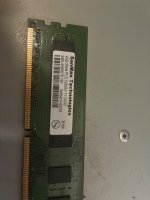
By the way, the memory was one piece at the time of purchase (as shown in the picture).
 

Attachments

  • IMG_0701.jpeg
    IMG_0701.jpeg
    351.6 KB · Views: 44
Greetings guys! I am hoping to get some help from the great people here. I have this ES3 system original game, complete with dongle and router. However, 1 of them started to have a graphics problem and I went ahead to get another same GPU but the BIOS wasnt compatible. I certainly hope that it has not bricked my game and now I wanted to flash the BIOS but I am a totally noob on this. Is there anyone who has done this flashing with a full tutorial that I can read up? Many thanks in advance!
 
Greetings guys! I am hoping to get some help from the great people here. I have this ES3 system original game, complete with dongle and router. However, 1 of them started to have a graphics problem and I went ahead to get another same GPU but the BIOS wasnt compatible. I certainly hope that it has not bricked my game and now I wanted to flash the BIOS but I am a totally noob on this. Is there anyone who has done this flashing with a full tutorial that I can read up? Many thanks in advance!
Hi, I’ll be willing to help as much as I can
It’ll take some time to write everything down as a tutorial for somebody who really doesn’t know how to do this sort of stuff
I have to remember how I did mine a few months back first haha
Give me a few days I’ll come up with something
 
I want to say I had this thread with notifications on but it doesn't anymore? Just happened to see "ES3" and wanted to hop in.

I've made decrypted "master" images of almost every game. Only reason I haven't shared more openly is because ES3 is a real bitch to work on, lot of dumb little things to trip people up, and I'm not good at compiling tools or notes good enough for an end user with lower technical abilities to follow reliably. Trying to support remotely is also a real PITA. I think for Tekken specifically, there'll be a solution that should just work for everybody, just needs to be tested before distribution.

I'm probably not going to read up too much of what I missed, but I do want to throw my hat back in to get updates for this thread. I have a really strong desire to see this hardware be end-user serviceable, which it really is not rn.

@kml42 there is a Star Wars/Mach Storm multi someone made. It should be usable to perform repairs to your PCB. It will disable TPM/BitLocker, and allow you to replace PC components without having to muck about the BIOS or anything dumb.

@Darksoft I'll hit you up at some point to discuss what can/should/shouldn't be discussed/distributed here. I don't remember if we talked about ES3 yet.

Right now, I'm super under stress with too many tasks/projects on the table, including a few new ES3 dumps, so I don't really want to take on too much more, BUT anyone who needs support for their systems can reach out to me. It will take a longer time, but I'm also willing to service anyone's ES3 for more obscure stuff (namely anything but Tekken 7 atm) for free.
My ES3 won't turn on. I came on here to see if I can get some tips to fix it but I saw that you mentioned a multi for the Star Wars and mach storm. What would I need to do something similar for my unit. Any information you can provide would be appreciated
 
My ES3 won't turn on. I came on here to see if I can get some tips to fix it but I saw that you mentioned a multi for the Star Wars and mach storm. What would I need to do something similar for my unit. Any information you can provide would be appreciated
Sorry, I've had this tab open to respond to you for a month and we're just not able to help. There's too much going on, I can't walk someone through this.
 
Back
Top