replacing scsi cd-rom drive with scsi sd card adapter?

Try updating the firmware on the Blue SCSI? It should work, you have the correct ISO. This seems like a configuration or firmwarfe problem. I wouldn't worry about the SD card speed warning, it probably does not matter at all for this use case. The CPS3 only uses the disc for validation, nothing runs off of it during gameplay.

Burning the ISO to CD-R shoud "just work" as long as your drive will read it. Sometimes, old CD drives have issues reading CD-Rs, but I've found that the Panasonic drives Capcom used work without issues.
 
@msamiullah @kazuo
Thank you for your help

I updated the firmware to the latest and I tried with a different SD card but still no success.
When I turn on the CPS3 I get a full blank screen, nothing more.
I pasted the full log file below.

The most concerning part are the two timeout messages
- `scsi_accel_rp2040_finishRead timeout`
and
- `WATCHDOG TIMEOUT, attempting bus reset`

Also, there's a `Quirks: Apple` mode enabled that I'm not sure if it can be related.

I've ordered a new SD card and I'll test it tomorrow. I will also try to enable Parity and disable the Quirk mode by setting a .ini file.
I'll post the results later.

I wonder if I should downgrade the firmware to something much older like the one someone posted in a different thread. I thin it was from around 2023.

Platform: BlueSCSI (Pico1)
FW Version: 2025.08.02-rel Aug 2 2025 16:25:01
Flash chip size: 2048 kB
I2C Supported

=== SD Card Info ===
SD card detected, exFAT volume size: 15189 MB
SD Name: SL16G, MID: 0x03, OID: 0x53 0x44
Speed grade set to reclocking system
Initial Clock set to 133MHz
Reclocking the MCU to 200MHz
Setting the SDIO clock to 40MHz
After reclocking, system reports clock set to 200MHz
======== Reinitializing BlueSCSI after reclock ========

=== Global Config ===
bluescsi.ini not found, using defaults

=== Finding images ===
=== Finding images in / ===
== Opening /CD10_2048-WZv1.iso for ID:1 LUN:0
---- Configuring as CD-ROM drive

== Platform supports ROM drive up to 1465 kB

=== Configured SCSI Devices ===
ID: 1, BlockSize: 2048, Type: Optical, Quirks: Apple, Size: 45584kB, Removable

Clock set to: 200MHz
Initialization complete!
INFO: Pico Voltage: 3.217V.
scsi_accel_rp2040_finishRead timeout
SCSI DMA state: READ
Current buffer: 0x00000006/0x00000006, next 0x00000000 bytes
SyncOffset: 0 SyncPeriod 0
PIO Parity SM: tx_fifo 0, rx_fifo 0, pc 6, instr 0x000060C8
PIO Data SM: tx_fifo 4, rx_fifo 0, pc 17, instr 0x0000201A
PIO Sync SM: tx_fifo 0, rx_fifo 0, pc 0, instr 0x00000000
DMA CH A: ctrl: 0x0102B021 count: 0x00000006
DMA CH B: ctrl: 0x001FC007 count: 0x00000000
DMA CH C: ctrl: 0x0103400B count: 0x00000001
DMA CH D: ctrl: 0x01014809 count: 0x00000001
GPIO states: 0x1773F87D
--------------
WATCHDOG TIMEOUT, attempting bus reset
Platform: BlueSCSI
FW Version: 2025.08.02-rel Aug 2 2025 16:25:01
GPIO states: out 0x1633FEFF oe 0x0A5C8FFF in 0x1733FAFF
scsiDev.cdb: 0x00 0x00 0x00 0x00 0x00 0x00 0x00 0x00 0x00 0x00 0x00 0x00
scsiDev.phase: 6
SCSI DMA state: IDLE
Current buffer: 0x00000000/0x00000000, next 0x00000000 bytes
SyncOffset: 0 SyncPeriod 0
PIO Parity SM: tx_fifo 0, rx_fifo 0, pc 6, instr 0x000060C8
PIO Data SM: tx_fifo 0, rx_fifo 0, pc 14, instr 0x000090A0
PIO Sync SM: tx_fifo 0, rx_fifo 0, pc 0, instr 0x00000000
DMA CH A: ctrl: 0x0002B

 
I should had mentioned that the cps3 works correctly and can play games when using the original Panasonic CD-Rom reader.
Only when using BlueSCSI I have problems
 
The official docs mentions that whatever is after the "-" will be ignored so I haven't tried with that particular file name. In all my tests the file name always was in the format "CD10_2048-xxxx.iso" .
Said that, I tried with just one file in the root too and also downgraded the firmware ( BlueSCSI_Universal_2024-12-08_2eecf5a1 ) but no luck. Disabling the "quirk = apple" I shared above didn't work neither.
I'm starting to think that my BlueSCSI unit have some kind of problem... Maybe I should try a different seller
 
Hello
Problem solved!
Seems like I needed to connect the power cable. After that it worked at the first try
For now I used a micro usb cable to the pico. I’ll get a proper mini 4 pin cable later, but for now it worker and was able to write a full game to the simms
Thank you all for the support
 
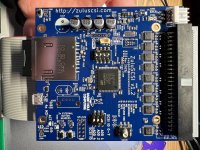
These are the settings that worked for my ZULU2SCSI. No external power needed. Named the image “CD1.iso” and put it in the sd card’s root. Hope this helps someone.
 

Attachments

  • IMG_4952.jpeg
    IMG_4952.jpeg
    300.8 KB · Views: 51
Hello, I would like to know if it's possible to use BlueSCSI with the original game. If so, where can I find images of the original games?
 
Hello, I would like to know if it's possible to use BlueSCSI with the original game. If so, where can I find images of the original games?
if you could find a MAME CHD set its in there, once you find it then you can convert those CHDs to ISOs/BIN. Look at the archives, ISOs might be there as well.
 
I'm asking if it's possible to use BlueSCSI with an original game, because I have the original Street Fighter 2nd Impact CD and I made an ISO copy with ImgBurn and it didn't work. Note: I use the same BlueSCSI with a Darksoft ISO. The board I have with the original 2nd Impact cartridge works normally with the CD.
 
I might be copying the CD incorrectly. Could someone advise me on how to copy the CD for use with BlueSCSI?
 
Because I have the game CD and I thought it would be simple to make a copy. And the CHD also needs to be converted to ISO, right?
 
Back
Top