SEGA Lindbergh Documentation + Preservation Project - Help needed!

There used to be a site that had the encryption key(s) for GDROM(s) , i think it was on guru's site, but i can't find it, we should try to recapture that data

I found the link, but its dead.. does anybody have this data?

http://members.iinet.net.au/~lantra9jp1/gurudumps1/naomi/index.html

This was described in the document called " THE DEFINITIVE GUIDE TO CONVERTING MAME's CHDs to CF/NETBOOT "
 
Last edited:
We are not against the discussion or study of Lindbergh, but when it comes to defeating security we cannot have them hosted on our forum. You can use some external website that may link to what users might be interested in. I hope this makes sense.
 
Hello, I know this topic is not up to date, but I still wanted to ask. I have a request: I’m not sure if there is a game disk available, but there was a machine released by Sega called Bejeweled. I also need its recovery disk. I don’t exactly remember the hardware specifications, but would it be possible to add this to the list for anyone who might have it?
 
Hello, I know this topic is not up to date, but I still wanted to ask. I have a request: I’m not sure if there is a game disk available, but there was a machine released by Sega called Bejeweled. I also need its recovery disk. I don’t exactly remember the hardware specifications, but would it be possible to add this to the list for anyone who might have it?
This topic is up to date actually, well 99%. There's definitely not a game called Bejeweled for Sega Lindbergh. Sorry can't help with that one.
 
Hello,


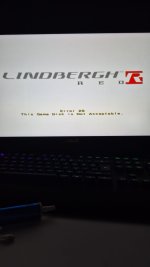
When I try to install software on the Rambo machine, I encounter this error. I have burned the CD using both Nero and Free ISO Burner, but I still couldn’t solve the problem. Is there anyone who can help me? I burned it on a CD using Windows 11.
 

Attachments

  • IMG-20260324-WA0003.jpeg
    IMG-20260324-WA0003.jpeg
    44.3 KB · Views: 33
  • IMG-20260324-WA0005.jpeg
    IMG-20260324-WA0005.jpeg
    107.8 KB · Views: 35
I dont know if that drive is accepted by Lindbergh setup kernel. Might be that. It might check that you have the right Lindbergh as well.
 
Did you burn it on a DVD-R ?
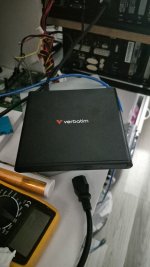
Yes, I burned it using a DVD writer. I tried every method, but it didn’t work. I use the same DVD writer on my Windows computer, and when I connect it to the Lindbergh system via USB, I hear the detection sound. However, after that, I get this error during startup. I couldn’t figure out if the problem is with the burning process.
 
Hello,


When I try to install software on the Rambo machine, I encounter this error. I have burned the CD using both Nero and Free ISO Burner, but I still couldn’t solve the problem. Is there anyone who can help me? I burned it on a CD using Windows 11.
Error 28 is displayed when SEGABOOT is unable to verify the alpha-DVD. ie. it knows you are using a copy.

You have 2 choices:
1) Obtain an original install DVD;
2) Patch Segaboot to not care about the alpha checks.
 
Error 28 is displayed when SEGABOOT is unable to verify the alpha-DVD. ie. it knows you are using a copy.

You have 2 choices:
1) Obtain an original install DVD;
2) Patch Segaboot to not care about the alpha checks.
How do I need to do the second option? Could you explain it to me?
 
How do I need to do the second option? Could you explain it to me?
I dont think this "patch" has been done, but that would involve modifying an original CF to bypass security or something like that. We don't allow for those to be published here. I think your best option is to get an original DVD.
 
As far as I understand, I won’t be able to reinstall the software on the Rambo machine using the file I downloaded. Is that correct?
 
Back
Top