Tekken 7 FR - How to link?

Hi guys, sorry if I get in the way but it is clear that @darkgame is forced to totally depend on a translator, so it certainly has great difficulty in understanding the concepts in English.
I am Italian and I wrote in Italian to @darkgame in PM but he strangely replied in English using Google translate and I do not understand why ...
Anyway I am here to offer @darkgame the possibility to send his ES3 to my laboratory in order to restore the functioning of the game board as it was originally.
I gladly do the work for free, you just have to pay the shipping costs!
So we can put an end to this whole series of confusing messages 🤣
 
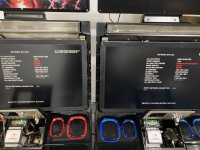
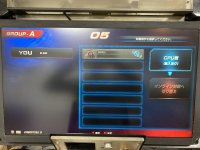
So I'm having troubles linking my cabs they both test good on local but I'm getting this everytime i try to play local play.
d5226dc6-04dc-4135-82d8-e663792c0ebc.jpg
 
What am I doing wrong?

Cabs are set to A-Red and A-Blue.

The cabs can see what character is being played on the other, so obviously link is working to some degree, but how do I actually interact with the other cab? The screenshot shows Shaheen being played on A-Blue cab, but I can't select it.

Is there something I'm missing in the test menu?
 

Attachments

  • IMG_2220 Large.jpeg
    IMG_2220 Large.jpeg
    179.7 KB · Views: 257
  • Screenshot 2023-04-21 at 2.24.51 AM.png
    Screenshot 2023-04-21 at 2.24.51 AM.png
    159.9 KB · Views: 268
  • IMG_2221 Large.jpeg
    IMG_2221 Large.jpeg
    162 KB · Views: 267
Last edited:
With the first cab, choose local match in the mode select screen and then the top blue option (the red one is that you don't want to be challenged).

Then with the second cab choose local match and pick to challenge the first cab.
 
Hello!
To play multiplayer locally rather than online,
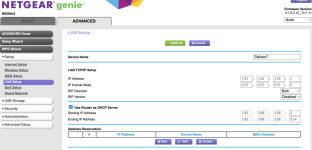
do I need to set the network IP address to 192.168.138.xxx?
Currently, I can’t get a dedicated router, so I’m using a commercially available one.

Is the reason content routers and store routers aren’t allowed because I don’t have an ALL.Net contract?
 
Hi! :)

For the IP address: The 192.168.138.xxx subnet is exactly what's used for linking cabinets for local Versus play. ^^

If you just want to play locally offline, a standard home router will do the job perfectly.

You just need to manually set static IPs within that range (like 192.168.138.11 and 192.168.138.12) with a 255.255.255.0 subnet mask, and both ES3 PC units will talk to each other without any issues.

Just keep in mind that I suspect the Versus link will simply refuse to launch if both ES3 aren't running the exact same TEKKEN 7 software revision.:thumbup:

8)For the router and contract: You hit the nail on the head.

The reason the system rejects standard routers when trying to set up the official network is strictly due to security. X/

Without an active ALL.Net contract, you can't use the official operator router that creates the secure VPN tunnel back to Bandai Namco's servers. :sleeping:

A standard commercial router just doesn't have the required certificates and security keys to clear that authentication check.;(


Back
Top