Can't get RGB sync out of this board...

Tommytamsworth

Beginner
Joined
Jun 10, 2024
Messages
16
Reaction score
6
Location
Brooklyn, New York
Hello friends. I recently got a taito f3 multi.

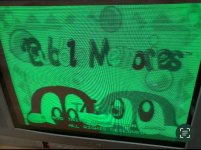
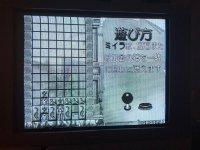
Ive had a f3 mobo and some carts for a little while now, and unfortunately my issues are the same as back then. I can not get a full signal out of this board, best I can do is one or two colors.

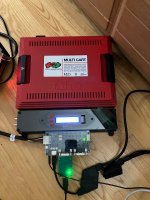
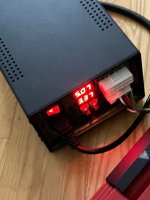
I will attach some photos and explain my setup:

Axunworks power supply giving 5.07v

HAS 5.0 Supergun

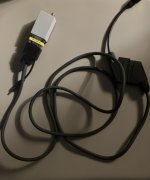
8pin mini din to SCART cable

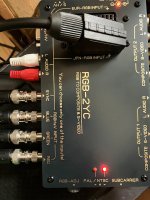
Which is going into my recently purchased RGB-2YC converter I brought from Axunworks

Trying to output s-video to my crt. I only have composite/s-video/component. Don't have the means to RGB mod atm. And my goal is for this setup to work with Y/C signals anyway for ease of setup elsewhere.

(I have some other connections in the converter image but I am not using those. Only the SCART cable is being used as an input)


Ive tried this on my small pvm and this consumer set I recently found, neither is giving me any luck.

Does anyone have any advice? I have an rgb2comp coming in soon to see if that would work...
 

Attachments

  • IMG_1413.jpeg
    IMG_1413.jpeg
    214.8 KB · Views: 27
  • IMG_1414.jpeg
    IMG_1414.jpeg
    208.7 KB · Views: 21
  • IMG_1415.jpeg
    IMG_1415.jpeg
    153 KB · Views: 27
  • IMG_1416.jpeg
    IMG_1416.jpeg
    146.5 KB · Views: 25
Other notes, ive messed with video settings on the HAS to enable/disable raw cysnc and that doesn't affect the image much

Also tried:

RGB Lab's y/c HD-15 to NTSC Composite Video/S-Video adapter (Needed to do some workaround to get 8-pin to vga, got a separate converter for that) same issue, either no sync or a black and white image.

Scart to BNC into the BNC input on the rgb-2yc converter in the first image, that is what I tested after the direct 8-pin mini din to scart did not work. This one I couldn't get to sync at all...wavy image no matter what I did on the HAS or the converter.
 
Last edited:
F3 has a strange sync pulse known to be a problem for some setups. Try martin jones sync assist? (Cant remember its name but that should get you there as a search term) or something similar.
 
Update on the RGB2COMP...it came in. Hooked it up, sorry I didn't take a picture...

Good news? Full RGB colors. Bad news? No Sync still...I tried messing around with my crt's service menu moving the horizontal and vertical image placement as I read that might cause some issues. No dice.

Does anyone else here own a HAS and has used it with the Taito F3 Before? Would appreciate some advice if you had to do any finagling to get it to work.

According to RGB's site "Taito F3 won't work via Scart" in reference to it not syncing to the OSSC. Don't have an OSSC, and if it doesn't work via Scart im going to have to find some other way to output a signal from the HAS, I only really have that connection from 8 pin mini din atm ;(

Really hope I don't need a new supergun...
 
Do you have another PCB to test? The F3 works in all my setups, including the HD-15 to Composite Video/S-Video Adapter connected to a PAL CRT.
 
Do you have another PCB to test? The F3 works in all my setups, including the HD-15 to Composite Video/S-Video Adapter connected to a PAL CRT.
Thanks for stopping by. I got a multicart setup and another mobo with other carts, I'll try that though that wasn't working either before

Ive seen both work on a Jamma cab so I'm pretty sure both motherboards are fine
 
RGB Lab's y/c HD-15 to NTSC Composite Video/S-Video adapter (Needed to do some workaround to get 8-pin to vga, got a separate converter for that) same issue, either no sync or a black and white image.
What's that workaround? Can you post pictures and/or a link to the product page for the cable/converter?

Other notes, ive messed with video settings on the HAS to enable/disable raw cysnc and that doesn't affect the image much
Have you tried the CSync set to TTL level? If you got my adapter, it requires TTL level. The TTL level will be safe for other equipment, too, with 75R termination the receiving device will only see 0.6-0.7Vp-p.
 
Last edited:
I had similar issues like your green screen picture when hooking up a Guwange PCB via RGB-YPbPr transcoder to a consumer set. I kinda ruled out that my TV was incompatible with the PCB.
 
Have you tried the CSync set to TTL level? If you got my adapter, it requires TTL level. The TTL level will be safe for other equipment, too, with 75R termination the receiving device will only see 0.6-0.7Vp-p.
Ive tried TTL level too. I do have your adapter, but I don't have your HAS with a native hd-15 out. Mine is the 5.0 with a 8-pin mini din video out. (Though I did recently order a 5.0b from you. I think i'm going to give/sell the 5.0 to a friend after that comes in :whistling:)

I tried finagling with a 8-pin mini din to hd-15 with a converter but the male/female inputs were wrong. I tried some ways to flip that and it didn't work, so i'll have to wait till the 5.0b comes in.
0.jpg
1.jpg
I got this with the one I had lying around I used to use with MiSter

I get a pretty clear image but the colors won't come through
 

Attachments

  • unnamed.jpg
    unnamed.jpg
    348.1 KB · Views: 9
What's that workaround? Can you post pictures and/or a link to the product page for the cable/converter?


Have you tried the CSync set to TTL level? If you got my adapter, it requires TTL level. The TTL level will be safe for other equipment, too, with 75R termination the receiving device will only see 0.6-0.7Vp-p.
I somehow missed the first part of this.
This is my best shot and it didn't really work
I got a 8-pin mini din to scart female (was the only one I could find)
Scart to HD-15 cable, which I believe I also brought from your store
A cheap HD-15 gender changer (I apologize if that's silly to use here, but I wasn't sure what other options I had)
And then your y/c converter. Of course when I do I have it setup I plug in a usb-c power source

As you can see in the post above I got it to hook up to the Mister addons y/c breakout board since that has a hd-15 female input on it.

With the setup I have in the image I unfort do not get any video output, It looks like i'll have to wait till the 5.1b comes in
Apologies if any of the terminology is wrong/confusing.
 

Attachments

  • unnamed.jpg
    unnamed.jpg
    94.6 KB · Views: 10
Thank you for the photo. This setup doesn't seem reliable. The Scart standard itself is bidirectional for CSync/CVid and audio signals (but not for RGB signals). The 8-pin mini DIN to Scart cable is sometimes wired to output RGB or to accept RGB via the female Scart (meaning the CSync could be on a different pin), depending on its purpose. I'm also unsure about the power pins. The HD-15 to Scart cable is used backwards. In short, a lot could be wrong here, and it's tough to pinpoint the exact issue.

I somehow missed the first part of this.
I edited my message a few hours later to include that question; apologies for the confusion.
 
Last edited:
Thank you for the photo. This setup doesn't seem reliable. The Scart standard itself is bidirectional for CSync/CVid and audio signals (but not for RGB signals). The 8-pin mini DIN to Scart cable is sometimes wired to output RGB or to accept RGB via the female Scart (meaning the CSync could be on a different pin), depending on its purpose. I'm also unsure about the power pins. The HD-15 to Scart cable is used backwards. In short, a lot could be wrong here, and it's tough to pinpoint the exact issue.


I edited my message a few hours later to include that question; apologies for the confusion.
I probably should've brought your 8pin mini din to scart adapter before it sold out.

I don't see too many 8pin mini din to scart adapters out there. Besides it being 8pin mini din to Scart (male) is there anything else I should be looking for?
 
Personally, I wouldn't buy any 8-pin mini-DIN to Scart cable adapters like the one pictured above. I'd just get an 8-pin mini DIN to HD-15 cable instead. Correct me if I'm wrong, but you'll probably only use the HAS with CRTs via RGB to Component/S-Video/Composite Video adapters, or with upscalers - and they use the HD-15/VGA port as input.

Please reach out via PM or my website contact form with your order number; I may be able to put something together for you for the V5.0.
 
Back
Top