[FS] RECO PCB - JAMMA button remapping & rapid-fire device

Wondering if this will allow me to gain access to my 4th button on my Neo Geo MVS single slot JAMMA PCB if I connect the CPS2 kick harness in my candy cab to the Reco?

Del
It will :)

Only 5 RECO PCB units are left in stock. I've also added one HAS bundle. Orders may be placed today until 11:00 PM UTC (7:00 PM EDT) - I'm closing the store for around a month after that.
 
It will :)

Only 5 RECO PCB units are left in stock. I've also added one HAS bundle. Orders may be placed today until 11:00 PM UTC (7:00 PM EDT) - I'm closing the store for around a month after that.
Thanks for confirming! I already ordered one before I even asked the question. LOL. It will be my 2nd Reco PCB!
 
Do you still have these in stock? I see on your own site they’re all out of stock still, and long time no see! I’ve been MIA from this place due to well other things.
 
  • Like
Reactions: RGB
Do you still have these in stock? I see on your own site they’re all out of stock still, and long time no see! I’ve been MIA from this place due to well other things.
Welcome back! There will be a restock, and I plan to open the store starting in July.
 
Yeah, for the past few years I’ve been running tournaments on your superguns, converting console and fightcade people to the real thing. Can’t wait for the store opening in July again.
 
  • Love
Reactions: RGB
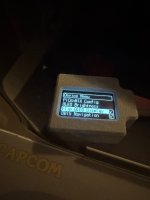
I noticed something odd with the external OLED on my RECO V5.1. I turned on the "Flip OLED Display" setting and saved to Profile 1. The OLED displays in the correct orientation for me:

IMG_4619.jpeg

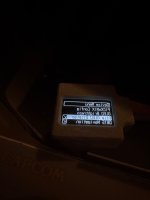
However, when I power off the cab and power it on again, the text on the OLED is displayed is reverse order:

IMG_4620.jpeg

Fortunately, I can toggle the "Flip OLED Display" setting off and back on again to correct the issue.
 
I noticed something odd with the external OLED on my RECO V5.1. I turned on the "Flip OLED Display" setting and saved to Profile 1. The OLED displays in the correct orientation for me:

IMG_4619.jpeg

However, when I power off the cab and power it on again, the text on the OLED is displayed is reverse order:

IMG_4620.jpeg

Fortunately, I can toggle the "Flip OLED Display" setting off and back on again to correct the issue.
I've just tried to recreate this, but it's worked fine for me. Can you please tell me step by step how you do it? Which save method, via the main menu, or by changing profile, and the automatic unsaved changes pop-up dialog? Do you boot to the same profile as the one saved?

Edit: The external OLED runs in overclocked mode by default. Perhaps the screen flip command is glitched in your setup during boot somehow. There is a way to slow down the comms with the external OLED to the manufacturer's recommended speed (device menu -> turn off "I2C Fast Mode Plus"), maybe this will help. Also, please perform the full device reset, just in case.
 
Last edited:
I think the key to replicating the issue is to set the OLED Brightness to Dim. I completed these steps to replicate the issue:

1. Reset - all profiles
2. Power cycle
3. External OLED - On
4. Flip OLED Display - On
5. DB15 Navigation - On
6. OLED Brightness - Dim
7. Save & Exit
8. Power cycle

If the OLED brightness is set to Default or Bright, then I cannot replicate the issue.
 
I just read the specs again and something's missing? There are 6 didfferent rates of rapidfire for each button and I believe there is also the option for max two buttons that can have very fine adjusted rates/Hz. Was I dreming or is it true?
 
I just read the specs again and something's missing? There are 6 didfferent rates of rapidfire for each button and I believe there is also the option for max two buttons that can have very fine adjusted rates/Hz. Was I dreming or is it true?
That's correct. 6 rapid-fire rates + two totally custom rates (but it requires the rotary encoder accessory).
 
OK went to your shop to look up the encoder. I'm confused of what this really does.
What I'm looking for is rapid fire adjustments in 1Hz increments. Finer granularity would be even better:)
 
Last edited:
You can get down to 0.1 Hz steps. Please check the User Guide - https://rgbslab.com/pages/reco-user-guide

"6.6. Adjust Hz Step

This setting lets you choose the step size when adjusting the custom Rapid-Fire rates (A or B).

You can select from the following options:
0.1 Hz, 0.5 Hz, 1 Hz, 2 Hz, or 5 Hz per click of the rotary encoder."

The RECO PCB V5.1 will be released tomorrow!

This version brings several quality-of-life upgrades:
  • It now handles the controls, too, allowing you to rotate the controls or enable 4-way joystick gate emulation (plus many other features known from the HAS).
  • Support for an external OLED display as an optional accessory.
  • Support for an external rotary encoder in the form of a standard Sanwa-style button as an optional accessory.

The rotary encoder enables quick adjustment of rapid-fire rates. It also supports two independent custom user-defined rapid-fire presets (A and B), adjustable from 1 to 35 Hz with 0.1 Hz precision. Additionally, the encoder can be used as a left/right directional controller for certain games, such as Puzzle Bobble.


The video demonstrates how I first switch between the standard VSync-synchronized rapid-fire rates (1 to 6) and then play around with custom asynchronous rapid-fire presets A and B.

How this works:

To enable Rapid-Fire on specific buttons, press and hold the desired button(s) and turn the rotary encoder’s knob clockwise. This sets the rate from 1 to 6.

Turning beyond 6 switches to one of the two customizable Rapid-Fire rates (A or B). Custom rates A and B are adjusted by turning the rotary encoder while no buttons are pressed.

To switch between rate A and rate B adjustment, press and hold the rotary encoder button and move the joystick left (for rate A) or right (for rate B).

To access the Rotary Encoder Menu, press the Rotary Encoder and the START button at the same time.

You can navigate the Rotary Encoder Menu using the buttons on the RECO PCB, or with the joystick up/down directions and buttons on your control panel.
Button 1: Enter / Confirm / Change value.
Button 2: Exit the Rotary Encoder menu and turn off the OLED screen.
Button 3: Go back to Main Menu.

 
Thank you very much now I fully understand what's going on here. 0.1Hz is exactly what i wished for.
 
Got mine today with rotary and cases. I'm very pleased. So many useful functions. The voltmeter is also very appreciated! Menu structure is quite easy to grasp.

What a wonderful device! Thank you.

Good to know that in menu mode I/O latency is introduced. I asume in game mode there isn't any latency.

Another question, the RECO must not plugged in when the machine/supergun is running. Makes sense. But controllers also? That menas I shouldn't plug in controller 2 in my supergun while running it? Nothing bad if so. i just want to make sure.

Greets
 
Back
Top